


On this page
- Define the next action before adding automation
- Start in MarketPulse
- An original account-research workflow
- Keep the sources distinct
- Choose the relevant BrandWell workspace
- Design for exceptions as well as success
- Measure effort and useful outcomes
- Add complexity only for a concrete requirement
- Frequently asked questions
An intent-data workflow connects relevant research evidence to a defined task, owner and reviewable outcome. The audience is the starting point. Your team still decides which records fit, what action is useful and how to check the result.
Custom workflow design means configuring the process around your business. It does not mean every BrandWell customer needs a separately hosted local product or a custom software build.
Define the next action before adding automation
Begin with the offer and the people it can help. Review available topic coverage rather than assuming every category, geography or buying situation is represented.
- Market: which companies and roles fit the offer?
- Topic: which research context is relevant?
- Evidence: what is known, when, and at which identity level?
- Action: what task should an operator complete?
- Outcome: what result would justify continuing?
A relevant signal can support investigation. It does not guarantee a purchase or make every available contact ready for a campaign.
Start in MarketPulse
MarketPulse intent-data plans are starting at $500/mo. Search available topics, apply your ICP and review matching people and companies. Keep source audience counts distinct from records that meet your criteria.
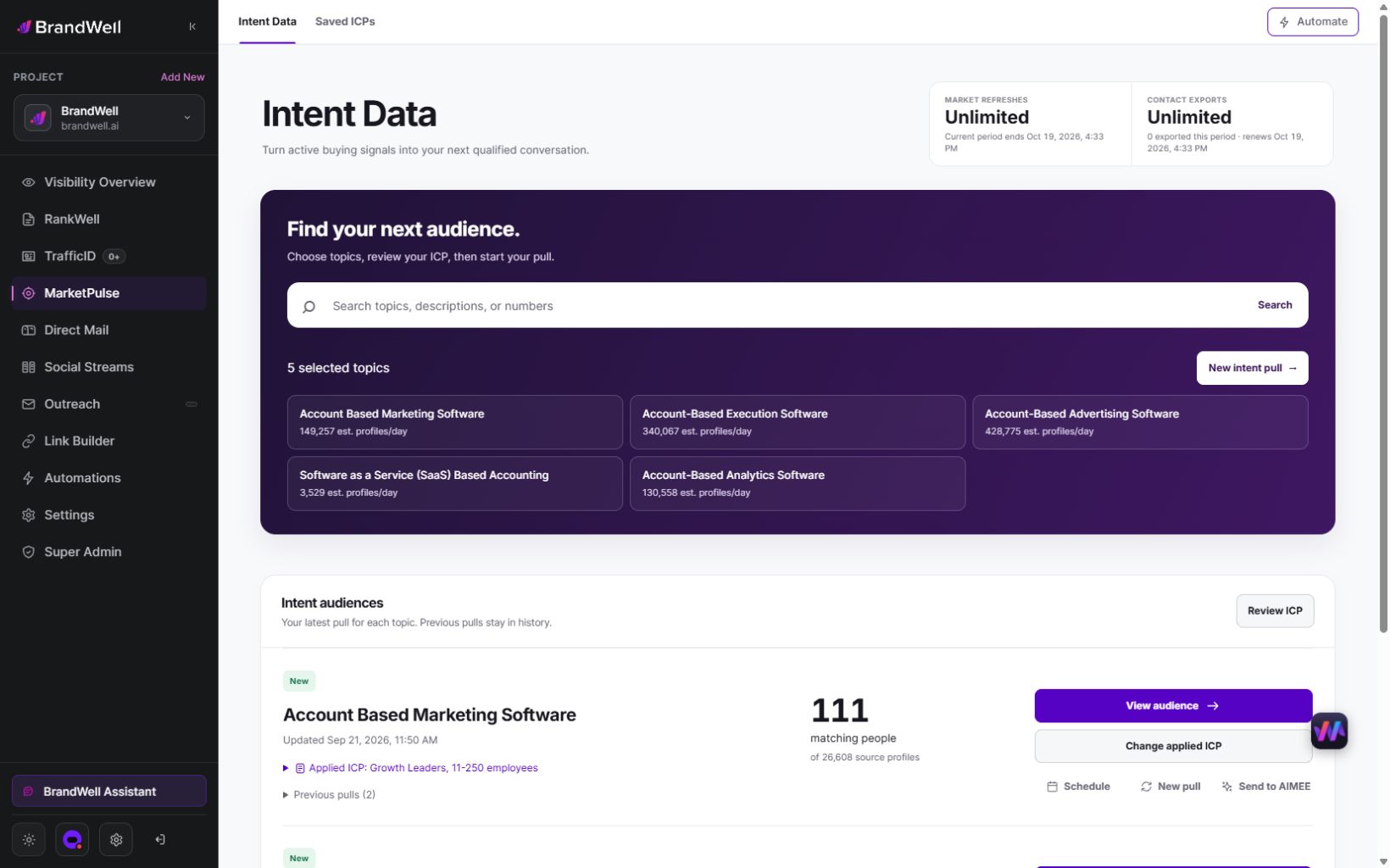
A pull retrieves available data from the previous 24 hours for one topic. Topic, refresh and export allowances depend on the plan. Counts, fields and coverage vary, and audiences can overlap.
Growth and Scale include AIMEE for the initial user. AIMEE can help research accounts and prepare the next step through configured tools and workflows. Confirm the available connections and permissions for the task you intend to run.
An original account-research workflow
For a fictional payroll software business, the task might be to prepare an account brief for organizations that meet a defined ICP and appear in a relevant payroll topic audience. The brief should help a researcher investigate fit; it should not claim to prove buying readiness.
- Review the audience. Check topic meaning, company fit, exclusions and available context.
- Prepare the brief. Summarize verified company facts, relevant roles, evidence dates and open questions.
- Check the facts. Confirm source-supported details and mark unresolved associations.
- Choose the next action. Approve a research task, content brief or permitted campaign preparation step.
- Verify the handoff. Inspect the actual destination, fields, owner and result.
- Record the outcome. Keep completion, exceptions and later qualification separate.
Use explicit states in your operating record: awaiting review, needs information, approved, completed or failed. These are example process labels, not a claim that every connection implements them automatically.
Keep the sources distinct
MarketPulse topic research and TrafficID website activity describe different contexts. Retain their dates and source labels instead of blending them into an unexplained “hot lead” score.
Likewise, a company association and a person’s contact details answer different questions. Do not assume every contact at the company performed the observed research. Record missing information and uncertainty before choosing an action.
Choose the relevant BrandWell workspace
Use RankWell for content preparation and review. Use the applicable Outreach, Direct Mail or other connected workflow for an approved next step. Confirm the actual supported destination and access in your workspace.
AIMEE assists through configured tools. Account permissions, workflow settings and availability determine what can execute. Review the result rather than treating a prepared instruction as completed work.
Advertising destinations have their own eligibility requirements, matching and budgets. Direct mail requires appropriate address handling, production and fulfillment. Data-plan pricing does not include every channel or service cost.
Design for exceptions as well as success
Agree on field mapping, ownership, duplicates and error review before treating a handoff as operational. Test what happens when a required field is missing, a connection fails or the record needs correction.
In the fictional payroll example, an account with a missing location might move to “needs information.” A conflicting company association should stay unresolved until reviewed. A failed handoff should show the failure and owner rather than silently count as completion.
Keep a dated change record and a correction path. For client work, keep records, access and permitted uses separate. An export allowance does not automatically establish every downstream communication or advertising right.
Measure effort and useful outcomes
Count records reviewed, accepted tasks, completed actions and exceptions separately. Measure operator time and additional costs. Then record responses or qualification where the workflow can observe them.
For an original fictional test, ten candidate accounts produce six approved research briefs, two rejected cases and two awaiting information. Report those states against the ten candidates. If the work takes three hours, record that operating effort before expanding.
Six briefs are not six meetings or six opportunities. A later opportunity associated with a brief does not prove the workflow caused it. Use a suitable comparison and explain limits when making business-impact claims.
Add complexity only for a concrete requirement
Additional configuration can be worthwhile for distinct client ICPs, a specific mapping, an approval chain or custom reporting. Start with one useful task and a named owner. Expand after the team can complete it reliably and understand its costs.
For a broader buying or implementation process, the intent-data RFP guide helps define requirements and evidence.
Frequently asked questions
Is BrandWell a custom local build?
BrandWell provides a shared growth app with AIMEE assistance through configured tools. Scope any special deployment or integration requirement separately.
Does intent data automatically create a campaign?
No. Review the audience, configure the destination and approve the relevant work. A proposed workflow is not proof that every connection is ready.
What does AIMEE add?
AIMEE can help research, prepare assets and carry out assigned work through configured tools. Check permissions, settings and results for the particular task.
How should we start?
Review the MarketPulse demo and current plans, choose a relevant topic and ICP, and complete one reviewed action with a clear outcome record.
Reviewed and updated October 2, 2026.

Written by
Jeff Joyce has been helping brands grow online since the Myspace era, when custom HTML layouts were still a competitive advantage. What started in design quickly evolved into a career spanning social media, content strategy, video, agency ownership, and growth marketing. After building his own agency and testing countless AI tools, Jeff joined BrandWell with a clear focus: helping marketers understand how AI can actually improve the way they create, optimize, and scale content. Today, Jeff brings a CMO-level perspective to BrandWell's marketing strategy, blending brand positioning, content, video, customer education, and growth. His work centers on turning complex AI concepts into clear, practical marketing that helps brands move faster, create better content, and stay competitive without losing their voice.

 Farnaz Kia
6 comments