


On this page
A keyword research report turns search data into a prioritized content plan. It should identify the reader’s task, the page responsible for it, the evidence for an opportunity and the next action. A large keyword export is an input; the report explains what the team should do and why.
Use the template below to connect research, existing performance and implementation. Then review the worked example and current BrandWell workflow.
A keyword research report template
| Field | What to record |
|---|---|
| Query cluster and reader task | Related phrases, intended audience and the question to answer. |
| Market and period | Country, language, device where relevant, collection date and reporting period. |
| Research source | Tool, settings and whether a metric is an estimate or observed site data. |
| Demand and competition | Estimated volume and clearly labeled research metrics. Advertising competition is not organic ranking difficulty. |
| Current performance | Search Console clicks, impressions, CTR and average position for the relevant page and filters. |
| Page owner | Existing URL or proposed page responsible for the reader task. |
| Action and priority | Create, refresh, consolidate or investigate, with the evidence and reason. |
| Evidence gap | Original examples, product facts or primary sources needed before publication. |
| Owner and review | Responsible person, due date, acceptance criteria and measurement date. |
Swipe the table to see all columns.
Copy these fields into your working document or spreadsheet. Keep unavailable values distinct from measured zeros and retain the source export so another reviewer can reproduce the decision.
Keep the metrics distinct
Estimated search volume describes demand under a tool’s settings. Search Console impressions describe appearances of your site’s results. Neither is a count of qualified buyers. A research provider’s difficulty score is an estimate, not Google’s permission to rank.
Google’s explanation of performance data defines CTR as clicks divided by impressions and position as an average. It also explains privacy filtering and row limits. Query tables can omit anonymized queries, so their sum need not equal chart totals. Label the report’s dimensions and limits before drawing a conclusion.
Do not discard a useful niche solely because an estimate is small. Business fit, the reader’s task and your ability to provide evidence matter. Conversely, a large volume estimate does not justify a page unrelated to your product.
A worked keyword-report example
The following is a fictional planning example for a support-software business, not a claim about a customer’s rankings or BrandWell results.
| Report field | Illustrative entry |
|---|---|
| Reader task | A small support team needs a checklist for choosing software. |
| Cluster | Customer support software for small businesses; small-team support software checklist. |
| Page owner | The existing buying guide, rather than a second near-duplicate article. |
| Observed baseline | 10,000 impressions, 50 clicks, 0.5% CTR over a defined 28-day period. |
| Evidence gap | No worked handoff example, evaluation checklist or clear product screenshots. |
| Recommended action | Refresh the guide with verified examples and a clearer opening and title. |
| Acceptance | A support lead can compare ownership, routing, reporting and implementation requirements. |
| Owner | Content editor with product-owner approval. |
| Review | Compare equivalent periods and filters, noting other site and campaign changes. |
Swipe the table to see all columns.
The recommendation follows the reader’s unmet task. It does not depend on copying another site’s article or assuming that the page with the largest volume should always come first.
Build the report in the current BrandWell app
- Open Visibility → Keywords → Research, enter the subject and choose the search market.
- Review related terms, estimated volume, intent and available research signals.
- Where Search Console is connected, compare the available clicks, impressions, CTR and current page. Unavailable fields do not prove zero demand.
- Save useful candidates and use Plan to move the opportunity into the content workflow.
- In RankWell → Articles, use Check opportunity, review the evidence and save the brief before drafting.
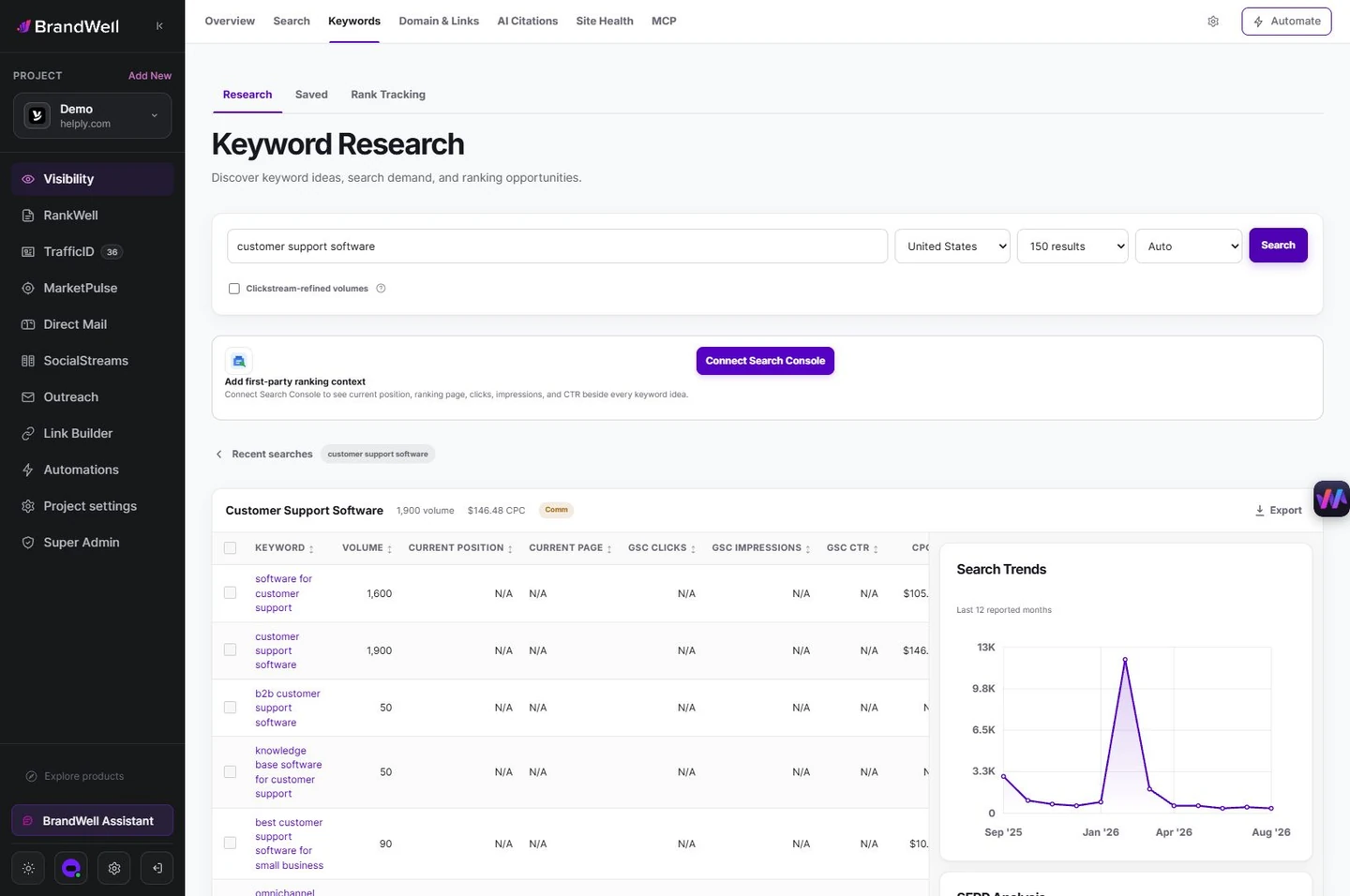
Visibility supports research, while RankWell connects the opportunity to a reviewed brief and content draft. Check existing coverage before deciding to create, improve or merge.
Prioritize a decision, not a keyword count
- Business fit: Does the reader match a useful audience for your product?
- Task fit: Does the existing or planned page answer the actual question?
- Evidence: Can you add verified product detail, an original example or a useful primary source?
- Existing coverage: Is a refresh or consolidation more useful than another URL?
- Effort and ownership: Can the team complete and maintain the change?
Inspect the current results for the intended market to understand the types of pages and questions being served. Search competitors can differ from commercial competitors. Their presence does not prove a tactic caused their ranking, and their success is not a result you can promise to reproduce.
Turn the recommendation into a content brief
Record the audience, task, page owner, useful sections, required sources and next action. Give AIMEE verified product facts and approved reference material. Review the output for unsupported claims, missing context and redundant coverage before approving publication.
Do not create a fixed-length article for every phrase or repeat terms to reach a quota. A cluster belongs together when the page can answer the shared task clearly. Split genuinely different tasks when each needs a useful, distinct destination.
Review results without overstating the cause
Using the fictional baseline, 50 clicks divided by 10,000 impressions is 0.5% CTR. A later period with 72 clicks and 12,000 impressions is 0.6%. That is a 0.1 percentage-point increase in CTR, alongside different impression volume.
Record query mix, position, device, country, seasonality and other changes. The comparison does not prove that a title edit alone caused the difference. Review meaningful visits and the relevant business action separately; an impression is not a sale.
Common questions
What should a keyword report include?
A reader task, source and settings, useful metrics, page ownership, recommended action, evidence gap and review plan.
Is advertising competition the same as SEO difficulty?
No. Label each measure and compare like with like. Neither guarantees an organic ranking.
How often should you update the report?
Set a review schedule around implementation, changing demand and the decision being made. Preserve the previous baseline instead of overwriting it.
Reviewed and updated October 7, 2026.

Written by
Julia McCoy has contributed articles to BrandWell on content marketing, writing, and search engine optimization. This archive retains her original bylines; individual articles may be updated by the BrandWell editorial team.

