On this page
- Define the lead before choosing tools
- Choose the capability for each stage
- Attract people with useful content
- Find relevant topic research with MarketPulse
- Review your own website audience with TrafficID
- Prepare relevant follow-up and keep control of the sequence
- Connect the handoff, not just the data export
- An original agency evaluation worksheet
- Measure outcomes before expanding
- Common questions
Lead generation tools support different jobs: attracting visitors, identifying relevant research, capturing inquiries, preparing follow-up, and measuring outcomes. Build the workflow around the job you need to complete rather than assembling the largest possible list of software.
BrandWell connects those jobs through its current portal and products. Start with a specific audience and offer, decide what counts as a useful lead, and add the capabilities needed to move that lead to a reviewed next action. Identification, engagement, and qualification are separate stages.
Define the lead before choosing tools
A form submission is an inquiry. An identified website visitor is a record associated with available activity. A topic-research signal is a reason to investigate fit. None of those alone proves purchase readiness, budget, authority, or consent to every kind of outreach.
Write a practical qualification definition: the account fits your service, the relevant role is present, the need is supported by evidence, and an appropriate next action is available. Keep unknowns visible instead of replacing them with a generic lead score.
Choose the capability for each stage
| Task | BrandWell product | Review before acting |
|---|---|---|
| Develop useful articles | RankWell | Sources, product facts, examples, reader task |
| Review search and AI visibility context | Visibility | Available data, connection, period, limitations |
| Find topic-research audiences | MarketPulse | Topic relevance, ICP, fields, activation eligibility |
| Review identified website visitors | TrafficID | Tag, coverage, fit, activity, suppression |
| Prepare an approved follow-up | AIMEE and configured Outreach workflow | Evidence, message, permissions, stop conditions |
| Connect recurring work | Automations and Integrations | Configured access, mapping, errors, approvals |
Swipe the table to see all columns.
These capabilities serve different purposes. Check the current package and configured destinations rather than assuming every product or action is included in one subscription.
Attract people with useful content
Use the relevant Company Project in the BrandWell portal. Begin with customer questions and available search evidence, then use RankWell to develop a reviewed article. Add original expertise, verify instructions, and connect the article to a relevant next step.
Visibility supports reviewing available search, website, and AI visibility context. Where Search Console is connected, inspect actual queries and pages alongside impressions, clicks, CTR, and position. A visibility observation is not automatically a website visit, lead, or sale.
Content is one part of the funnel. Do not promise a fixed six-month wait for SEO or immediate leads from every article. Measure the actual response for the audience and buying cycle.
Find relevant topic research with MarketPulse
MarketPulse lets teams select research topics, apply ideal-customer filters, and review available audience and contact fields. Keep the topic context attached when assessing accounts. A topic category does not prove someone researched a specific competing brand or has committed to buying.
Current standard monthly plans are:
| Plan | Price | Topic and refresh scope | Contact exports |
|---|---|---|---|
| Starter | $250/month | One topic, weekly refresh | 25,000/month |
| Growth | $500/month | Three topics, daily refresh | 100,000/month |
| Scale | $1,000/month | Ten topics, daily refresh | Unlimited |
Swipe the table to see all columns.
Each pull covers available data from the previous 24 hours. Audience counts and fields vary with the topic and filters; overlapping audiences are possible. Topic capacity and export allowances are not guarantees of qualified leads. A personal early-access rate is a separate offer with its own actual eligibility and deadline.
Review your own website audience with TrafficID
TrafficID surfaces identified website visitors and available person, company, role, and activity context. Identification and field coverage vary. It does not identify everyone or establish why a person visited.
- Select the intended project and review the TrafficID website-tag settings.
- Check installation status and applicable tracking controls on the intended pages.
- Review the Identified visitors view and available filters.
- Apply suppression and assess account fit before preparing a next action.
- Keep form completions distinct from identification and inferred interest.
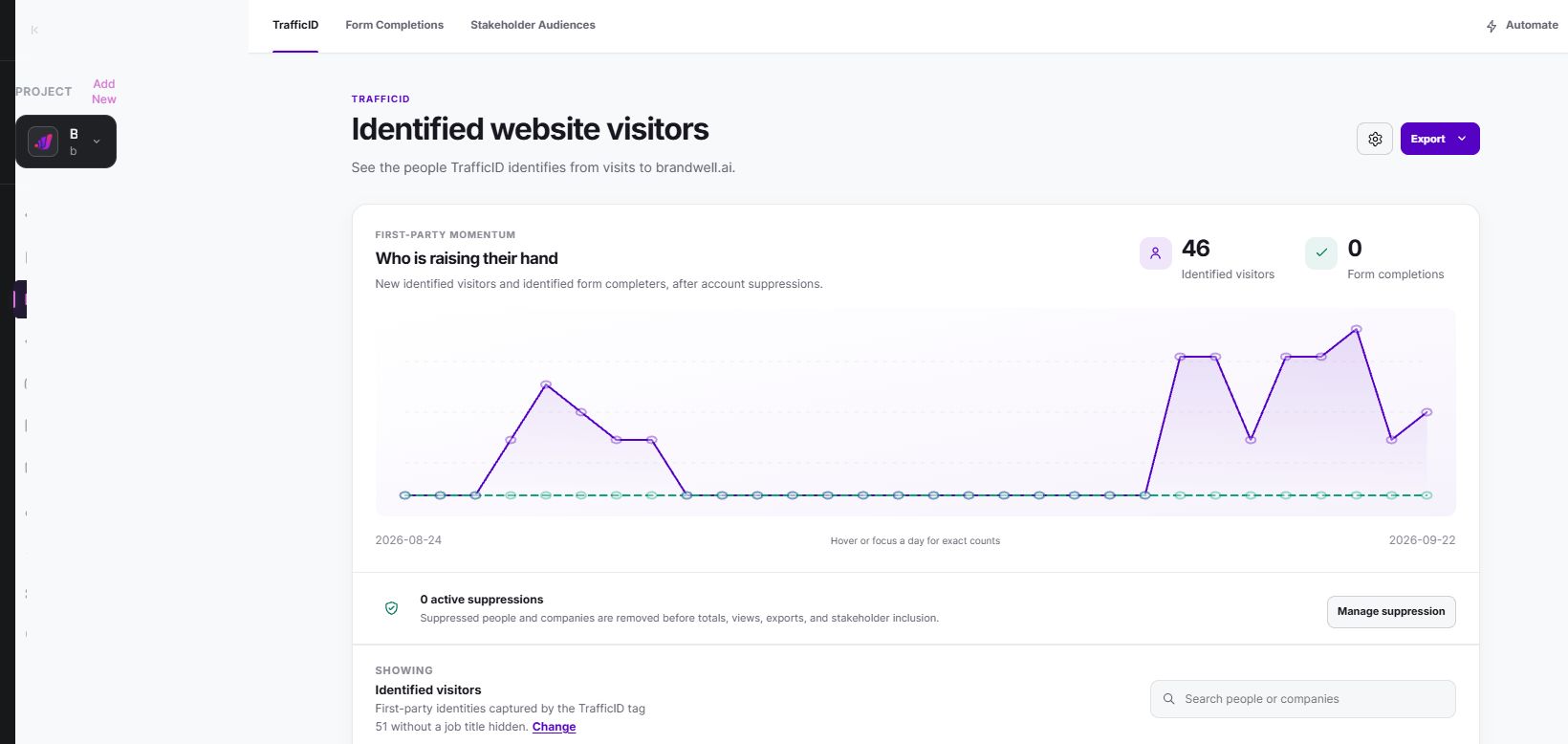
A pricing-page visit can help prioritize research, but it can also come from an existing customer, a job applicant, or someone gathering information. Check the context rather than labeling every identified visit a sales-ready lead.
Prepare relevant follow-up and keep control of the sequence
Give AIMEE approved company context, the actual signal, verified sources, and the next task. A useful assignment might be to prepare an account brief and draft a question for review. Available execution depends on the tools and access configured.
Use the appropriate Outreach workflow for reviewed campaigns. Keep sender identity, audience eligibility, suppression, and response handling with the campaign. Stop or change the sequence after a purchase, reply, opt-out, or other relevant state change.
Commercial email programs should follow applicable rules. The FTC’s business guidance covers U.S. commercial-email requirements, including business-to-business messages. It does not establish permission for every recipient or jurisdiction.
Advertising activation has its own rules. Google Customer Match policy requires eligible directly collected customer data. A purchased intent export or hashed address is not automatically eligible first-party data.
Connect the handoff, not just the data export
Use configured Integrations and Automations to connect approved work. Test field mappings, duplicate handling, errors, permissions, and the receiving system. Do not assume that every website, CRM, or channel is supported without checking the actual configuration.
Assign an owner to replies and exception queues. An exported list has not completed the lead-generation task until a relevant, eligible next action is handled and its outcome is recorded.
An original agency evaluation worksheet
This planning example is not a customer result or a guarantee. For an IT-services client, a team could evaluate one topic audience, one website segment, and one approved follow-up rather than activating every record at once.
| Question | Evidence to record |
|---|---|
| Does the account fit? | Industry, company scope, role, and remaining unknowns |
| What signal is available? | Topic context or observed website activity, with date |
| Can we use the record? | Allowed purpose, destination policy, suppression and preferences |
| Who handles the next step? | Named owner and reviewed message |
| What happened? | Qualified reply, rejection, opportunity, purchase, or no response |
| What did it cost? | Software, activation, labor, and other included costs |
Swipe the table to see all columns.
When delivering services for clients, review current terms and permissions for the specific account, data, and destination. Do not assume native white-label portals, unrestricted resale, or a fixed referral commission from an old example.
Measure outcomes before expanding
Track records reviewed, eligible contacts, completed follow-ups, qualified conversations, opportunities, customers, and revenue separately. Include costs and keep the denominator explicit. A count of identified visitors is not a count of acquired customers.
Compare a defined baseline with a comparable period or test group where possible. Allow for the buying cycle and record attribution limitations. Automation can reduce repeated work, but it does not prove conversion lift by itself.
Common questions
Should we start with MarketPulse or TrafficID?
MarketPulse addresses topic research beyond your own website. TrafficID addresses identified visitors on your site. Choose based on the audience source you need to investigate and the workflow you can operate.
Does visitor identification make someone a qualified lead?
No. Review the account, role, evidence, and appropriate next action. Qualification is a business decision supported by context, not a label automatically established by a visit.
Do we need every BrandWell product?
No. Start with the capabilities needed for a defined task, then connect additional work as the process and evidence justify it. Review current scope and pricing before purchase.
Reviewed and updated October 2, 2026.

Written by
Justin McGill is the founder of <a href="https://brandwell.ai/">BrandWell</a>, an intent-led marketing platform that identifies anonymous website visitors, uncovers companies actively researching competitors, and puts your ads in front of their entire buying committee — before anyone fills out a form. Justin has been building B2B sales and marketing software since 2008. When he's not working, he's spending time with his wife and their two kids in Arizona.

 Farnaz Kia