


On this page
- Trending keywords versus high-volume keywords
- 1. Compare time periods in Google Trends
- 2. Check whether your own pages are gaining impressions
- 3. Research the opportunity in BrandWell
- 4. Check the results before choosing a format
- 5. Decide whether to create, refresh, or consolidate
- Keep a decision log for each opportunity
- A simple trend research checklist
- Frequently asked questions
Find trending keywords by comparing recent search interest with a longer baseline, checking related queries, and deciding whether the trend fits your audience. Then verify what people want from the results before creating or updating a page. A short spike is not the same as lasting demand.
A useful workflow combines Google Trends for direction, Search Console for your own search visibility, and BrandWell’s keyword research and RankWell planning tools for deciding what to publish.
Trending keywords versus high-volume keywords
A high-volume keyword attracts substantial demand over a measured period. A trending keyword is gaining attention relative to an earlier period. It may still have a small audience. Seasonal searches can also rise predictably every year without representing a new market.
| Signal | What to check | Possible action |
|---|---|---|
| Brief news spike | Is there a useful angle you can publish while it matters? | Publish a timely explanation only if you can verify it. |
| Recurring seasonal growth | Does the same pattern appear in earlier years? | Refresh the existing page before the next peak. |
| Sustained new demand | Does interest persist beyond a single event? | Build a durable guide or product resource. |
| Your impressions rise but clicks lag | Do title, intent, position, and device explain the gap? | Improve the existing page and its search snippet. |
Swipe the table to see all columns.
1. Compare time periods in Google Trends
Start with a topic your customers care about. Set the geography and compare a recent period with a longer one. Compare terms using consistent settings. Check whether an apparent rise is a recurring seasonal pattern or a response to a one-off event.
Record the search term or topic, geography, date range, category and search type so the comparison can be reproduced. Avoid treating an unfinished period as directly comparable to a completed one.
Google’s Trends data FAQ explains that Explore interest is normalized on a 0-100 scale. It is not an absolute search count. A zero can reflect insufficient search volume, rather than proof nobody searched.
Illustrative interpretation: a normalized index moving from 50 to 100 within the same comparison does not mean demand rose from 50 to 100 searches. Check the broader pattern and an appropriate volume estimate separately.
Look at related queries as well as the original term. Google’s related-search guidance distinguishes top searches from rising searches; “Breakout” indicates growth greater than 5,000% over the comparison period. That percentage does not tell you the absolute number of potential customers.
2. Check whether your own pages are gaining impressions
In Search Console’s performance report, compare equivalent date ranges and review queries alongside pages. Separate countries, devices, and branded searches where they change the interpretation. A page can receive more impressions because it is appearing for many new queries, even while its overall click-through rate falls.
Record the query, the relevant page, clicks, impressions, position, and comparison period. Use the same filters when checking the result later. Search Console query data is incomplete because some queries are withheld for privacy, so do not assume the visible rows represent every search.
3. Research the opportunity in BrandWell
- Open Visibility → Keywords → Research.
- Enter the topic and choose the search market.
- Review related keywords, estimated volume, intent, and the available competition and CPC signals.
- Where connected, use the Search Console columns to check impressions, clicks, CTR, and the current page.
- Save useful terms. Use the Plan action for an opportunity you want to develop.
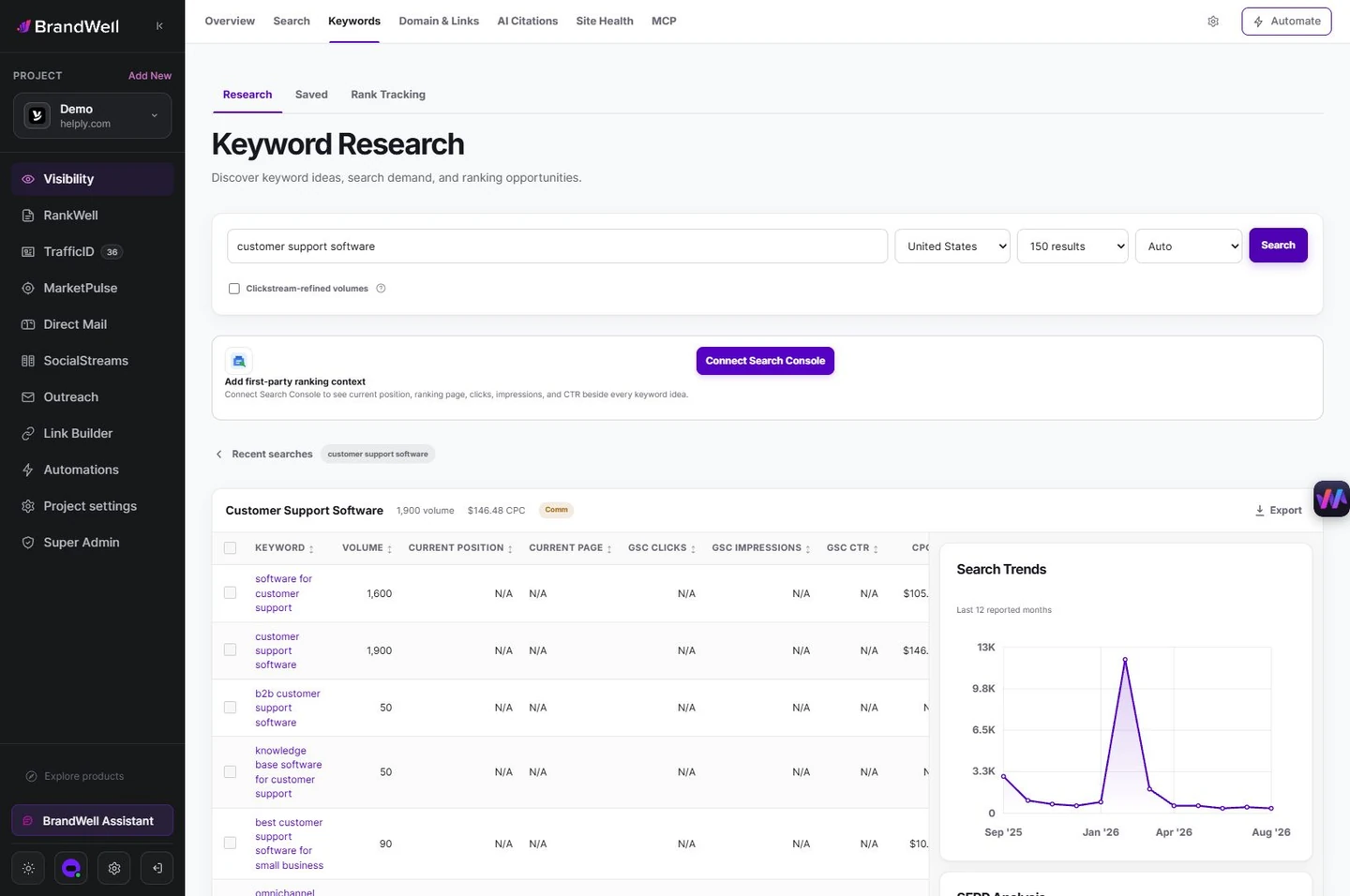
These signals answer different questions. Keyword estimates help size demand; Search Console describes your own site’s observed search performance. An unconnected project may show unavailable Search Console fields. Treat missing data as unknown, not zero demand.
4. Check the results before choosing a format
Read the current results for the target query. Are searchers being served definitions, tutorials, product pages, comparisons, videos, or recent news? Identify the task those pages address and what evidence would make your answer more useful. Do not copy their headings or add unrelated sections just to match their length.
For example, a query about a new reporting feature might need a dated explanation and current screenshots. A broad buying question may need selection criteria and a decision table. A troubleshooting query needs steps, expected results, and what to do if a step fails.
5. Decide whether to create, refresh, or consolidate
In RankWell → Articles, use Plan before you write and select Check opportunity. Review the recommendation alongside existing pages and drafts. Save the brief or draft with AIMEE only after confirming the topic belongs in your content plan.
If an existing page serves the same task, consider updating it before creating another article. Keep useful examples and preserve its URL where appropriate. A distinct audience need may still deserve a separate page. Add verified new information, correct obsolete instructions and make the introduction answer the current question directly.
Keep a decision log for each opportunity
Save the query group, source settings, observation date, existing destination, evidence gap, proposed action and owner. This separates a promising idea from approved production work.
Fictional example: suppose a payroll provider notices rising interest in switching providers before a seasonal planning deadline. Check prior years and current customer questions first. If the existing implementation guide answers the same task, update its steps and evidence. If the query concerns a distinct legal obligation, require appropriate expertise rather than adding an unsupported paragraph.
After publishing, record the change date and inspect the live mobile page. Compare suitable periods with the same filters. More impressions may reflect new query coverage or seasonality; it does not prove the update caused growth. Track qualified outcomes separately from traffic.
A simple trend research checklist
- Audience: Would the people searching this topic plausibly need your product?
- Timing: Is this a short-lived event, seasonal demand, or a sustained change?
- Evidence: Can you verify the new information and show the process?
- Page ownership: Which existing or planned page should answer the query?
- Measurement: Which clicks, engagement, or business outcomes would justify the work?
Frequently asked questions
Are Google autocomplete suggestions proof that a keyword is trending?
No. They can help discover phrasing, but they do not provide a trend growth rate or a reliable search-volume estimate. Validate the idea with additional data.
Does a breakout keyword guarantee a content opportunity?
No. The increase can come from a small base or a short event. Check audience fit, timing, evidence and whether you can publish a useful answer before investing.
How often should I review trending keywords?
Choose a schedule that matches your market. A weekly review may suit fast-changing subjects, while a monthly review can be enough for steadier topics. Use event-driven checks when a relevant product or rule changes.
Should I create a page for every related keyword?
No. Group queries that share the same intent and can be answered well on one page. Separate pages when the reader’s task is meaningfully different.
Research opportunities with Visibility, then turn the right ones into a RankWell content plan.
Reviewed and updated October 6, 2026.

Written by

