


On this page
- Retargeting and remarketing: focus on the actual setup
- Choose the audience source deliberately
- A reviewed TrafficID workflow
- Google, Meta and LinkedIn: avoid interchangeable instructions
- Six practical retargeting decisions
- B2B and B2C: investigate the buying process
- Create useful follow-up content in BrandWell
- Measure the audience pipeline and business outcome
- Frequently asked questions
Retargeting uses eligible audience data to reach people who previously interacted with your business. Start with a permitted source, a relevant offer and verified campaign settings. TrafficID can support review of identifiable website activity, but identifying a visitor does not automatically create a matched or deliverable ad audience.
Coverage, platform matching and campaign delivery vary. A pricing-page visit is context to investigate, not proof of a person’s budget, buying stage or permission for every marketing channel.
Retargeting and remarketing: focus on the actual setup
The terms overlap in marketing usage. Some teams use retargeting for ads and remarketing for email, but this is not a universal distinction. Define the audience source, destination, channel and objective instead of relying on the label.
Google now uses your data segments in place of older remarketing terminology. Check the current interface and requirements for the campaign you intend to run.
Choose the audience source deliberately
| Source | What it represents | What to verify |
|---|---|---|
| Website or app events | Eligible activity collected through the configured measurement setup. | Consent, event configuration, membership rules and destination eligibility. |
| Customer or subscriber records | Information collected in a customer or subscription relationship. | Source, permitted use, current preferences and platform requirements. |
| Platform engagement | Supported interactions with videos, ads, forms or other platform content. | Available audience type, rules, date range and delivery settings. |
| Reviewed visitor records | Identifiable activity and available profile context. | Coverage, source rights, channel eligibility and supported identifiers. |
| Added account stakeholders | Other people found at a relevant company. | Do not label them as visitors; evaluate eligibility separately. |
Swipe the table to see all columns.
Keep source and permission information with each audience. A downloadable file or available email address does not establish that uploading it to an advertising platform is permitted. If eligibility is unresolved, pause that activation and use a supported source.
A reviewed TrafficID workflow
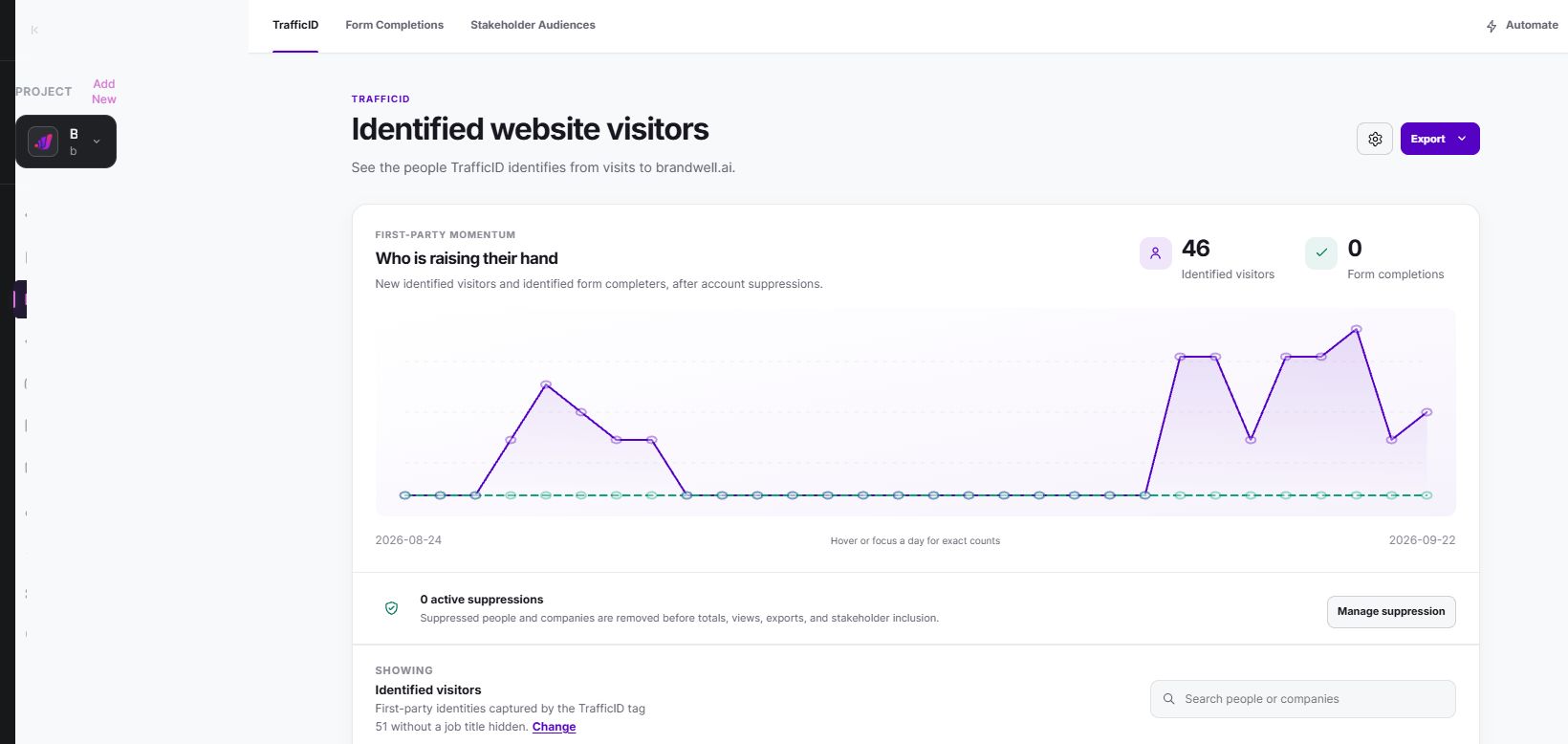
- Select the project. Check the website tag, installation and exclusions for the intended site.
- Review available activity. Inspect identifiable visitors and page context. Missing fields and unidentified visits remain limitations.
- Keep views distinct. Form completions and additional stakeholders are different from identified visits.
- Apply eligibility. Check fit, suppression, customer status, source rights and the destination’s current requirements.
- Prepare the approved handoff. Review the records and supported export or configured workflow. Do not assume native ad syncing.
- Verify the destination. Inspect processing, match status, exclusions and campaign eligibility before launch.
- Monitor the result. Record actual delivery, responses and outcomes. Resolve rejected records and stale audiences.
For topic research beyond your own website, MarketPulse plans are starting at $500/mo. Topic research and website activity are separate sources. A topic match does not establish website visitation or advertising eligibility.
Google, Meta and LinkedIn: avoid interchangeable instructions
Google Ads
Select the supported data source and campaign type, then verify the current collection, consent, audience and policy requirements. A website segment and a customer-list upload are different routes. Do not treat third-party visitor enrichment as automatically eligible first-party customer data.
Dynamic product advertising needs its own supported event and feed configuration. A list of viewed URLs by itself is not a complete dynamic-ad implementation. Check campaign settings that may broaden reach beyond the intended segment.
Meta
Website activity, customer lists and platform engagement have different setup and eligibility requirements. Review the current terms and account options for the source you use. Inspect exclusions and audience expansion behavior in the actual ad set.
Match the creative to a legitimate audience need. An upload succeeding does not mean every record matched, saw an ad or can be identified in reporting.
LinkedIn discontinued lookalike audiences on February 29, 2024. Predictive audiences and Audience Expansion are different options with their own rules. Do not follow older instructions for creating new LinkedIn lookalikes.
Retargeting previous engagement and expanding to other people answer different questions. Check which audience is active, what the campaign can reach and whether your reporting separates the intended cohort from broader delivery.
Six practical retargeting decisions
1. Define one relevant objective
Choose a useful next step: a demonstration, implementation guide or consultation. Keep the offer consistent with the audience context. Avoid assigning a sales stage solely from a page visit.
2. Set membership and refresh rules
Define the relevant activity window, refresh process and removal conditions. Use current evidence and include a process for purchases, opt-outs and ineligible records. Omission from a new upload may not remove a record already present at the destination.
3. Use manageable segments
Segment only where you can explain the difference and maintain sufficient eligible audience and review capacity. Overly narrow groups can fragment delivery and make small result differences difficult to interpret.
4. Match the ad and landing page
Use accurate product facts, readable media and a clear next step. The destination should answer the promise in the ad. A specific useful page can work better for the task than an unrelated homepage, but test the actual journey.
5. Plan frequency and exclusions
Inspect exposure and available controls for the campaign type. Exclude customers from acquisition offers where appropriate and avoid repeatedly showing an expired promotion. Do not promise a universal frequency cap across every platform.
6. Review copy and permissions
Explain the benefit without revealing unnecessary behavioral details or implying surveillance. Use real deadlines and authorized testimonials. An available or enriched mobile number is not SMS opt-in.
B2B and B2C: investigate the buying process
Some business purchases involve multiple stakeholders and long evaluation cycles; some consumer purchases do too. Learn the actual decision process rather than assuming every B2B visitor is in a long funnel or every consumer wants an immediate discount.
For a business account, distinguish the original visitor from additional stakeholders. Tailor a resource to a verified role or request without claiming everyone at the company showed the same interest. Confirm account and contact identities before combining records.
Create useful follow-up content in BrandWell
Use RankWell to prepare a relevant guide or product explanation: save the brief and sources, review the draft and media, verify current facts, then approve and publish through the configured connection. AIMEE can assist through configured tools; retain an owner for review and execution.
Test the landing page on mobile, including the form and confirmation state. Preserve permitted source information, and verify successful submissions separately from clicks.
Measure the audience pipeline and business outcome
Report eligible unique records, accepted identifiers, matched people where available, reachable audience, impressions and conversions separately. These units are not interchangeable. Record what the destination does not disclose rather than estimating a match rate from impression totals.
Fictional example: 100 unique people are reviewed and 80 are approved for an eligible destination. If that destination reports 48 matched people for those same 80 people, the match rate is 60%. It does not mean 48 people saw an ad. Do not use this calculation when the platform’s reported units differ.
Track spend, qualified inquiries, purchases and realized contribution with consistent dates and attribution. If $1,000 of ad spend is attributed $4,000 of purchase revenue, revenue ROAS is 4.0. That is not profit, and an attributed conversion is not proof the ad caused an incremental purchase.
For incrementality, plan an appropriate comparison and account for exposure, sales-cycle timing and uncertainty. A small before/after increase can reflect audience changes, other campaigns or seasonality. Keep unobserved outcomes visible.
Frequently asked questions
Does TrafficID automatically sync a retargeting audience?
Do not assume that. Review the supported export or configured connection, destination eligibility and actual processing result.
Can I retarget every visitor?
No. Collection, consent, identification coverage, matching and campaign rules limit the eligible and reachable audience.
Are lookalikes the same as retargeting?
No. Audience expansion seeks other people; retargeting concerns prior interactions. Check the current product and campaign settings.
Should I put a discount in every retargeting ad?
No. Choose the next step that addresses the audience’s actual question. Keep pricing and offer conditions accurate.
How do I start?
Choose one eligible source, one offer and one destination. Verify the handoff and reporting before expanding. See the current TrafficID workflow for reviewing website activity.
Reviewed and updated October 6, 2026.

Written by


3 comments