


On this page
- What does a marketing automation platform do?
- Marketing automation, CRM and AI agents: the differences
- How BrandWell connects the work
- A first workflow: search opportunity to reviewed article
- What to evaluate before expanding automation
- Measure completed work and business outcomes separately
- Common questions about marketing automation platforms
A marketing automation platform connects a trigger, customer context and a defined next action. It can help a team repeat a useful process, such as preparing a lead handoff or turning a search opportunity into a reviewed article. The important question is whether the workflow completes the right work, with a visible owner and a result you can verify.
This guide explains what to evaluate, how automation differs from a CRM, and how to plan a first workflow using the current BrandWell products.
What does a marketing automation platform do?
Marketing automation software runs configured tasks when a condition is met or a schedule arrives. A workflow might gather account context, prepare content, route a task for approval, or carry out an authorized follow-up. Its capabilities depend on the products, accounts, permissions and instructions you configure.
A useful workflow has five parts:
- Trigger: what starts the work.
- Context: the information needed to make the next decision.
- Action: the bounded task to prepare or execute.
- Owner: who reviews the output and resolves exceptions.
- Result: what actually happened at the destination.
Scheduling a message is one kind of automation. Completing the research, checking eligibility, preparing the message and recording the handoff is a broader process. Define which of those steps you need before choosing features.
Marketing automation, CRM and AI agents: the differences
- A CRM organizes customer and opportunity records. A CRM may also include automation features.
- A marketing automation workflow uses conditions and actions to move work forward. It may read from or write to a CRM.
- An AI agent can help carry out tasks through configured tools and instructions. Its output still needs the review appropriate to the task.
These roles can overlap. Test the actual handoff: does an approved brief reach the intended record, with the right owner and status? A successful run in one tool does not establish that every downstream step succeeded.
How BrandWell connects the work
BrandWell Automations describes workflows that connect research, content and follow-through. Configure the connected accounts and approval steps for your own process. AIMEE carries out work through the tools you permit it to use.
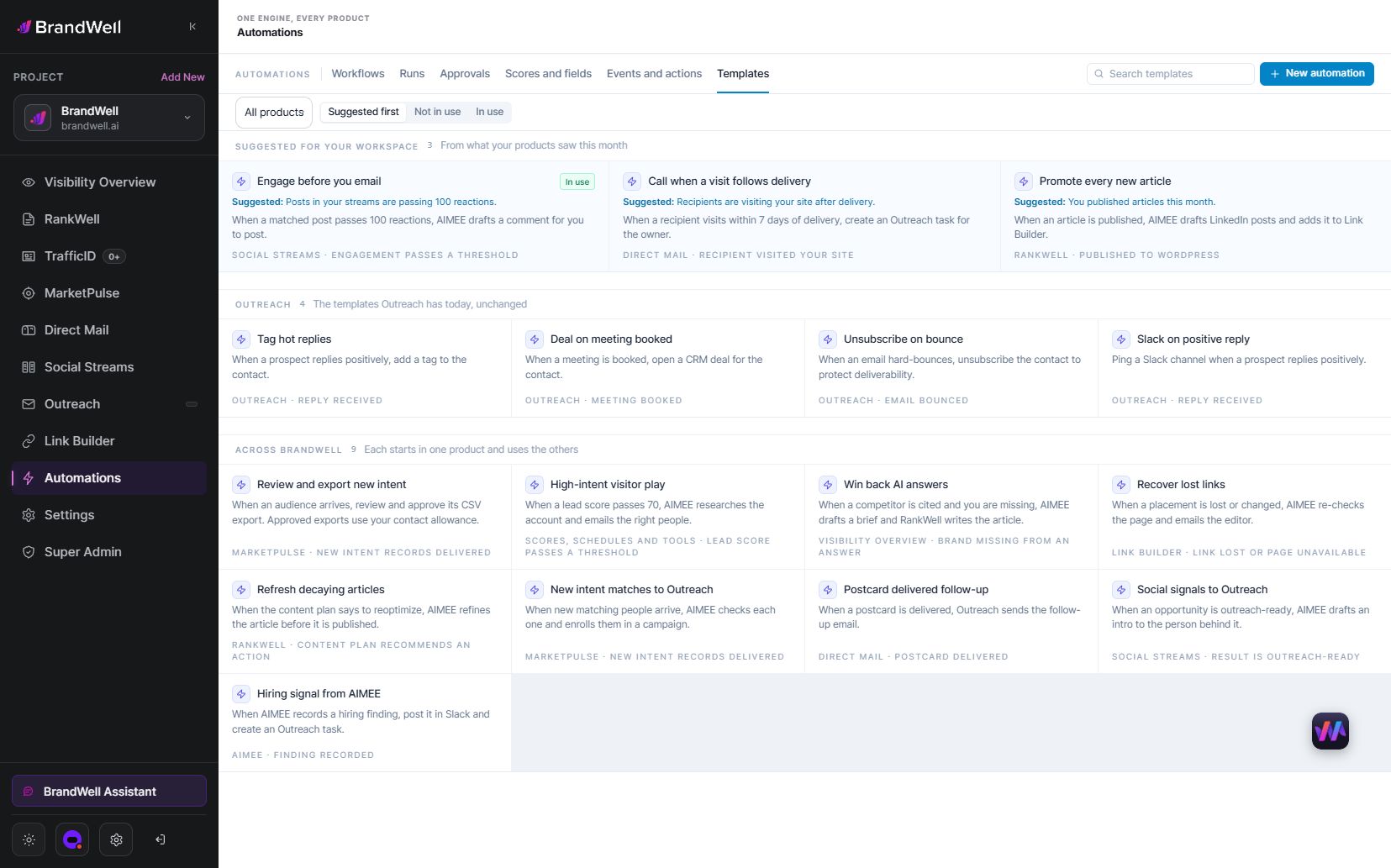
Choose the products needed for your input and outcome:
- Buyer research: use MarketPulse to explore relevant research topics and review the audience against your ideal customer profile. Intent data is starting at $500/mo; this is a MarketPulse starting price, not a price for every BrandWell product.
- Website interest: TrafficID surfaces available website audience information. Review the context before assigning follow-up.
- Content opportunities: use Visibility for research and RankWell for the content workflow, with an editor reviewing the article before publication.
Open the current BrandWell portal, confirm the products available in your account, and start with a single defined process. Access to a research signal does not itself grant permission to contact someone.
A first workflow: search opportunity to reviewed article
This is an original planning example for a payroll software company, not a customer result or a fixed template available in every account.
- Choose an opportunity. Review relevant search and visibility data. Select a question your product team can answer with first-hand information.
- Prepare a brief. Give AIMEE the audience, question, approved product facts, source requirements and intended outcome.
- Create the draft. Use RankWell for the content work. Include a real product example when it helps explain the answer.
- Review the evidence. An editor checks the sources, calculations, screenshot labels and product claims. Mark missing evidence as a request for help.
- Approve publication. Publish through the configured process only after approval. Verify the live URL, formatting and links.
- Record the result. Keep the URL, publication date and owner. Measure search performance later using a stated comparison period.
Keep drafting, approval and publication as separate states. If the editor rejects a claim, the article remains in review. If publishing fails, it remains unpublished even if the draft is complete.
What to evaluate before expanding automation
Data and integration fit
Write down the exact fields the workflow needs and where they come from. Test missing values, duplicate records and outdated information. Verify that a connected account supports the action you intend to take.
Approvals and exceptions
Decide which work can run automatically and which needs review. Assign an owner for disconnected accounts, incomplete research and failed writes. Define how to pause a workflow without losing its context.
Access and retention
The FTC’s security guidance recommends keeping only needed information and limiting access according to legitimate business needs. Apply that principle to connected accounts and workflow records: give each task the access it requires, with a clear retention policy.
Total cost
Include subscriptions, connected services, usage, setup and review time. Compare the cost of an accepted result rather than counting every automated action as useful output.
Measure completed work and business outcomes separately
Track eligible inputs, completed tasks, review failures, exception time and downstream results. Content publication, a qualified conversation and a purchase are different outcomes. A task completing successfully does not prove it caused revenue.
Illustrative calculation: suppose a monthly pilot costs $300 in software and connected services plus four review hours valued at $50 per hour. Total cost is $500. If the team accepts 20 completed briefs, cost per accepted brief is $25. If only 10 are accepted, it is $50. These invented figures show the calculation, not a BrandWell price quote or performance benchmark.
For a fair comparison, use the same acceptance criteria for manual and automated work. Include correction time. If you measure pipeline or revenue, state the attribution method and comparison period instead of implying that every later sale came from the workflow.
Common questions about marketing automation platforms
What should a small team automate first?
Choose a repeatable task with clear inputs and an easily checked result. Preparing a reviewed account brief or content brief is easier to evaluate than automating an entire campaign at once.
Does automation replace a CRM?
Not necessarily. A workflow can use a CRM as its record system while other tools perform research, drafting and execution. Confirm which system owns each field and status.
Can the platform run without human review?
Some low-risk tasks can run under defined permissions. Customer-facing claims, new campaign enrollment, publication and spending need the approval rules appropriate to your business. Expand autonomy only after you can verify the results.
Does more automation guarantee better marketing?
No. Repeating a weak process can increase mistakes. Start with a useful task, measure accepted outputs, resolve failures and then expand the workflow.
Explore BrandWell’s workflow examples and choose one process your team can test from input to verified result.
Reviewed and updated October 2, 2026.

Written by
Jeff Joyce has been helping brands grow online since the Myspace era, when custom HTML layouts were still a competitive advantage. What started in design quickly evolved into a career spanning social media, content strategy, video, agency ownership, and growth marketing. After building his own agency and testing countless AI tools, Jeff joined BrandWell with a clear focus: helping marketers understand how AI can actually improve the way they create, optimize, and scale content. Today, Jeff brings a CMO-level perspective to BrandWell's marketing strategy, blending brand positioning, content, video, customer education, and growth. His work centers on turning complex AI concepts into clear, practical marketing that helps brands move faster, create better content, and stay competitive without losing their voice.

 Farnaz Kia