


On this page
A crawl-based content audit starts with a URL inventory, then combines URL-level findings with search performance and an editorial review. The crawl can identify pages worth investigating; it cannot decide whether an article is accurate, useful, or commercially important.
Use this workflow to move from a list of warnings to a specific action for each page. Keep the original export and a record of changes so the audit can be reviewed and repeated.
1. Define the audit scope
Choose the site or section, the intended audience, and the decision you need to make. For a blog refresh, collect the article inventory, publication and modification dates, canonical URLs, and Search Console performance over a consistent period.
Start with a manageable crawl and a rate the server can handle. Do not assume missing URLs are absent from the site: redirects, crawl settings, authentication, rendering, and URL limits can affect discovery. Check the limits and available fields in the crawl tool you already use before treating an export as a complete inventory.
2. Collect the technical evidence
Review response codes and indexability first. Then inspect page titles, descriptions, headings, canonicals, and internal links. Where available, use crawl depth and the number of distinct internal linking pages to investigate important URLs with weak linking. Record how the tool defines each field so later exports remain comparable.
For duplicates, enable the relevant content checks and run the required crawl analysis. A similarity flag is a prompt to compare the pages, not an instruction to delete either one. Confirm whether they serve the same intent or represent valid variations.
3. Find orphaned pages using additional sources
A crawl that follows links cannot discover every unlinked page. Compare the crawl with XML sitemaps, your CMS inventory, and appropriate analytics or Search Console sources. Simply following internal nofollow links does not solve orphan detection.
Reconcile discovered URLs against the additional inventories before marking a page as orphaned. Investigate why each URL is absent from the crawl. Some private, retired, or campaign-specific pages may intentionally lack normal navigation links.
4. Group comparable pages
Compare articles with articles and product pages with product pages. Add a page-type column to the inventory and compare equivalent groups. A search for matching text is useful for finding a phrase, but it does not establish that the pages have the same purpose.
A useful grouping might separate evergreen tutorials, dated announcements, customer stories, and statistical reports. Each group needs a different review: an old launch announcement can be historically accurate even though it does not describe today’s product.
5. Join search data to the audit
Match Search Console page data to the correct URLs and record the date range. Check aliases and parameters before combining rows. Compare query intent, clicks, impressions, and average position together; a sitewide CTR benchmark is not equally meaningful for every result type.
| Finding | Investigate | Possible action |
|---|---|---|
| Many impressions, few clicks | Query match, position, title promise, result features | Improve the answer and search presentation |
| Older article losing visibility | Changed intent, outdated facts, competing internal pages | Refresh the evidence or consolidate with care |
| Little organic traffic | Referral value, customer use, conversions, indexability | Keep, improve, or retire based on purpose |
| Short page | Whether the task is fully answered | Add missing value, not arbitrary word count |
Swipe the table to see all columns.
Do not label every article under 300 words “thin” or every title over 60 characters “wrong.” Length checks help inspection; they are not Google’s universal quality thresholds.
6. Separate performance lab tests from field data
The current Core Web Vitals are LCP, INP, and CLS. FID has been replaced by INP. PageSpeed-related integrations can help locate performance problems, but available field data depends on sufficient real-user observations. Missing field data is not a passing result.
Use web.dev’s metric definitions when interpreting results. A lab score diagnoses one test condition; field data describes observed experiences over its reporting window. Prioritize the affected template, then verify important interactions on a phone.
7. Turn findings into reviewed content in BrandWell
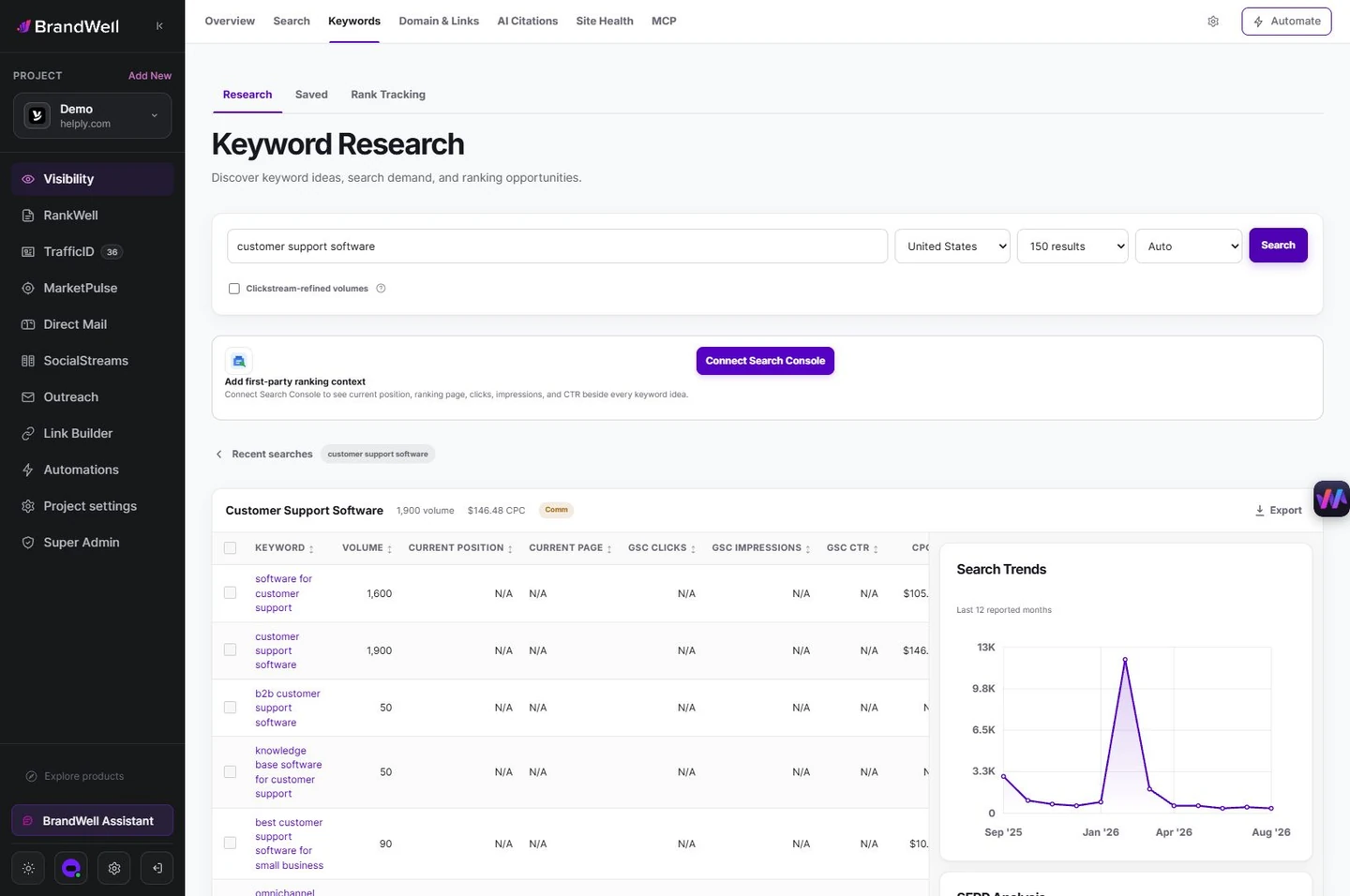
For each article, record the reader’s task, factual problems, useful existing material, sources to verify, and proposed action. In Visibility > Keywords > Research, investigate relevant queries and the intended market.
Use RankWell > Articles > Plan before you write > Check opportunity to prepare the content brief. Review the draft’s sources, examples, search preview, and product claims before publication. A crawl warning does not replace that editorial work.
8. Verify the release
Keep a backup or revision, preserve established URLs unless a move is justified, and test redirects when URLs change. Confirm the live title, canonical, social image, internal links, and mobile layout. Record the release date and measure comparable periods after recrawling.
Use our content audit checklist for the broader review and our title guidance for search-presentation checks.
Reviewed and updated October 2, 2026.

Written by
Julia McCoy has contributed articles to BrandWell on content marketing, writing, and search engine optimization. This archive retains her original bylines; individual articles may be updated by the BrandWell editorial team.

