


On this page
- Understand the source before creating a segment
- Segment for a different message or action
- Personalize without overstating what you know
- Write an email with one clear purpose
- Use TrafficID evidence in the current BrandWell workflow
- Design automation with entry and stop conditions
- Measure delivered messages and meaningful outcomes
- Worked example: keep the denominators visible
- Nine practices for maintaining the campaign
- Frequently asked questions
Effective email campaigns start with eligible recipients, reliable context and one useful next step. Segment your audience using evidence you actually have, personalize without inventing interests, test the complete workflow and measure replies or completed actions alongside delivery.
Lead data can help choose relevant content. It does not automatically establish permission, a buying stage or an expected return. This guide covers segmentation, personalization, content, automation, testing and measurement using the current BrandWell workflow.
Reviewed October 3, 2026.
Understand the source before creating a segment
Separate information someone submitted, existing CRM history, identified website activity and topic-research matches. Each source supports a different interpretation. Preserve the source, collection or observation date, intended purpose and any applicable limits.
Use the fields available in your actual workspace. A missing company size, role or activity event remains unknown. Do not infer a person’s sensitive circumstances from a page visit or turn a guessed interest into a fact in an email.
Review the relationship, channel requirements and suppression before enrollment. A contact address or identified visit is not, by itself, authorization for a marketing sequence. Seek qualified advice for the actual jurisdiction and use case rather than treating this workflow as a legal determination.
Segment for a different message or action
Useful segments have a reason to receive different content. A long list of narrow categories adds complexity if every category receives the same message.
- Expressed need: the resource or information a recipient actually requested.
- Business fit: the supported industry, company type or role present in the record.
- Relationship: subscriber, active inquiry, customer or another documented state.
- Observed activity: a relevant recorded event, with its source and time.
- Action eligibility: checked separately, with opt-outs and other suppression taking precedence.
Do not automatically classify a pricing-page visitor as ready to buy. The visit could relate to research, support, recruiting or client work. Use it as a reason to review context rather than a reason to send an aggressive offer.
Personalize without overstating what you know
Personalization can mean selecting the relevant example, explaining a use case for a known business category or acknowledging an actual request. It does not need to reveal tracked activity or assert that you know someone’s priorities.
For a confirmed marketing-agency inquiry, a suitable opening might be: “Here is how to evaluate topic research for your agency’s prospecting or client work.” A generic fallback could be: “Here is how to evaluate topic research for your business.” Neither claims the person has a specific budget or is ready to purchase.
Test missing names, uncertain industries and malformed fields. Use a readable fallback rather than displaying template tags or inventing details. Review generated content for factual support, current pricing, tone and the correct recipient.
Write an email with one clear purpose
- Use an honest subject. Describe the actual message, such as “Your topic research guide.” Avoid unsupported improvement percentages, fake reply prefixes or manufactured urgency.
- Explain why it is relevant. Connect to the expressed request or supported business context.
- Use short bullets. Explain what the reader can review, what matters and what to do next.
- Link to one primary action. Make the destination clear and ensure it matches the promise.
- Include readable sender and preference information. Confirm the actual unsubscribe and reply paths work.
A short message can offer a topic evaluation checklist: inspect relevance, review the available matches and compare the plan allowances. Link to the demo or appropriate guide. Do not promise a free trial, guaranteed leads or an offer the recipient is not eligible to receive.
Use images only when they help explain the task. Keep essential text and the action readable with images blocked. Inspect the layout on a small screen, including long company names, link labels and the footer.
Use TrafficID evidence in the current BrandWell workflow
TrafficID supports review of identified visitors to your own site and the information available about them. Coverage and fields vary. Keep visitor evidence separate from topic-research evidence and from a submitted inquiry.
- Select the right BrandWell project and open TrafficID.
- Review the website tag and installation status in settings, including intended pages and exclusions.
- Inspect Identified visitors, available fields, filters and suppression controls.
- Keep Form Completions and Stakeholder Audiences distinct; a stakeholder is not automatically a site visitor.
- Review fit, context and eligibility before preparing an action.
- Use Automate or the relevant configured campaign workflow, then verify the enrollment and destination result.
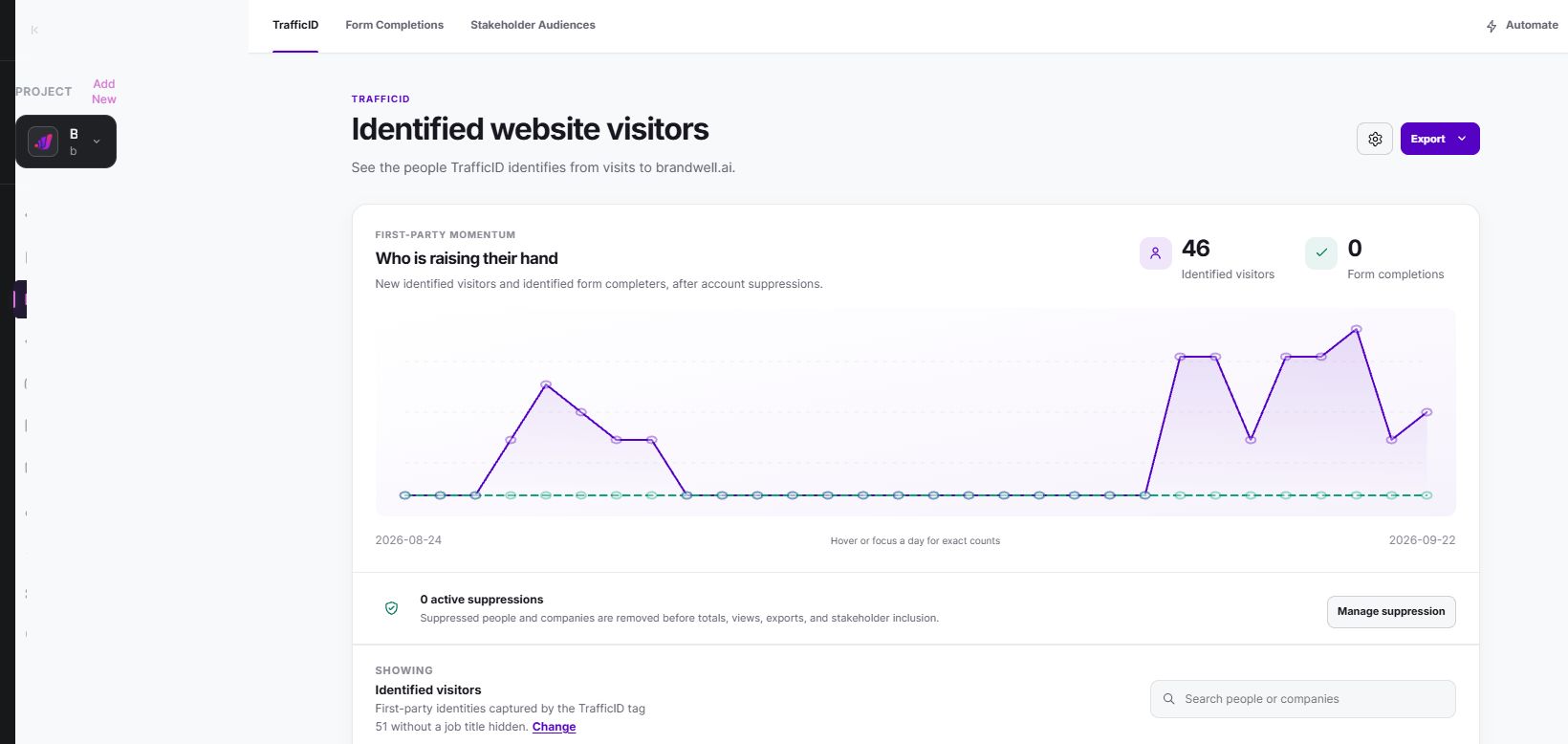
AIMEE can help prepare relevant content and a next-step brief through configured connected tools. Review what it prepared and the actual supported workflow. Do not assume a particular event trigger, email integration or attribution model is included without checking the configuration.
Design automation with entry and stop conditions
For each proposed sequence, document its eligible entry, message timing, responsible owner and exit rules. Common examples include a welcome series for subscribers, follow-up on a requested resource and customer onboarding. A cart reminder requires a real commerce event and an appropriate recipient relationship; it is not inferred from any website visit.
Stop or change the sequence when someone opts out, purchases, replies with a different need, becomes ineligible or reaches the defined end. Prevent repeated enrollment and conflicting messages from other workflows.
Test a small approved set before expanding. Check missing fields, delayed events, retries, duplicate enrollments, completed purchases, suppression and failure reporting. A scheduled action is not proof that a message was delivered.
Gmail’s sender guidelines distinguish all-sender and bulk-sender requirements. Review authentication and applicable unsubscribe requirements for your actual sending configuration. These requirements concern personal Gmail delivery, not a guarantee of inbox placement.
Measure delivered messages and meaningful outcomes
Define each denominator and count people or messages consistently. Track attempted sends, accepted delivery, bounces, unique clickers, replies, completed actions and opt-outs. Separate technical delivery from inbox placement and human engagement.
Apple explains that Protect Mail Activity loads remote content in the background regardless of engagement. An image load therefore does not establish a human read. Use open tracking as a limited signal rather than the sole success criterion.
Check link-scanner and automated activity handling in your actual analytics. A recorded click alone does not establish a useful conversation or a purchase. Keep attributed conversions separate from incremental outcomes caused by the email.
Worked example: keep the denominators visible
In a fictional campaign, 1,000 eligible recipients are sent a message. Delivery is recorded for 950, with 50 bounces. There are 38 unique recorded clickers and six defined purchases during the follow-up.
- Recorded delivery: 950 divided by 1,000, or 95%.
- Bounce rate: 50 divided by 1,000, or 5%.
- Unique recorded click-through rate: 38 divided by 950 delivered, or 4%.
- Purchase rate per delivered recipient: six divided by 950, or approximately 0.63%.
- Purchase rate per sent recipient: six divided by 1,000, or 0.6%.
If each purchase records $100, attributed revenue is $600. Against a defined $300 campaign cost, the revenue-to-cost ratio is 2. That is not profit, customer lifetime value or causal ROI. Product cost, refunds, other operating expenses and what would have happened without the campaign require separate treatment.
Nine practices for maintaining the campaign
- Check data freshness. Keep original sources, dates and conflicts visible.
- Review eligibility. Apply suppression across the actual configured destinations.
- Control frequency. Prevent overlapping sequences and unnecessary repeats.
- Match content to the known need. Do not invent a buying stage.
- Use only recorded behavior. Do not assume unavailable tracking fields.
- Test the stated hypothesis. Randomly assign eligible recipients where feasible and retain original assignments; before-and-after changes can remain confounded.
- Inspect mobile and image-blocked versions. Check readability, buttons and fallbacks.
- Coordinate other channels. Preserve the same source and suppression context rather than duplicating contacts indiscriminately.
- Read replies. Route questions to an owner and update the next step from what the recipient actually says.
Frequently asked questions
Can every identified visitor enter an email sequence?
No. Review the actual relationship, source, action eligibility and suppression before enrollment.
What is the best send time?
There is no universal time established here. Test a defined hypothesis for your eligible audience, using the same follow-up and meaningful outcomes.
Can TrafficID guarantee fewer bounces?
No guarantee is made. Review available fields and the actual sending results; visitor identification is not proof of mailbox deliverability.
Which BrandWell product provides topic research?
MarketPulse standard plans are starting at $500/mo. TrafficID concerns eligible visitors to your own site. Keep the two sources distinct and verify your selected product allowances and connected workflows.
Explore TrafficID or review BrandWell’s automation examples to plan a specific, verified next step.
Reviewed and updated October 3, 2026.

Written by

