


On this page
Retargeting reconnects with an eligible audience that previously interacted with your business. To make it useful rather than repetitive, define who should receive the message, what would help them next, when the audience expires and what will stop further advertising. A previous visit does not establish purchase readiness.
This guide covers audience selection, frequency, creative and measurement for paid-media teams and service businesses. It also explains how to review identified website visitors in the current BrandWell app without assuming that identification automatically creates an advertising audience.
What retargeting does, and what it does not prove
A website tag, permitted customer list or eligible platform engagement can supply an audience input. The advertising platform applies its own matching, eligibility, delivery and policy rules. Tracking technologies, browser settings, consent choices and account configuration affect what is available.
Retargeting can remind someone of a relevant next step or answer an unresolved question. It can also reach someone who already bought, has no fit, cannot act or simply does not want another ad. Do not treat all visitors as warm buyers.
There is no universal visitor nonconversion rate or guaranteed retargeting ROI. Results depend on the audience, offer, costs, measurement design and business. More impressions do not necessarily mean more trust or incremental sales.
Choose the job before the channel
- Return to a useful resource: offer the guide, product comparison or explanation that answers the next question.
- Evaluate the product: show a relevant demonstration, implementation detail or current plan information.
- Complete an interrupted action: provide a clear route back when the audience and workflow permit it.
- Support existing customers: separate onboarding or approved expansion messages from prospect acquisition.
These are possible campaign purposes, not promised outcomes. Give each audience one primary job and a measurable acceptance criterion. Avoid bundling awareness, lead generation, customer onboarding and revenue into one success metric.
Seven steps for useful retargeting
1. Define eligibility and exclusions
Write down the source, observation window, geography, permitted use, fit rules and expiration. Separate an article reader from someone who requested a demonstration. Neither action reveals everything about the person’s needs.
Exclude people who should not receive this campaign, including purchases where appropriate, opt-outs and other agreed suppressions. Assign an owner to update the audience and check whether removals reach the actual destination.
2. Choose a bounded frequency policy
Check the controls supported by the actual campaign type. Google Ads documents frequency capping for Display and Video campaigns; it currently says Demand Gen does not support this feature. Display caps count viewable impressions. Do not assume one setting applies across every campaign or platform.
A proposed cap is a starting hypothesis, not an optimal universal number. Review reach, observed frequency, costs and negative feedback, then decide whether to change the message, reduce delivery or stop. TrafficID activity does not determine the perfect ad frequency.
3. Rotate a message when the question changes
Build a small set of distinct messages around product fit, implementation, proof and next steps. Replacing an image without changing the underlying message may not solve repetition.
For example, a fictional service-software campaign might first offer a short workflow demonstration, then a clearly scoped implementation checklist. That sequence is a proposal to test. Do not invent testimonials or describe a prospect’s alleged browsing in the ad.
4. Make the call to action specific
Use a call to action that accurately describes the destination: watch the demonstration, compare plans or read the implementation checklist. Ensure the landing page delivers that exact next step on mobile.
A discount or deadline must reflect the actual offer. A generic button is not automatically worse, and personalization does not automatically improve conversion. Test the relevant difference under comparable conditions.
5. Verify data and platform readiness
First-party data, platform engagement and identified visitor records are different sources. Document what each record represents. Browser restrictions and consent choices vary; avoid treating the web as uniformly cookie-free.
Check the current platform requirements, source permissions, available identifiers, match status and suppression behavior before launch. An identifier, a hashed upload or an active tag is not proof that every person can be reached or that your use is permitted.
6. Offer value beyond another sales reminder
Address a useful question with current evidence. A guide can explain the workflow; a demonstration can show the actual product; a plan page can clarify scope and costs. Do not assume every reader needs an incentive.
RankWell can support the content workflow for a supporting article or landing page. Check facts, screenshots, offer terms and the published mobile result before using that content in a campaign.
7. Test outcomes with the right comparison
Define the eligible population, primary outcome, observation window, costs and stop criteria. Keep audience overlap and exposure to other campaigns visible. A creative comparison and an incrementality test answer different questions.
A properly designed randomized holdout can help estimate incremental impact where feasible. Comparing visitors who saw ads with people who did not is observational when assignment was not randomized; selection and other differences can explain the result. Do not call all attributed revenue incremental revenue.
Use TrafficID to review website visitors
TrafficID surfaces eligible identified website visitors and available person, role, company, source and activity fields. Coverage varies; it does not identify every visitor or guarantee a complete profile, qualified lead or sale.
- Choose the intended project and open TrafficID.
- Review the website tag and installation status in the project’s settings.
- Check the tag on the intended pages and review exclusions.
- Review the Identified visitors view, available filters and suppression controls.
- Keep Form Completions and Stakeholder Audiences separate from observed identified visits.
- Review any configured Automate or campaign workflow and verify permitted enrollment and destination results.
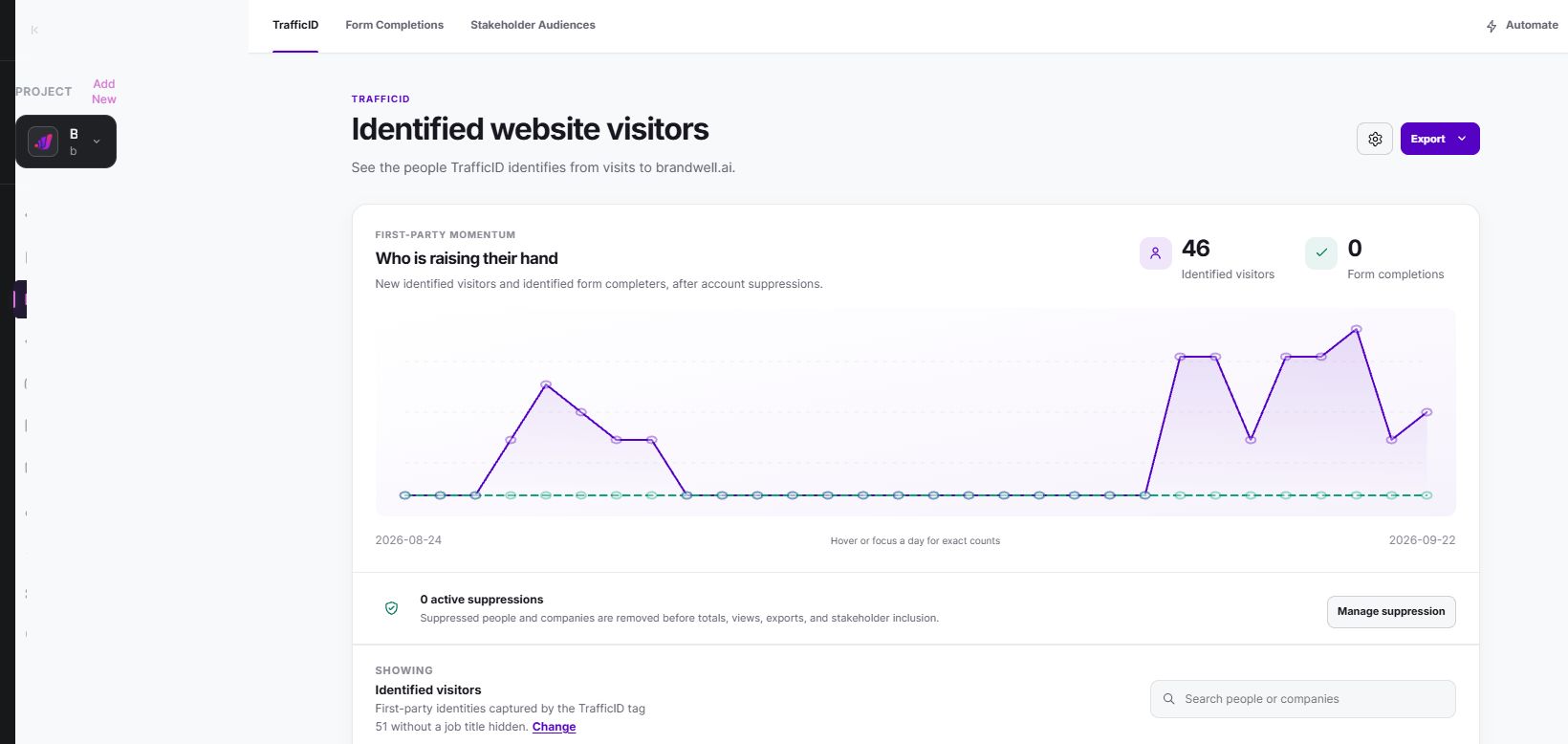
Adding a stakeholder does not establish that the person visited your website. Similarly, an identified visitor list does not establish that an advertising audience has synced, matched or received impressions. Check each step separately.
Watch the TrafficID demonstration and review current plans. For a broader view of people researching relevant topics, MarketPulse is starting at $500/mo. Website activity and off-site topic research are different inputs; review fit and permissions for the intended action.
Keep channel choices current
Google, Meta and X have their own audience sources, campaign formats and eligibility rules. Confirm the current options in the authorized advertising account and official documentation before implementation. Do not assume a tool’s visitor record is a native integration with each platform.
Choose a channel because the eligible audience, offer and operating costs support the campaign. Coordinate exclusions and exposure across channels where your available data permits it. A campaign cannot promise to follow every visitor everywhere.
Measure the funnel without mixing units
In a fictional month, $600 media spend generates 100 clicks and five recorded purchases with $500 attributed revenue. Cost per click is $6, click-to-purchase conversion is 5% and attributed return on ad spend is approximately 0.83. None of those figures establishes profit or incremental impact.
If software and operator costs add another $200, included campaign cost is $800. Product costs, fulfillment, refunds and other relevant costs still need their own treatment. Label the cost basis and revenue window rather than presenting attributed revenue as earnings.
- Delivery: eligible source size, matched audience, reach, impressions, frequency and spend.
- Response: clicks, landing engagement and completed actions, with explicit denominators.
- Business result: accepted leads, qualified opportunities, wins or purchases, contribution and refunds where relevant.
- Guardrails: complaints, opt-outs, failed suppressions, repeated exposure and disallowed enrollments.
Review the result against the declared goal. A cheaper click can coexist with a worse cost per accepted opportunity. A small number of purchases is uncertain evidence; report the sample rather than claiming a stable benchmark.
Frequently asked questions
How can I retarget without annoying visitors?
Use a relevant next step, current exclusions, bounded audience windows and the supported frequency controls. Monitor negative feedback and stop when the campaign no longer serves the agreed purpose.
Does TrafficID automatically create ad audiences?
An identified record is not evidence of a working advertising integration. Check the configured workflow, permitted use, supported identifiers and destination status separately.
What is the best frequency cap?
There is no universal number. Check the available controls, define a starting policy and evaluate actual delivery, costs and feedback for the audience and offer.
Does retargeting always improve ROI?
No. Evaluate the full cost and suitable outcome comparison. Attributed revenue and observed return on ad spend do not by themselves prove profit or incremental sales.
Reviewed and updated October 3, 2026.

Written by
Jeff Joyce has been helping brands grow online since the Myspace era, when custom HTML layouts were still a competitive advantage. What started in design quickly evolved into a career spanning social media, content strategy, video, agency ownership, and growth marketing. After building his own agency and testing countless AI tools, Jeff joined BrandWell with a clear focus: helping marketers understand how AI can actually improve the way they create, optimize, and scale content. Today, Jeff brings a CMO-level perspective to BrandWell's marketing strategy, blending brand positioning, content, video, customer education, and growth. His work centers on turning complex AI concepts into clear, practical marketing that helps brands move faster, create better content, and stay competitive without losing their voice.

 Farnaz Kia