


On this page
- What is a content funnel?
- Start with your own traffic and questions
- Build the three content stages
- Where TrafficID fits
- Keep website activity and off-site intent separate
- Create and maintain the resources in BrandWell
- Use popups, chat and follow-up deliberately
- Measure the path with explicit denominators
- Funnel review checklist
- Frequently asked questions
A content funnel for anonymous website visitors gives people a useful path from an initial question to a relevant next step, even when they have not shared their contact details. Start with clear educational content, connect it to deeper evaluation resources and make the inquiry or purchase process easy to understand.
Visitor identification can add available signals for some visitors. It does not identify every person, establish their buying intent or replace the need for a helpful website. Build a journey that works for unidentified visitors too.
What is a content funnel?
A content funnel is a connected set of resources that helps someone learn, evaluate and act. The stages are a planning model, not a guaranteed sequence. Someone may arrive directly at a pricing page, read an article later and return through another channel.
- Discovery: explain the problem and help the reader decide whether it applies.
- Evaluation: explain the options, process, evidence and limitations.
- Action: make the next step, price and relevant terms clear.
Choose a next step appropriate to the page. A visitor reading a definition may need a practical checklist. A visitor comparing service scope may need an implementation explanation or a conversation with the team.
Start with your own traffic and questions
Do not assume that 95% of your visitors are anonymous or that everyone who leaves without a form submission is a missed sales opportunity. Define what your business considers a qualified inquiry and inspect the data available in your actual setup.
Review common customer questions, landing pages, acquisition sources, form completions and downstream outcomes. Check that the tracking implementation records the intended actions and excludes your test activity where appropriate.
Google’s GA4 Traffic acquisition documentation points to Reports, then Acquisition and Traffic acquisition. Report availability can depend on the property’s navigation configuration. This is different from the old Audience and Behavior navigation used in Universal Analytics.
Use the available report to compare source and session activity. Keep analytics records separate from contact records and avoid sending private contact details in analytics event values or URLs.
Before interpreting a low form-completion rate, ask whether the page serves an informational need, whether the offer fits that visitor and whether the form works on mobile. A useful answer can serve its purpose without producing an immediate lead.
Build the three content stages
1. Discovery: answer the first useful question
Create a clear explanation, checklist or demonstration for a real audience problem. Put the answer near the beginning and use descriptive links to the next relevant resource. Keep basic explanations available without requiring unnecessary personal information.
Original hypothetical example: a payroll-software company publishes an article explaining what information a business needs before changing payroll providers. It links to a migration checklist and a page explaining the product’s supported setup process.
The article should distinguish general preparation from the company’s actual capabilities. If a specific integration or jurisdiction is unsupported, the evaluation material should say so. A broad promise at the top of the funnel should not contradict a limitation later.
2. Evaluation: provide enough detail to judge fit
Offer current product demonstrations, scope explanations, implementation guides and approved customer examples. Show what the product does, who it serves and what the customer must provide or configure.
For the payroll example, a useful evaluation resource might explain supported data import, required review and the steps that remain the customer’s responsibility. It should not imply that a demonstration guarantees the same setup time for every business.
If you offer a downloadable resource, explain what the form requests and what happens after submission. A resource request, newsletter subscription and text-message permission are different choices; record the actual permission rather than inferring all of them from one action.
3. Action: remove uncertainty about the next step
Make pricing, the available plan, relevant conditions and the next action understandable. A demo request should explain what the visitor receives. A purchase page should explain the product and subscription being purchased.
Use truthful deadlines and offers. Do not create a countdown that resets to imply a deadline that is not actually enforced. Explain guarantee conditions close enough to the decision for the visitor to evaluate them.
For a service business, a consultation may be more appropriate than an immediate checkout. For a standardized product, a clear plan comparison and purchase process may be the right route. Choose based on the actual offer.
Where TrafficID fits
TrafficID is BrandWell’s website visitor-identification workflow. It surfaces identified visitors and available profile or activity fields. Coverage and fields vary; a record is a signal to review, not proof that someone wants to buy or receive a message.
- Select the intended project and open TrafficID.
- Review the website tag, installation status and exclusions.
- Inspect available records, filters and suppression controls.
- Check fit and the evidence supporting a potential next step.
- Use the relevant configured workflow only after checking eligibility and permission.
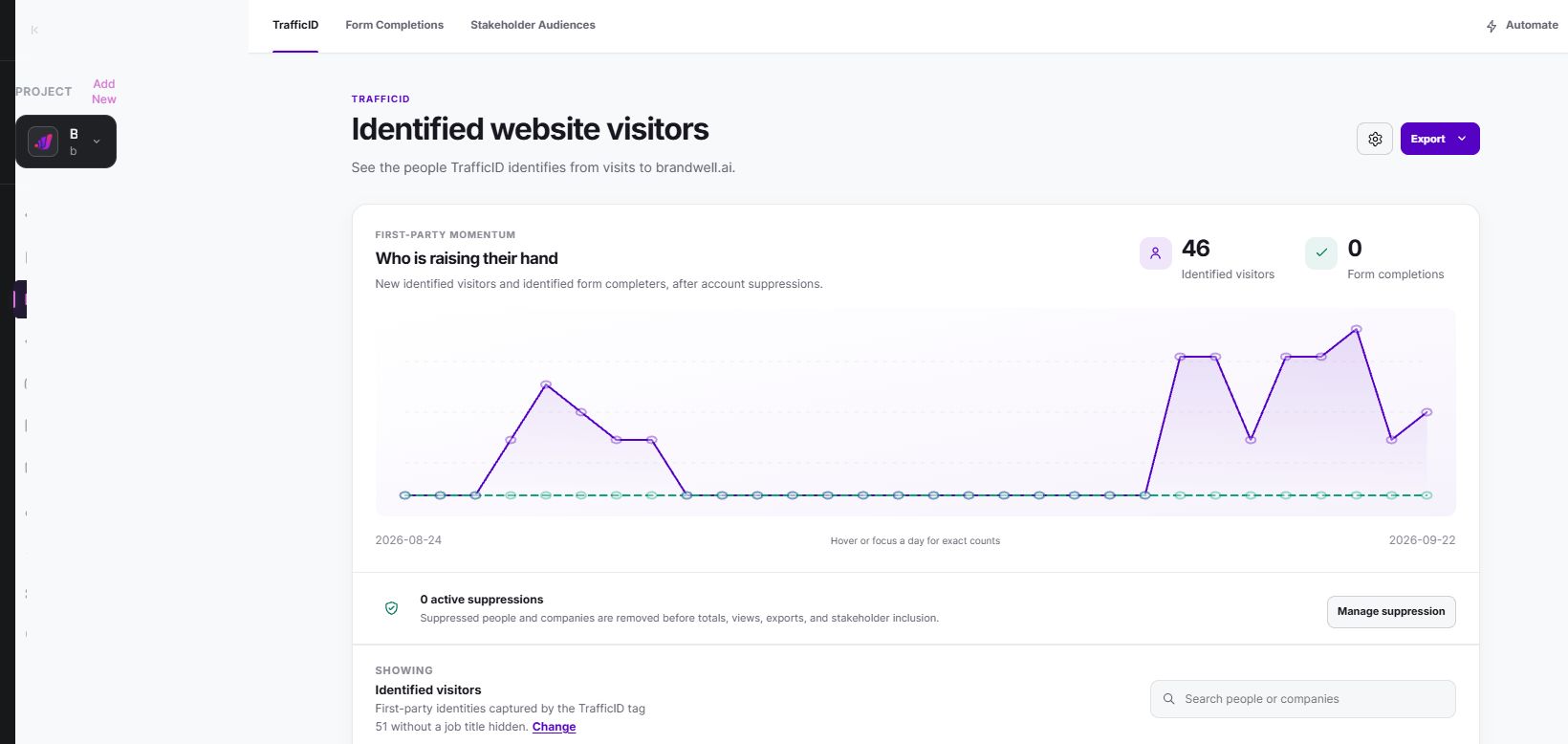
Form Completions and Stakeholder Audiences are separate views. Do not count every audience record as a new form submission, unique visitor or qualified sales lead. Confirm what each view represents in the current workspace.
Do not write a follow-up that asserts a person’s exact intent from a page view. A relevant introduction can explain the problem your business solves without overstating what you know about the recipient.
Keep website activity and off-site intent separate
TrafficID relates to available website-visitor signals. MarketPulse provides topic-based intent-data pulls. The two can inform different research questions; they are not interchangeable datasets.
MarketPulse plans are starting at $500/mo. Topic, refresh and export allowances vary by package. Verify current scope and any eligible offer on the product page before purchase.
An Intent Scan uses the previous 24 hours of available data. Counts and fields vary with the topic and filters, and audiences can overlap. Do not present an available profile as a confirmed visitor to your own website or a guaranteed opportunity.
Create and maintain the resources in BrandWell
Use RankWell to prepare and review the educational content. Give the draft a specific audience question, verified product details, approved evidence and intended destination. Review the finished text and media before publishing through a configured connection.
The Content Hub supports article, strategy, queue and calendar work. Keep the discovery article, evaluation resource and action page connected with meaningful links. Update the source article when product details change rather than repeatedly adapting an obsolete explanation.
AIMEE works through configured tools, access and permissions. Specify whether it should prepare a brief for review or carry out an approved action. Do not assume every destination or workflow is connected.
Use Automations where the relevant triggers and schedules are configured. Define the owner, required information, approval step and what happens when a record is ineligible or a connection fails.
Use popups, chat and follow-up deliberately
An optional popup can offer a useful resource or free topic lookup. Make it easy to dismiss, keep it usable on mobile and avoid repeating it after every interaction. Measure whether visitors actually complete a useful next step rather than counting popup impressions as conversions.
Chat can help an unidentified visitor ask a question. Clearly explain whether the response is automated and provide a route to a person when the question requires account-specific help. Do not require irrelevant contact information before answering a basic product question.
For email, text messages or advertising activation, check the applicable permission, suppression and platform requirements. Visitor identification does not itself establish consent. Keep opt-outs and purchase status available to any configured reminder workflow.
If the landing page redirects to another funnel page, preserve the relevant campaign parameters and test that the receiving page records the source correctly. Avoid putting personal contact details into the URL.
Measure the path with explicit denominators
Track the events your implementation actually supports: resource views, CTA clicks, submitted forms, qualified inquiries and purchases. Distinguish attempts from successful submissions and repeat events from unique people.
Original hypothetical example: 1,000 measured article sessions produce 80 clicks to an evaluation resource. Twenty visitors submit the inquiry form and eight inquiries meet the business’s qualification criteria. The session-to-resource click rate is 8%; the form-to-qualified-inquiry rate is 40%. These illustrative figures are not BrandWell results.
If the next period has more inquiries, inspect changes in traffic mix, offer, tracking and sales follow-up before attributing the change to one article. A later purchase associated with several touches does not establish that the first content view caused it.
For a test, define one change and a primary outcome before launch. Keep the period, audience and implementation differences documented. Small samples can be useful for diagnosing broken steps without supporting a confident conversion claim.
Funnel review checklist
- The first resource answers a real question without an exaggerated promise.
- Evaluation pages show current product capabilities and limits.
- CTAs describe what happens next.
- Mobile forms, media and dismissal controls work.
- Permissions and suppression are checked before activation.
- Reporting distinguishes visitors, records, events and qualified outcomes.
- Every stage has an owner and a review date.
Frequently asked questions
Does a content funnel require visitor identification?
No. Useful pages, clear navigation and an appropriate next step can serve visitors without knowing their identity. Identification can add available signals for review.
Does a pricing-page visit prove buying intent?
No. It can be relevant context, but the visitor may be researching, checking a price or evaluating an unsuitable product. Review fit and other available evidence.
Should all content be gated?
No. Keep the basic answer and enough evaluation information accessible. Request information when there is a clear reason and explain the exchange.
Which BrandWell product should support the funnel?
Use RankWell for reviewed content, TrafficID for available website-visitor signals and MarketPulse for topic-based intent research. Configured Automations and AIMEE can support approved next steps.
Reviewed and updated October 3, 2026.

Written by

