


On this page
A multi-client intent portal should scope access by person, action, client workspace and time. Viewing a report should not automatically grant export, activation, credential-management or deletion rights. Define the actual jobs first, then create and test the role assignments.
This is a proposed access-design worksheet for agencies and client administrators. It does not establish that BrandWell offers every role, tenant boundary, audit feature or approval control described below. Verify the selected product and deployment before promising those capabilities to a client.
Define actions before roles
Client-level permissions should prevent four predictable failures: one client seeing another client’s records; an analyst activating data without approval; a former employee retaining access; and an operator changing a sensitive rule without understanding the impact. The promise is not “military-grade access.” A measurable promise is: “Every user has one or more documented roles, each role maps to explicit actions and client workspaces, privileged access expires or is reviewed, and onboarding, change, and offboarding tests prove the intended boundary.”
Start with actions, not job titles. “Marketing manager” means different things across clients. Define whether a role can view topic trends, view company signals, view named contacts, change filters, configure identity, create reports, share links, export data, prepare an audience, approve activation, write to CRM, manage users, manage credentials, change billing inputs, or delete records. Then group compatible actions into roles.
A proposed role-permission matrix
A useful client-level-permissions framework includes these baseline roles.
- Agency owner: manages agency-wide commercial settings and appoints privileged administrators. It should not use daily super-admin access for routine client delivery.
- Agency platform administrator: configures integrations, credentials, workspace provisioning, and access policy across approved clients. Separate this from client billing and from routine campaign decisions where possible.
- Agency operator: reviews signals, prepares reports, resolves data-quality exceptions, and proposes activations within assigned client workspaces. It should not grant itself new clients or approve its own high-risk change.
- Client administrator: manages the client’s users and approved workspace settings, but cannot view another client or agency-global configuration.
- Client analyst: views signals, reports, and permitted evidence; may create filters or drafts without exporting people or activating destinations by default.
- Client activator: prepares CRM, outreach, or advertising actions from eligible records. For sensitive workflows, require a separate approver.
- Client approver: accepts, rejects, or pauses proposed activations and records a reason. Avoid combining approval with credential administration.
- Executive or read-only reviewer: sees approved summaries and outcomes, with no configuration, export, user-management, or activation rights.
- Temporary specialist: receives time-limited access to a narrow client and function for implementation or support. Expiry should be automatic where the platform supports it and manually verified otherwise.
- Service account: has a nonhuman identity, minimum destinations and fields, named owner, credential-rotation plan, and no interactive reuse.
For each role, mark allow, deny, approval required, or not applicable across view, configure, export, activate, administer, and delete. Add columns for client scope, data sensitivity, authentication requirement, time limit, reviewer, and evidence. Default to deny. Avoid wildcard client access for agency operators unless they truly deliver every account.
Set context-sensitive controls
A permission should consider more than the action. Viewing an aggregate company trend is lower consequence than downloading named contacts. Changing a topic list can change service cost and scope. Editing a suppression list can create compliance exposure. Sharing a bearer report link may grant whoever holds it access; it is not equivalent to a named portal user. Browser automation or an agent acting under a user session should have the same or narrower authorization than the person who approved it.
OWASP’s Authorization Cheat Sheet recommends least privilege, denial by default and permission checks on every request. It distinguishes verifying an identity from authorizing an action. These are design principles, not proof that a particular product implements the required client boundary.
Manage the access lifecycle
First, inventory data and actions by workspace. Include topic reports, website events, identity candidates, enriched contacts, filters, suppression, exports, audiences, CRM writes, workflow instructions, credentials, support access, and deletion. Mark which actions are reversible and which can expose data or communicate externally.
Second, create a role request with client, business purpose, required actions, approver, start, expiry, and conflict checks. The client administrator should approve client access; the agency should approve its own privileged operations. Do not grant all-client access merely to reduce administration.
Third, test from the user’s perspective. A client analyst should attempt an allowed view and a prohibited export. An agency operator assigned to Client A should attempt to search for Client B. A revoked user should fail through direct URLs, saved links, API credentials, exports, and browser sessions. Test invitation errors, duplicate emails, changed domains, stale tokens, shared report links, and service accounts.
Fourth, review access on a cadence tied to risk. Privileged and temporary access may need more frequent review than read-only users. Trigger an immediate review after staff departures, client ownership changes, suspicious behavior, new destinations, mergers, or contract changes. Record the reviewer and remediation without assuming the platform supplies a general audit log.
Fifth, offboard completely. Disable named and service accounts, revoke tokens, remove group membership, invalidate report links where supported, rotate shared credentials, stop queued automations, transfer permitted outputs, and verify that support staff no longer have access. A screenshot of a disabled user is not proof that every downstream credential was revoked.
The staffing model usually includes a service owner, platform administrator, client administrator, delivery operator, and privacy or security reviewer. The handoff should give the client a role glossary, matrix, request route, approval rules, review cadence, emergency access process, and offboarding checklist. Any response target belongs in a written service agreement; reviewed sources do not establish a BrandWell permissions SLA.
Choose the delivery model
Build when the agency has engineering, identity, security, and support capacity and client permissions are central to the product. Custom software creates a durable obligation to test every endpoint, export, automation, cache, support tool, and browser path.
Resell when a provider can demonstrate the required client hierarchy, negative permissions, temporary access, and administration. The agency should own its role design and reviews even if the platform enforces them.
Refer when the client needs direct enterprise identity integration, regulatory controls, or administration the agency cannot safely operate. Retain strategy and activation work without taking inappropriate platform responsibility.
Avoid offering a portal to clients that demand shared credentials, cross-client visibility, unrestricted bulk export, unreviewed automation, or an unsupported granular-RBAC promise.
Budget and measure the work
Price the setup from number of clients, users, roles, data classes, destinations, authentication requirements, and approval paths. Recurring work includes onboarding, change requests, temporary access, quarterly reviews, offboarding, credential rotation, negative tests, and exception resolution. Model actual operator time and vendor cost before stating a gross margin.
A recurring package can include a maintained role-permission matrix, least-privilege defaults, monthly joiner/mover/leaver processing, client-admin support, quarterly access certification, temporary-access review, credential inventory, two-workspace negative test, and annual permission redesign. Keep software licensing, implementation, support, and managed governance visible.
Useful KPIs include percentage of accounts with an owner, privileged-user count, stale-account rate, temporary access past expiry, review completion, denied-action test pass rate, approval turnaround, excessive-access findings, offboarding completion, and unauthorized or duplicate activation. Connect these to preserved client trust, reduced rework, accepted activations, opportunity progression, and renewal evidence, but do not claim access controls caused pipeline.
Best-fit clients have several stakeholders, sensitive person-level records, multiple activation destinations, procurement requirements, distributed teams, or frequent staffing change. A single-user client receiving a read-only report may need a much simpler design. Exclude clients unwilling to name administrators, enforce individual accounts, or accept approval boundaries.
Before accepting a platform, keep a small library of permission implementation examples. Include an analyst who can filter but not export, an activator who can prepare but not approve, an agency specialist with one-client temporary access, and a service account that can write only approved fields to one destination. Run the examples after every material configuration or integration change. This operational checklist catches permission drift that a static planning guide will miss. It also gives client administrators a concrete decision guide when a new employee requests “the same access as my manager,” a phrase that should trigger clarification rather than a copied role.
Make the permission design testable: define actions, narrow the client scope, separate preparation from approval where appropriate, review temporary access and verify prohibited paths using authorized test accounts.
A permission test card
Use an approved test environment and synthetic records for negative tests. Document the identity, assigned role, client, requested action, expected result, actual result and evidence owner. Do not test access against another organization’s live data without authorization.
- Allowed view: A Client A analyst can view the summary explicitly assigned to that role.
- Denied export: The same analyst cannot export named records when export is outside the role.
- Client boundary: A Client A operator cannot retrieve a Client B test record through a direct link or supported API.
- Separate approval: An operator can prepare an action but cannot approve it when a separate approver is required.
- Revoked access: An offboarded test user cannot use an old session or token to reach protected resources.
- Service scope: A service account can operate only on the permitted fields and destination.
A hidden button is not sufficient evidence of enforcement. Review the behavior of the supported request paths with the technical owner. Record both successful authorized actions and correctly rejected actions.
A fictional review and cost example
If 18 of 20 planned access tests pass, test-pass coverage is 90%. Investigate the two failures before accepting the boundary. The percentage is not a certification and says nothing about untested paths.
Suppose a proposed setup requires six hours of design, four of configuration and four of testing. At an assumed $75/hour, fourteen hours cost $1,050. A later three-hour review is $225 at the same assumed rate. These are fictional calculations; licensing, technical remediation and specialist review are separate.
Keep the BrandWell scope clear
MarketPulse supports topic-based intent research, with standard plans starting at $500/mo. Growth includes three topics with daily pulls; Scale includes ten topics with daily pulls. Available fields and audiences vary, and audiences can overlap.
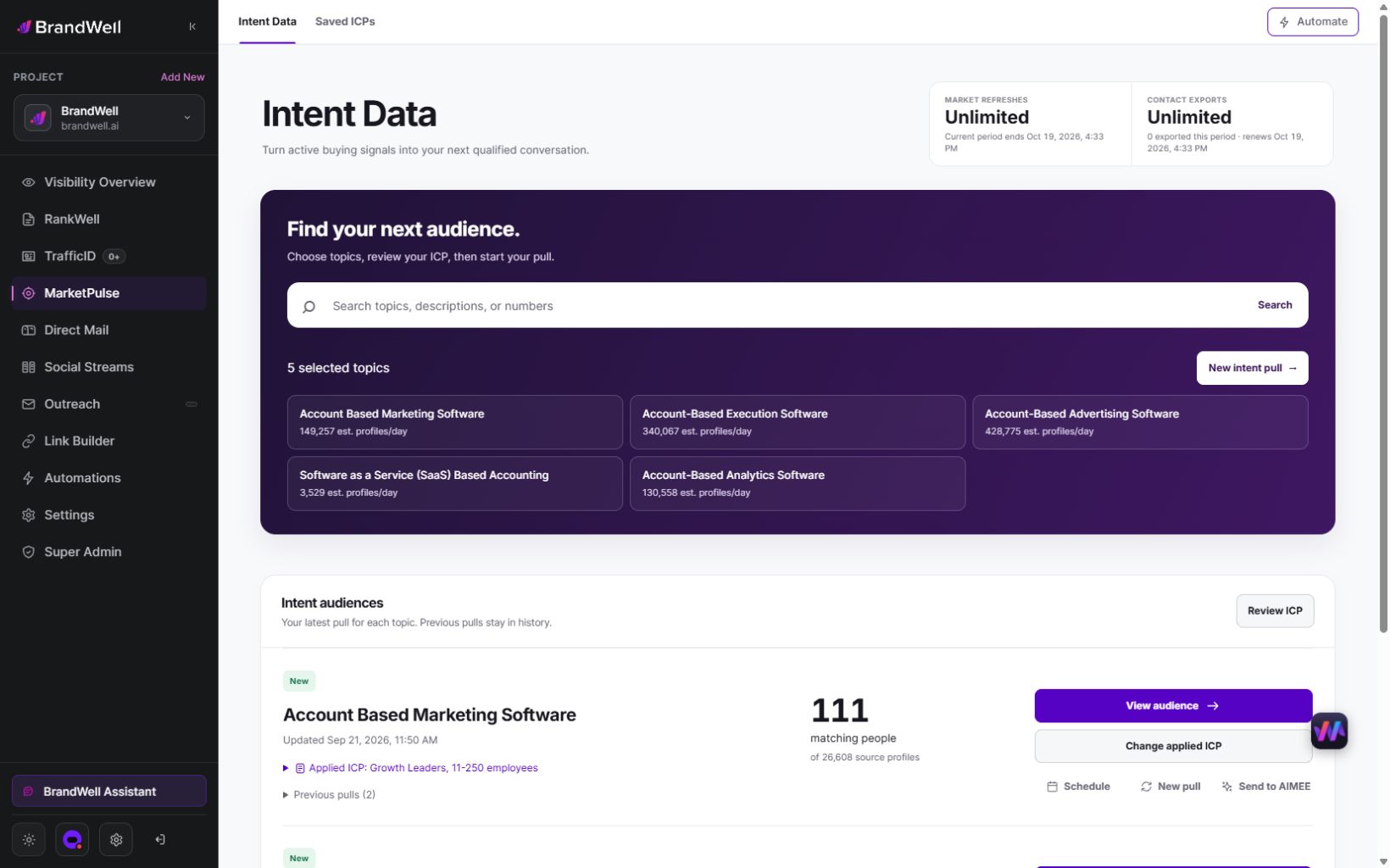
Verify the specific access, export, integration and client-delivery requirements against the current product and written scope. An export allowance does not establish a native multi-client portal, granular role controls, white-label rights or account-level isolation.
AIMEE can help prepare research and connected tasks according to configured tools and access. Define the action and destination before delegating work, and verify the scope of the user session or integration it operates through.
Client permission questions
Is login security the same as authorization?
No. Establishing who a user is does not determine every resource or action they may access.
Can viewing a report imply export permission?
Define those actions separately in the proposed matrix and verify the actual enforcement.
Should temporary access expire?
Set a reviewed time limit and verify expiry through the supported mechanism or an owned manual process.
Can a role matrix prove client isolation?
No. The matrix states the design; authorized positive and negative tests assess the implementation.
Review MarketPulse’s current product information or visit the BrandWell product directory before committing to client delivery.
Reviewed and updated October 3, 2026.

Written by

