


On this page
- What broad match can and cannot do
- 1. Audit the conversion goals before expanding reach
- 2. Review actual search terms and business fit
- 3. Apply negatives with the correct matching behavior
- 4. Budget for a bounded test
- 5. Use intent research to improve the hypothesis
- Keep Customer Match and third-party research distinct
- 6. Compare qualified outcomes after conversion lag
- A useful weekly review
- Frequently asked questions
Control Google Ads broad match with meaningful conversion goals, search-term review, appropriate negatives and a defined test budget. Use external intent data to inform market research and sales prioritization. It does not turn broad match into a campaign restricted to the people in an intent-data export.
For B2B advertisers, the central problem is often the definition of a successful conversion. A campaign optimizing toward easy form submissions can look efficient while producing few qualified opportunities.
What broad match can and cannot do
Google’s keyword matching documentation explains that broad match can reach related searches beyond the direct meaning of a keyword. Google emphasizes using Smart Bidding with it. Phrase and exact match offer narrower matching, but exact match is not limited to a literal character-for-character query.
Choose the match type around the offer, measurement quality and ability to review results. Broad match is not automatically the right next step for an account without reliable conversion feedback or enough budget to learn from outcomes.
1. Audit the conversion goals before expanding reach
Define the outcome that matters commercially: a qualified inquiry, a meaningful sales stage or a purchase with an appropriate value. Keep diagnostic events such as page views separate from outcomes you want bidding to pursue.
Check both the action setting and the goals used by the campaign. Under Google’s conversion-goal rules, primary actions can inform bidding when the relevant goal is used. Secondary actions are normally observed in All conversions, but a secondary action included in a custom goal used by the campaign can also affect bidding.
Test the complete path: form submission, CRM record, qualification and any imported outcome. Check duplicate handling, timestamps, values and missing imports. Do not call a form submission a qualified lead simply because it was accepted by the website.
2. Review actual search terms and business fit
Keywords describe what you target; search terms show reported queries that triggered ads. Review the available search-term evidence alongside spend, conversions and downstream quality. Google explains the search terms report and its reporting limits; do not assume it is a complete list of every query.
Classify terms into useful categories:
- Relevant commercial: a search connected to the service and customer you can support.
- Relevant informational: a question that may need a resource rather than a direct sales offer.
- Wrong audience or offer: hiring, education, consumer support or another need you do not serve.
- Needs investigation: ambiguous language, missing outcome data or insufficient sample.
Inspect geography, offer and landing-page alignment too. A relevant phrase can still attract the wrong customer if the ad promises a service or location you cannot support.
3. Apply negatives with the correct matching behavior
Google’s negative keyword guidance distinguishes negative matching from positive matching. Add appropriate synonyms and singular or plural forms when needed. Its current documentation says negatives account for casing and misspellings automatically; do not assume they expand to every related meaning.
Choose the appropriate campaign, ad-group or account scope. An account-wide exclusion can suppress a legitimate offer elsewhere. Review the consequence before applying a broad exclusion.
For a fictional managed IT provider, a search for an IT support job may belong in a hiring exclusion. A search for an IT support contract may be relevant. Do not exclude the general word “support” simply because one reported query was irrelevant.
4. Budget for a bounded test
Set a test allocation, outcome review date and conditions that require intervention. Include media, management, creative, software and the effort needed to inspect CRM quality.
An average daily budget is not a strict daily cap. Google’s spending-limit documentation says that for most campaigns the daily limit is twice the average daily budget and the monthly limit is 30.4 times that budget. Check the actual campaign’s budget type and report, particularly when settings change.
For an unchanged average daily budget of $50 in a campaign subject to those standard limits, the example daily limit is $100 and monthly limit is $1,520. These are illustrations of the rules, not a suggested media budget or a promise about actual daily spend.
5. Use intent research to improve the hypothesis
In MarketPulse, inspect available research topics, apply your ICP and review the matching audience. This can help investigate the problems a suitable market researches and prepare more useful content or sales context.
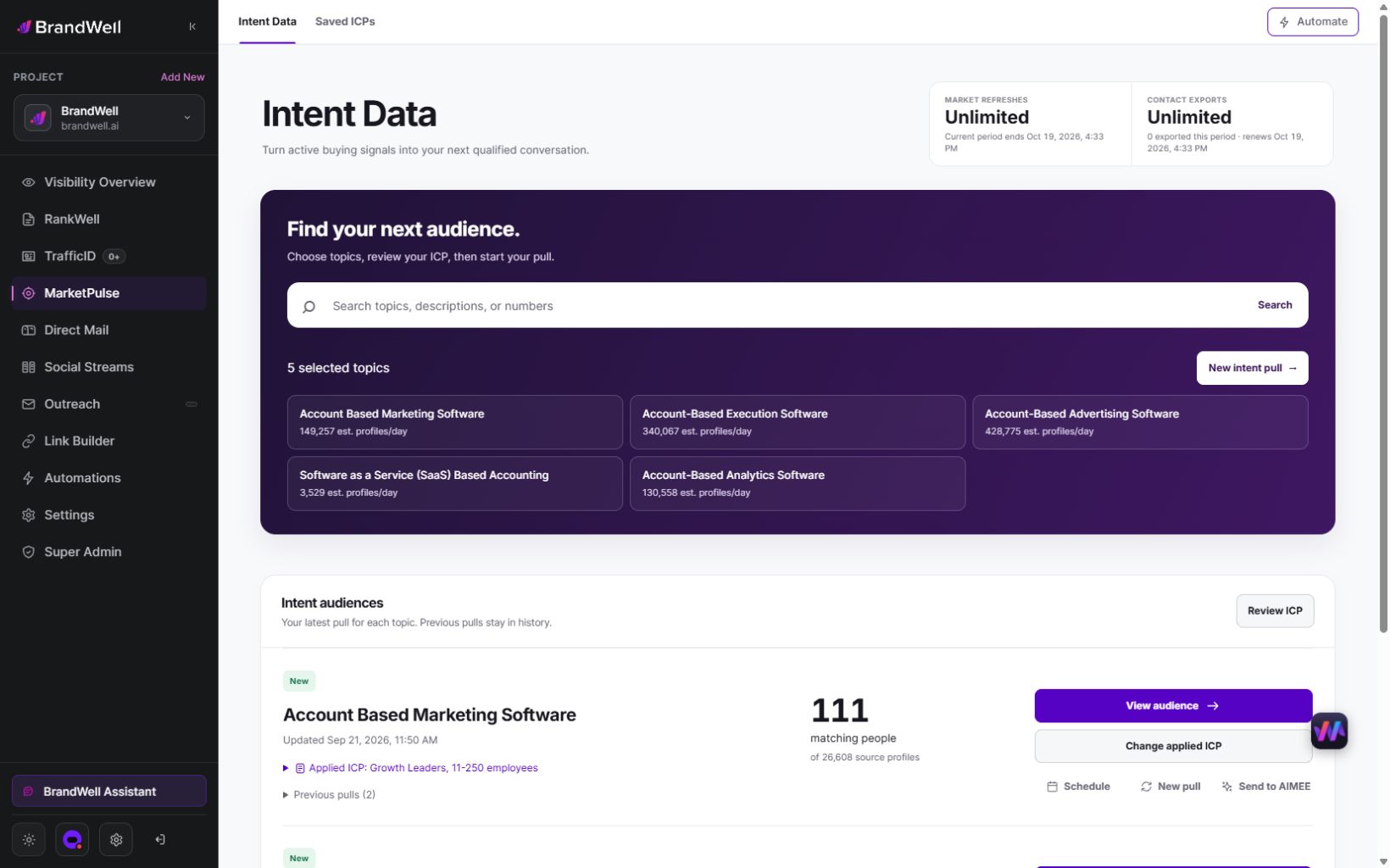
Public MarketPulse plans are starting at $500/mo. Compare current topic, refresh and export allowances on the product page. Audience size and fields vary. AIMEE can assist with work through configured tools; available actions depend on the connections and access in your workspace.
For the IT provider example, backup and recovery concepts might suggest a useful resource and landing-page hypothesis. Verify the actual topic and audience fit, then test the ad message against qualified outcomes. A topic match is not proof that a specific ad click came from that research activity.
Keep Customer Match and third-party research distinct
Google’s Customer Match policy permits customer information collected in a first-party context, such as information customers shared directly with you. A licensed third-party intent export does not become first-party customer data merely because you bought it or hashed its fields.
Verify the destination’s policies and your permitted use before any upload. Keep topic research, CRM qualification and eligible first-party audience workflows separate. Do not promise that every external audience can be uploaded to every advertising platform.
6. Compare qualified outcomes after conversion lag
Report spend, forms, qualified leads, opportunities and realized revenue separately. Allow time for sales qualification and import delays before judging a recent cohort. Mark changes in goals, conversion definitions and import methods on the report.
Consider an original synthetic example:
- Campaign A spends $1,000 and produces 20 forms, five of which qualify. Cost per form is $50; cost per qualified lead is $200.
- Campaign B spends $1,000 and produces 40 forms, five of which qualify. Cost per form is $25; cost per qualified lead remains $200.
The lower form cost in B did not improve qualified-lead efficiency in this example. Inspect the disqualification reasons before concluding that broad match performed better.
For a meaningful test, define the compared change and primary outcome first. Avoid changing the landing page, bidding objective, matching and sales qualification rules all at once if you want to understand which change helped. Use a suitable campaign experiment where feasible; a before-and-after comparison also contains seasonality and other confounding changes.
A useful weekly review
- Confirm conversion tracking and CRM imports are still working.
- Inspect available search terms and disqualification reasons.
- Review proposed negatives at the correct scope.
- Check offer, location and mobile landing-page alignment.
- Reconcile spend with mature qualified outcomes.
- Record what to keep, stop, test or repair, with an owner.
Automate evidence collection and suggestions where helpful. Keep a decision log so the team can explain why a goal, exclusion or budget changed.
Frequently asked questions
Does intent data directly control broad match?
No. It can inform research and operating decisions. Google uses its own matching and bidding controls; an external export is not a new keyword match type.
Should every form be a primary conversion?
Only if that action reflects the outcome you want the campaign to pursue. For B2B campaigns, review downstream quality and the selected goals rather than assuming every form has equal value.
Are negative keywords the same as exact-match exclusions?
No. Negatives have their own broad, phrase and exact behavior. Check the rule and scope, and consider synonyms and singular/plural variations where needed.
What should I fix first?
Verify the conversion goal and qualified-outcome feedback. Then review search terms, exclusions and the landing experience before increasing the exploration budget.
Reviewed and updated October 2, 2026.

Written by

