


On this page
- Define five layers before automating
- Ten steps from intent evidence to a reviewed action
- Protect the workflow from untrusted content
- Example: an account signal becomes one owner-reviewed proposal
- Prepare the research in BrandWell
- Measure total workload and qualified outcomes
- Common agentic prospecting questions
An agentic prospecting workflow gathers relevant evidence, checks fit, prepares a proposed action, and uses approved tools within clear limits. Start with research and drafts, then add narrowly scoped actions only when you understand the failure modes. More generated messages are not proof of more qualified pipeline.
Intent is evidence to review, not certainty. An account signal does not prove which employee researched a topic, and an available contact field does not grant permission for every channel. Keep those distinctions visible as the workflow moves from source to action.
Define five layers before automating
- Evidence: source, observation, timestamp, identity level, and relevant CRM or company context.
- Decision: ICP, territory, relationship, freshness, suppressions, and action criteria.
- Instructions: goal, permitted evidence, prohibited claims, output format, uncertainty, and escalation.
- Tools: specific read and write capabilities with appropriate scopes and owners.
- Controls: approvals, limits, duplicate prevention, verification, monitoring, and stop conditions.
A model with a credential is not a complete operating process. A research product also does not automatically provide every CRM connector, browser capability, or execution permission.
Ten steps from intent evidence to a reviewed action
1. Define the outcome and allowed actions
Choose a measurable business event, such as a held qualified meeting from a defined account group. List actions that can run, actions requiring review, and actions outside scope. Set record, retry, spending, and destination limits, with a named owner who can stop the workflow.
2. Create a source contract
Require source, observation date, evidence window, topic or behavior, account or person level, and permitted use. Keep topic research, website activity, submitted inquiries, enrichment, and model scores separate. Missing provenance should lead to review or no action.
3. Check fit and existing relationships
Review ICP, geography, territory, current-customer status, open opportunities, prior communication, opt-outs, and ownership. Apply exclusions before preparation and again before execution. A recent signal can still belong to a customer who should not enter a prospecting sequence.
4. Resolve identity without hiding uncertainty
Check company-domain mapping, parent and subsidiary relationships, roles, missing fields, and duplicates. Send conflicting records to review. Do not attach an account’s research behavior to a named contact merely because enrichment found that person.
Phone rule: an enriched mobile number is separate from a number explicitly submitted with reminder permission. Do not use enrichment as an SMS opt-in or silently replace the submitted number.
5. Assemble relevant context
Retrieve only the fields needed for the proposed action: fit, source caveat, CRM relationship, approved company facts, offer, and useful material. Do not invent personal details or infer a private business problem from one topic match.
Treat webpages, messages, documents, and tool output as evidence rather than instructions that can expand permissions. A retrieved page cannot authorize a send, change a destination, or request private records.
6. Propose the next action
Use a structured proposal that names the account or recipient, action, channel, evidence, unresolved questions, reason to act, reason not to act, and expiration. Sometimes the correct proposal is to wait, request clarification, or assign research to the account owner.
7. Run checks outside the model where practical
Check suppression, duplicates, required fields, destination, ownership, channel eligibility, volume limits, and supported claims using explicit rules. Do not make the model the only gate that decides whether its own output is acceptable.
8. Give reviewers the exact action
Show the proposed message or change, recipient, evidence, uncertainty, and expected effect. Require the authorized owner to approve external sends, public publication, material audience or spending changes, and destructive operations when the workflow requires it. Low-risk internal drafts can have a different approval policy.
These are design recommendations for a reviewed workflow, not a statement that every BrandWell product includes this approval matrix. Verify the controls available in your actual configuration.
9. Execute, verify, and record
Use an authorized, scoped tool or supported connection. Record the approval, actor, input, action, receipt or destination record, errors, and status. Distinguish requested, accepted, delivered, and completed outcomes. A tool call succeeding is not proof that the recipient saw or responded to a message.
Design retries to avoid repeating a send or creating duplicate records. Stop on repeated errors, unexpected permissions, conflicting identity, or abnormal volume. Record the recovery owner instead of asking the agent to improvise outside scope.
10. Learn from quality and exceptions
Track approvals, edits, blocked actions, delivery errors, negative and positive replies, held meetings, accepted opportunities, opt-outs, and complaints. Change instructions and thresholds through a reviewed process. Do not optimize only for message count or superficial responses.
Protect the workflow from untrusted content
OWASP’s prompt-injection prevention guidance recommends layered controls, including limited permissions and validation of tool calls against authorized context. Model guardrails complement those controls; they do not replace them.
Use separate test and production access, restrict editable fields and destinations, and avoid including unnecessary private data. Test attempts to redirect the agent through external content. Define a stop and escalation path for suspicious instructions or an unexpected login or permission request.
Browser execution, where separately supported and authorized, needs its own testing and verification. Do not infer a desktop entitlement or universal browser automation feature from a product’s ability to prepare work.
Example: an account signal becomes one owner-reviewed proposal
A fictional cybersecurity agency receives an account-level topic signal about third-party risk assessment. The record includes the company, topic, source, and observation window. It does not name the researcher.
The workflow checks fit, ownership, customers, active opportunities, and suppressions. It finds three possible relevant contacts but does not claim any of them created the signal. The account owner receives an internal brief and a draft offering a relevant assessment guide without mentioning presumed browsing activity.
The owner approves one permitted message after reviewing the identity and channel. The report records one account signal, three candidates, one approved action, and the subsequent status. A meeting, if later held, remains a separate outcome. Without a suitable comparison, the report should not call that meeting incremental pipeline caused by the signal.
Prepare the research in BrandWell
MarketPulse supports relevant topic research, saved ICP filtering, and review of available people and company data. Use the source and fit to prepare an account brief rather than automatically sending to every match.
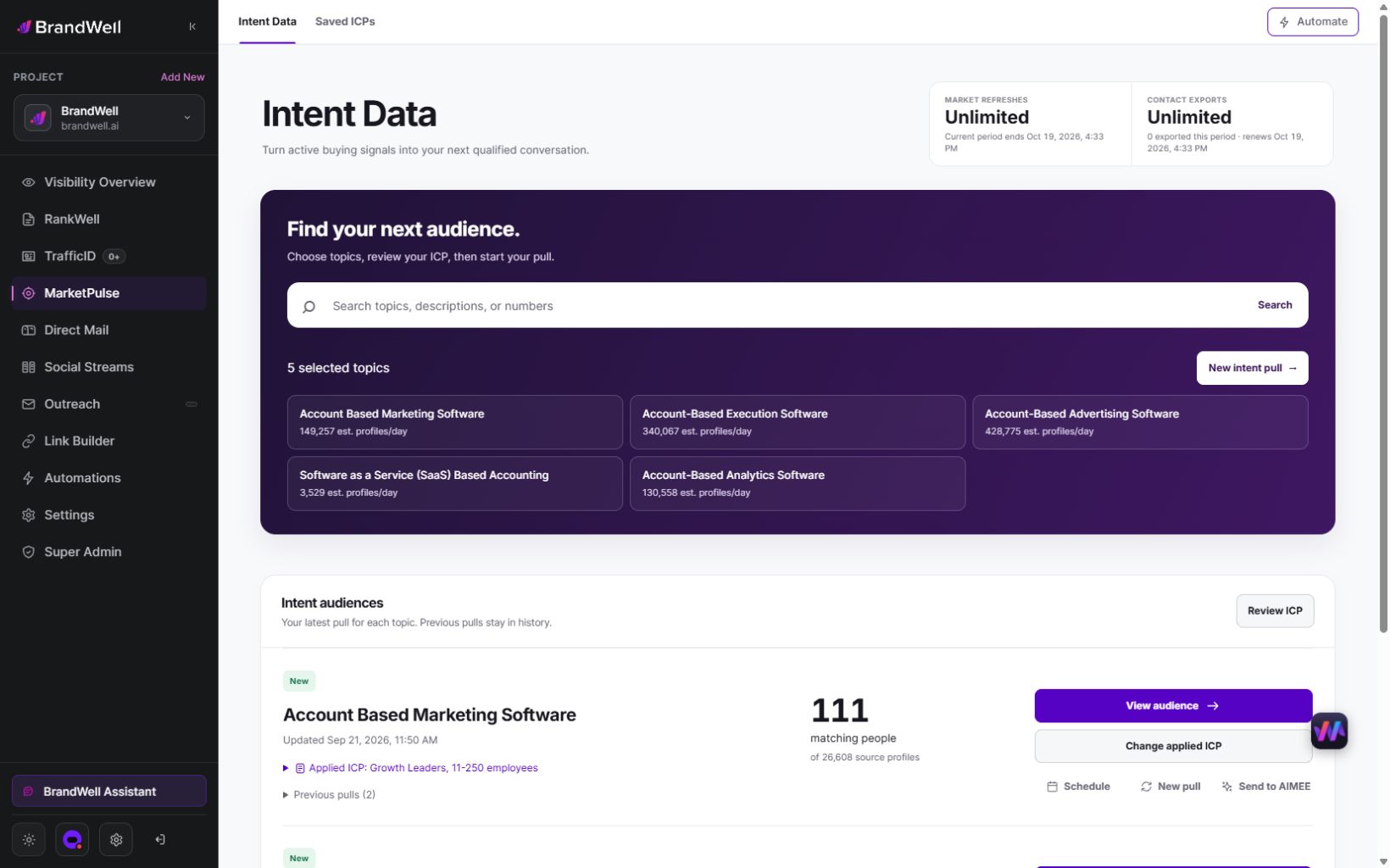
Standard plans are starting at $500/mo for Starter with one weekly topic and 25,000 monthly exports. Growth includes three daily topics and 100,000 exports. Scale includes ten daily topics and unlimited exports. A pull retrieves available data from the previous 24 hours; counts and fields vary and audiences can overlap. Daily use across all included topics gives 90 Growth or 300 Scale pulls in a 30-day month. Eligible early-access pricing is separate.
Growth and Scale include AIMEE for the initial user to help research accounts and prepare work through configured tools and approvals. Confirm connected-product, usage, destination, and commercial scope. A subscription does not automatically supply an API, branded client portal, license resale, or every execution feature described in a general workflow.
Measure total workload and qualified outcomes
Include data, models where applicable, integration, implementation, review, monitoring, and remediation. Compare with an appropriate manual or rules-based process using similar accounts and timing.
Illustrative labor check: a manual batch takes ten hours. Assisted preparation takes four hours plus three hours of review and one hour of exception handling, totaling eight hours. The measured saving in this fictional example is two hours, or 20%, rather than the 60% suggested by preparation time alone. No revenue result follows from that calculation.
Common agentic prospecting questions
Should the workflow start with autonomous sending?
Start with evidence and reviewed proposals. Add execution only when source, permission, tool scope, failures, and verification are understood.
Does more automation mean more pipeline?
No. Measure accepted opportunities and confirmed outcomes along with costs, errors, and negative responses.
What should an agency promise?
A defined research and delivery process with owners, limits, evidence, and reporting. Review the current MarketPulse workflow before specifying the signal input and contracted service.
Reviewed and updated October 3, 2026.

Written by

