


On this page
- What productivity research can and cannot tell you
- Map the task before automating it
- Research relevant opportunities in Visibility
- Draft and review the article in RankWell
- Prepare visuals that explain the work
- Reuse approved material without losing context
- Use AIMEE and Automations for a defined next step
- Measure net time saved and acceptable output
- Keep a tool only when it improves the process
- Frequently asked questions
The most useful AI productivity workflow reduces the time needed to complete acceptable work. Measure the whole task: preparing inputs, producing a draft, checking it, making corrections and carrying it into the next approved step. More generated output is not automatically more productivity.
For content teams, start with the bottleneck. Research, drafting, source verification, visual production, review and handoffs need different inputs and skills. This guide shows how to evaluate those tasks and use the current BrandWell products without treating every capability as an automatic result.
What productivity research can and cannot tell you
The Generative AI at Work research summarized by Stanford’s Digital Economy Lab studied 5,172 customer-support agents. AI assistance increased issues resolved per hour by 15% on average, with substantial differences across workers.
That is evidence from a particular support setting, not a promised gain for a marketing team or a BrandWell benchmark. Test your own task, quality requirements and review cost before claiming a benefit.
Map the task before automating it
Choose one repeatable piece of work and describe its inputs, acceptable output, reviewer and destination. “Create more content” is too broad to evaluate. “Prepare an article brief from approved research and route it to an editor” is more concrete.
- Input: What facts, sources, customer context and brand guidance are available?
- Output: What must the finished work contain?
- Acceptance: Who checks facts, usefulness, formatting and permissions?
- Action: Is the next step a draft, internal review or publication?
- Exception: What happens when information is missing or a connected tool fails?
Keep the existing process as a baseline. Record both active work time and waiting time so a faster draft does not conceal a slower approval queue.
Research relevant opportunities in Visibility
Use Visibility for the keyword-research workflow. Review the relevant searches against the audience, customer questions and pages already in the library. The opportunity is useful only if the team can support the answer.
Original hypothetical example: an IT service provider receives recurring questions about preparing for an office move. The team investigates searches related to network planning, downtime and equipment handoff. It chooses a practical checklist because it can explain its own supported process and the decisions the customer needs to make.
Turn the research into a brief with a clear question, verified service scope, evidence and intended next step. Do not substitute a search-volume estimate for an editorial decision.
Draft and review the article in RankWell
Use RankWell in the current BrandWell portal to prepare content from the brief and review the finished draft. The Content Hub organizes article, strategy, queue and calendar work.

For the IT checklist, verify what the company actually handles, what the customer must prepare and which scheduling constraints remain. Label hypothetical examples. Replace unsupported claims and ensure that the final call to action fits the service.
Use the article, search preview and recommendations to improve the page. A generated draft or score does not establish factual accuracy, source compliance or future rankings. Assign an editor to those checks.
Prepare visuals that explain the work
A current product screenshot, process diagram or approved illustration can help a reader understand the task. Decide what the image needs to communicate before generating or editing it.
For the office-move checklist, a reviewed timeline can show customer preparation, equipment checks and the handoff. It should reflect the provider’s real process rather than inventing a guarantee about zero downtime.
Check text legibility, mobile dimensions, contrast, file weight and alternative text. Review rights and permitted use for the source material. Do not promise that generated music, images or other media are unrestricted merely because an AI system produced them.
For audio and video, review transcripts and captions against the recording. A generated subtitle still needs correction where terminology or meaning is wrong.
Reuse approved material without losing context
Once the article is approved, prepare shorter summaries for an email, a social post or a sales conversation. Keep the original meaning, service limitations and evidence intact in each format.
Use SocialStreams for configured social-content work available to the workspace. Review the destination, text and image before release. Do not describe a suggested clip or headline as guaranteed to become viral.
Track repurposing as a separate task. If an editor must reconstruct missing context in every short version, the team may need a better source brief rather than more variations.
Use AIMEE and Automations for a defined next step
AIMEE works through configured tools, access and permissions. Specify the assignment, supported inputs and whether the action should prepare work for review or carry out an approved step.
Use Automations for available triggers and schedules, with an owner, expected outcome and exception path. Confirm the actual connected tools rather than promising that every app or action is included.
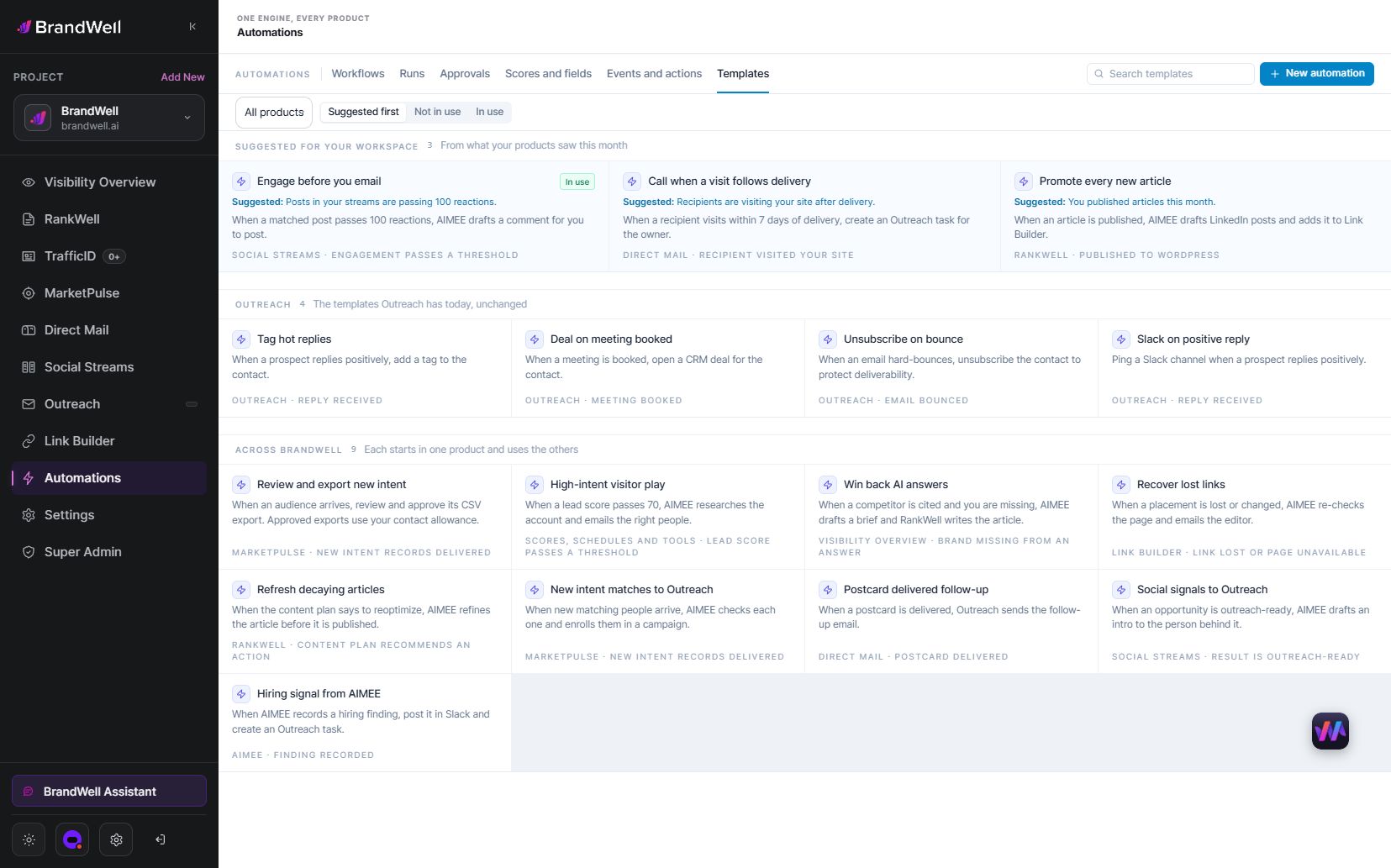
An original workflow could prepare an approved checklist summary and route it to the person responsible for a customer newsletter. Missing service details should pause that task for review rather than producing an invented answer.
Measure net time saved and acceptable output
Original hypothetical calculation: a manual article task takes eight hours: two for preparation, four for drafting and two for review. A tested assisted process takes seven hours: two for preparation, one for drafting, three for review and one for rework. Net saving is one hour, or 12.5% of the eight-hour baseline.
Reporting only the three hours saved in drafting would overstate the result. Include review and corrections, and compare work that meets the same acceptance criteria.
Track acceptable completed tasks, total labor, rework reasons, unsupported claims found, failed handoffs and publishing delays. A small trial with one experienced reviewer does not establish what every team member will achieve.
Keep a tool only when it improves the process
After the trial, decide what to keep, revise or stop. A useful workflow has clear inputs, dependable review and an output the next person can use. Remove redundant steps and avoid buying more capacity when the bottleneck is missing product knowledge or approval ownership.
Document the process and train the team on its limitations. Recheck it when the product, sources, connected tools or publication requirements change.
Frequently asked questions
What is the best place to start?
Choose a repeatable task with known inputs and a reviewer who can define acceptable output. Measure the current process first.
Should I measure words generated or tasks completed?
Measure acceptable completed tasks and total effort. Word count alone does not capture review, corrections or usefulness.
Can AI rewriting make copied material original?
Rewriting does not remove source-use responsibilities. Verify the meaning, independently explain it where appropriate and provide the required attribution.
Does BrandWell automate every connected action?
Available actions depend on configured tools, access and permissions. Define the assignment and review requirements for the workspace.
How often should the workflow be checked?
Review it after material changes and at a cadence that can catch recurring errors, rework and failed handoffs.
Reviewed and updated October 3, 2026.

Written by
Jeff Joyce has been helping brands grow online since the Myspace era, when custom HTML layouts were still a competitive advantage. What started in design quickly evolved into a career spanning social media, content strategy, video, agency ownership, and growth marketing. After building his own agency and testing countless AI tools, Jeff joined BrandWell with a clear focus: helping marketers understand how AI can actually improve the way they create, optimize, and scale content. Today, Jeff brings a CMO-level perspective to BrandWell's marketing strategy, blending brand positioning, content, video, customer education, and growth. His work centers on turning complex AI concepts into clear, practical marketing that helps brands move faster, create better content, and stay competitive without losing their voice.

 Farnaz Kia