


On this page
A white-label intent data client portal is an agency-branded workspace for explaining research signals, reviewing relevant audiences, and deciding what to do next. The best fit depends on client permissions, evidence, delivery scope, and total operating cost. A logo change alone does not make a useful portal, and a data subscription does not automatically include white-label or resale rights.
Start with the client decision your service supports. Then choose between a branded report, direct product access, a separate client portal, or a custom implementation. This guide provides a practical evaluation framework without assuming that a provider has features or licensing it has not documented.
What should an intent data portal show?
A client should be able to distinguish an observed research signal from your agency’s interpretation and from a completed outcome. Organize the workspace around five questions:
- What changed? Show the source, observation date, topic, and available identity level.
- Does it fit? Explain the client’s audience filters, exclusions, and unresolved information.
- What can we do? Present a recommended action with its owner and required approval.
- What happened? Record completed actions, replies, qualified opportunities, and exceptions.
- What is included? Display the review cadence, usage allowance, support boundaries, and next reporting date.
Account-level research, a resolved contact, and a visit to a client’s own website are different observations. Preserve those distinctions instead of turning them all into a single unexplained intent score. An available contact record does not establish permission for every outreach channel.
Compare four delivery approaches
1. Branded report and review call
Use a dated report when the client needs a short decision summary and a small action queue. This is a useful way to test demand before investing in a portal. Define who maintains the report and how revisions are approved so multiple copies do not become competing versions of the truth.
2. Direct product access
A client that wants to own its research workflow may prefer its own product account. Agree on agency responsibilities, account ownership, and permitted access. Direct access is not the same as a white-label service.
3. Separate client portal
A dedicated portal can combine approved reports, client-specific roles, comments, and action history. Evaluate its actual isolation, export, authentication, and offboarding behavior. Confirm how data can be imported and whether that use is permitted before buying the interface.
4. Custom implementation
A custom portal may suit a differentiated workflow with sufficient volume and technical ownership. Budget for design, hosting, authentication, monitoring, accessibility, maintenance, and recovery. The agency is taking on a software operating responsibility, not just adding a presentation layer.
Where MarketPulse fits in the agency workflow
MarketPulse provides topic research data that agencies can evaluate for their own business or permitted client work. Its standard plans are starting at $500/mo:
- Starter: One topic, weekly refreshes, and 25,000 contact exports.
- Growth: Three topics, daily refreshes, and 100,000 contact exports.
- Scale: Ten topics, daily refreshes, and unlimited contact exports.
To calculate effective cost per pull, divide the subscription cost by the Intent Scans actually used during the same period. A pull retrieves available data from the previous 24 hours for one topic. Unused allowances increase the effective cost per consumed pull; fields, counts and audience overlap vary.
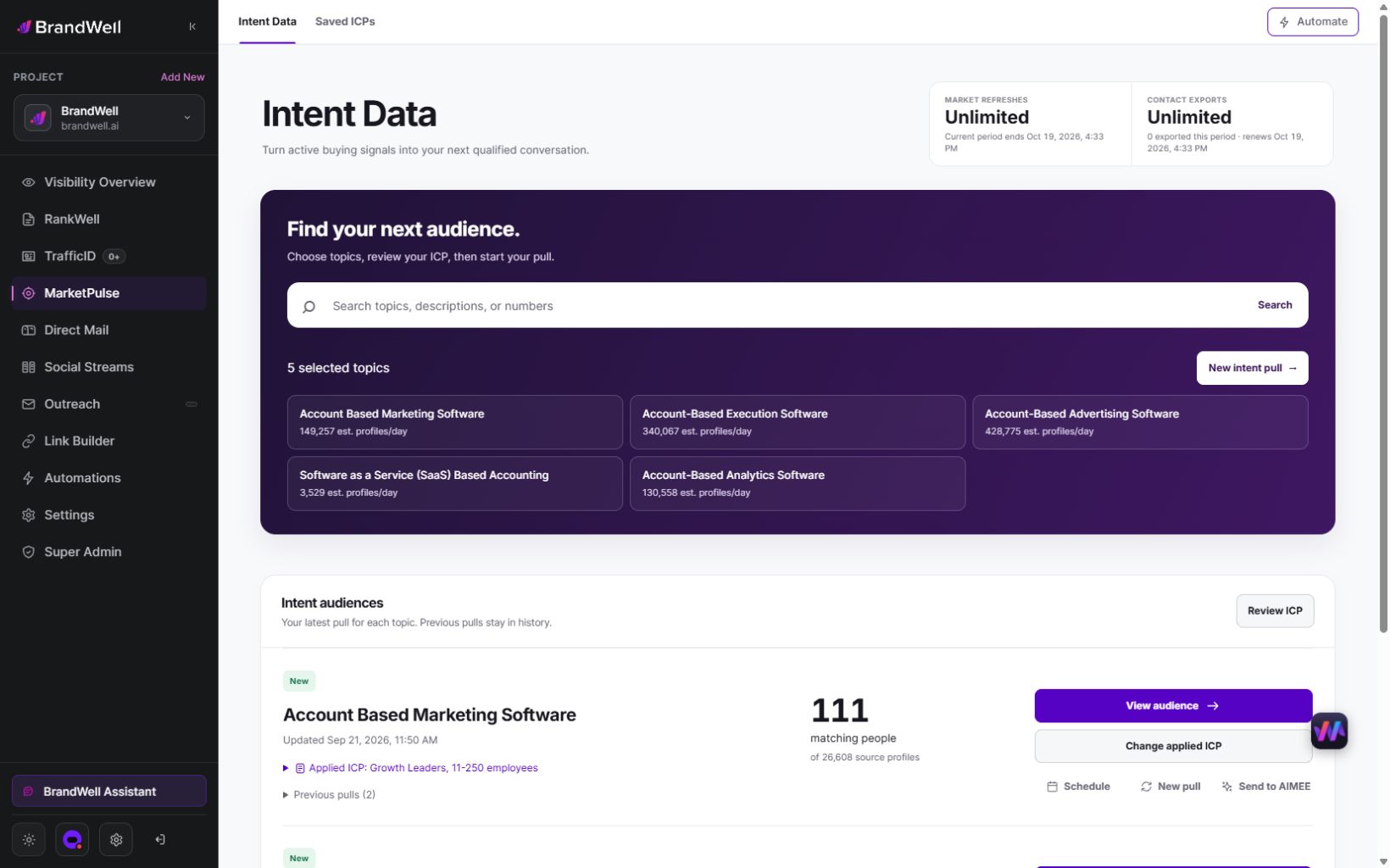
Do not infer a public API, custom domain, branded client login, or unrestricted redistribution from these plan allowances. Confirm the current terms and implementation scope before promising a portal or resale package. Unlimited exporting describes a plan allowance, not an unlimited license for every downstream use.
A client onboarding checklist
- Define the audience. Capture the client’s services, market, target roles, topic choices, exclusions, and territories.
- Confirm the delivery rights. Document permitted recipients, uses, destinations, retention, and deletion.
- Assign roles. Identify the client approver, agency analyst, action owner, and support contact.
- Agree on the evidence. Specify required source, timestamp, topic, identity, and fit fields. Preserve unknown values.
- Test a small queue. Review one reporting cycle and record accepted, rejected, and unresolved items.
- Review the service. Expand only after the client uses the information and the operating work fits the budget.
For any multi-client system, verify isolation across records, files, sessions, exports, and background jobs. OWASP’s multi-tenant security guidance explains that a tenant identifier is not itself authorization: access must be checked against the authenticated user’s authorized tenant context. Test offboarding as well as onboarding.
Price the service, not just the portal
Estimate data subscriptions, portal costs, integration maintenance, analyst time, support, and security work separately. State which topics, reports, review calls, and revisions the client fee includes. Additional markets, historical backfills, custom destinations, and new reports need explicit scope.
Hypothetical example: A $1,500 monthly client fee minus $500 in allocated data costs and $600 in direct delivery labor leaves $400 before portal fees, support, overhead, taxes, and other costs. That is a preliminary contribution calculation, not net profit. If the data account serves several clients, allocate its cost consistently rather than charging the full subscription to each client in the margin calculation.
Track time to first useful decision, client review completion, accepted actions, support requests, and direct labor. Record later opportunities and revenue separately. A portal visit or a signal touching an opportunity does not prove that the portal caused the sale.
Frequently asked questions
Do agencies need a client portal immediately?
No. A report with clear definitions, a focused action queue, and a scheduled review can establish whether clients use the service. Build a portal when it solves a demonstrated collaboration or operating problem.
What belongs in a recurring package?
Include the agreed topics, reporting frequency, evidence fields, review responsibilities, approved actions, support limits, and change process. Avoid promises of a fixed number of meetings that the service cannot control.
Does MarketPulse include a white-label portal?
The plan details above do not establish that entitlement. Evaluate MarketPulse as the research data component and confirm any separate client access, branding, integration, or redistribution requirements before committing to a portal design.
How should an agency choose its first implementation?
Choose the smallest approach that gives the client a useful decision and preserves evidence, rights, and ownership. Compare the full delivery cost and pilot results before adding more interfaces or automation.
Explore MarketPulse and watch the demo to compare topic coverage, refresh cadence, and exports before choosing your agency delivery model.
Reviewed and updated October 3, 2026.

Written by

