


On this page
- 1. Define the audience before choosing topics
- 2. Choose topics that connect to the offer
- 3. Build the initial audience in MarketPulse
- 4. Keep advertising eligibility separate
- 5. Deduplicate and assign ownership
- Example: narrowing 180 records into a workable group
- 6. Measure relevance and outcomes separately
- Current MarketPulse plans
- Frequently asked questions
Build a B2B audience with buyer intent data by defining your ideal customer, choosing relevant research topics, filtering the available matches and checking which next action is permitted. Keep research evidence separate from fit and permission. A person researching a topic is a candidate for review, not a guaranteed customer.
The useful output is a focused group your team can act on and measure. Start with one offer and one clear decision, such as which accounts to research this week. Expand after you understand the relevance, workload and results.
1. Define the audience before choosing topics
Write a short brief covering what you sell, whom it helps and which records should be excluded. Your topic describes a research area; your ideal customer profile describes the market you can serve.
- Offer: The specific product or service being promoted.
- Fit: Relevant industries, company sizes, geography and roles.
- Exclusions: Customers, unsuitable accounts, duplicates and people who should not receive the proposed outreach.
- Action: Research, an appropriate sales follow-up or another authorized workflow.
- Owner: The person responsible for reviewing and acting on the audience.
A payroll software company might start with payroll-related topics and a company-size filter. That does not establish that every match owns payroll purchasing. Review the role and business context before deciding what to do.
2. Choose topics that connect to the offer
Start with the buyer’s problem or product category. Inspect the available topic names and descriptions rather than assuming an exact keyword is available. Broad topics may provide more records while including less relevant research.
Compare a small selection against actual matches. Ask whether the companies fit, whether the roles make sense and whether the topic supports a useful conversation. Do not describe a topic match as the person’s exact search query unless your source actually provides that evidence.
3. Build the initial audience in MarketPulse
- Open MarketPulse in the BrandWell portal and search the topic catalog.
- Choose an available topic relevant to the offer.
- Apply your ICP filters and inspect matching people and companies.
- Review available contact fields and remove unsuitable records.
- Use permitted exports or prepare the next step through configured tools.
- Record outcomes so the next review can improve topic and filter choices.
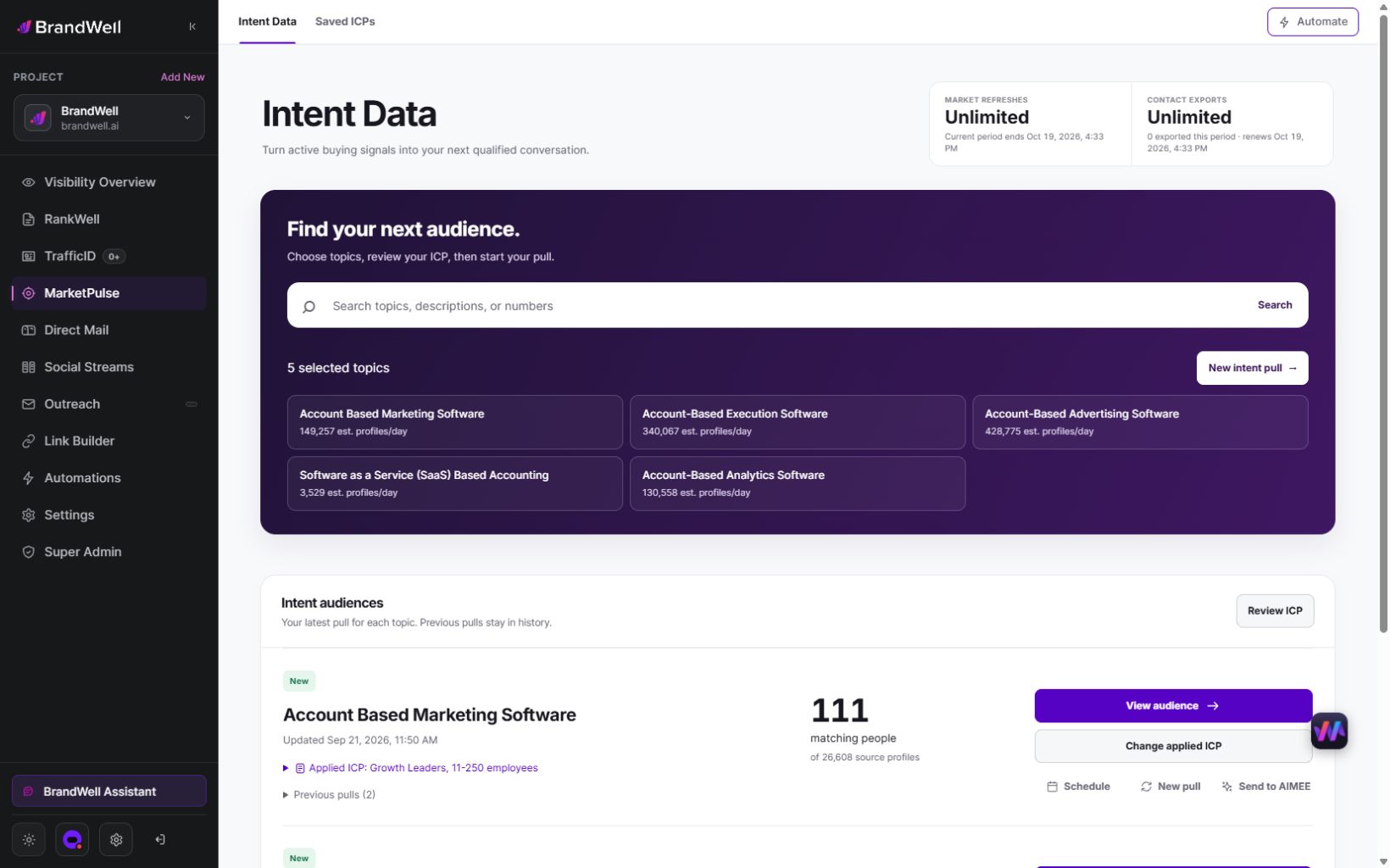
A pull retrieves available data from the previous 24 hours for one topic. Counts and contact fields vary, and topic audiences can overlap. Separate the research signal from your own fit judgment; neither establishes a person’s buying authority or permission for every channel.
4. Keep advertising eligibility separate
A contact export is not automatically eligible for an ad-platform audience. For example, Google’s Customer Match policy limits uploads to customer information collected in a first-party context. A third-party topic match does not become first-party data merely because you import it into your CRM.
Choose a permitted next action based on the source, the relationship and the destination’s current requirements. Do not treat hashing, platform acceptance or an available mobile number as consent. If a record cannot support the proposed action, retain it only within an appropriate permitted research workflow or exclude it.
5. Deduplicate and assign ownership
Use a stable record identifier and review overlapping topic matches before creating tasks. Keep company and person records distinct. Avoid assigning three simultaneous follow-ups because one person appears under three topics.
Maintain enough context to explain the decision: topic, pull date, fit criteria, exclusion checks, owner and next action. Keep unnecessary personal information out of shared reports. For client work, maintain each client’s scope and permissions separately.
Example: narrowing 180 records into a workable group
This is an original hypothetical example, not a benchmark or product result. A team reviews 180 records from selected Intent Scans. It removes 30 duplicates, 50 that fail fit criteria and 20 requiring unresolved review. The remaining 80 become its working audience.
If the team can research only 40 records this week, it should choose a documented priority rule and leave the rest unassigned. A larger export does not increase team capacity. Recheck relevance before acting on the remaining records later.
6. Measure relevance and outcomes separately
- Audience acceptance: Which reviewed records meet your defined criteria?
- Action coverage: How many accepted records received the intended next action?
- Response: How many acted-on records produced a relevant response?
- Business result: How many became qualified opportunities or customers?
- Cost: What did data, review and execution cost for that result?
In another hypothetical example, 40 reviewed contacts receive appropriate follow-up and eight respond. The response rate is 8 divided by 40, or 20%. If two become qualified opportunities, that rate is 2 divided by 40, or 5%. Neither number proves that intent data caused the outcome.
For a useful comparison, keep the offer, fit criteria, action and measurement window consistent across groups. Account for existing relationships. A matched record, a delivered message and a qualified opportunity are different events.
Current MarketPulse plans
- Starter: One topic, weekly refreshes and 25,000 monthly contact exports.
- Growth: Three topics, daily refreshes and 100,000 monthly contact exports.
- Scale: Ten topics, daily refreshes and unlimited contact exports.
Daily pulls across every included topic provide 90 Growth pulls or 300 Scale pulls in a 30-day month. Weekly Starter pulls vary by calendar month. Refreshes stop at the plan limit without overage charges. Any eligible early-access discount is a separate time-limited offer.
Growth and Scale include AIMEE for the initial user to research and prepare next steps through configured tools. Connected products, channel usage and fulfillment may cost extra. An audience-building workflow described here is a team process, not a promise that every ad sync or integration is included.
Frequently asked questions
Should every topic match enter a sales sequence?
No. Review fit, role, exclusions and the proposed channel first. Some records may support account research without supporting direct outreach.
Are intent audiences the same as lookalikes?
No. Topic audiences reflect available research signals. A modeled expansion seeks additional people based on a seed and platform behavior; those additional people do not inherit the seed’s research history.
Can a service business build audiences for clients?
Available pulls and permitted exports can support client work. Keep client scope, data permissions and service fees clear. A subscription does not automatically provide exclusive audiences or a white-label platform.
What should I do if the audience is too large?
Refine the fit criteria, review topic relevance and match the working group to execution capacity. Do not narrow solely to produce an impressive acceptance percentage.
Explore MarketPulse and its current plans to see how topic research and ICP filtering can support your next audience-building workflow.
Reviewed and updated October 2, 2026.
MarketPulse plans are starting at $500/mo. Review current package scope, usage and any separate product or service costs before purchase.

Written by

