


On this page
- Start with the question, then choose the tool
- Measure search discovery with queries and pages
- Use GA4 engagement metrics with their current definitions
- Define important actions as events
- Keep conversion rates and denominators explicit
- Review the evidence in BrandWell
- Build a monthly review that leads to decisions
- Report content ROI without inflating it
- Common questions
Content marketing analytics connects a published page to its intended purpose: being found, helping the reader, generating a useful next action, or supporting an existing customer. Choose metrics for that purpose, verify the tracking, and record the limits of what the numbers can tell you.
A page view is not a qualified lead. An engagement event is not proof that a reader understood the article. A purchase after a content visit is not automatically proof that the content caused the purchase. A useful report keeps those distinctions visible.
Start with the question, then choose the tool
Use an original measurement plan like this before building a dashboard:
| Question | Evidence | Where to review it |
|---|---|---|
| Can people find the page in search? | Relevant queries, impressions, clicks, position | Search Console and connected Visibility context |
| What do visitors do? | Validated page and interaction events | Website analytics |
| Do visits produce meaningful actions? | Correctly defined lead or purchase events | Analytics plus the receiving system |
| Are the leads useful? | Qualification, opportunity, and disposition | CRM or the system of record |
| What should change? | Evidence, hypothesis, owner, review date | BrandWell research and content workflow |
Swipe the table to see all columns.
Assign an owner to each source and keep the date range, timezone, filters, and definition with the report. Two dashboards can disagree because they measure different things, not because one must be broken.
Measure search discovery with queries and pages
The Search Console Performance report provides clicks, impressions, CTR, and average position. Examine the queries and pages together, using the same search type, period, country, and device filters when comparing.
If a page has many impressions and few clicks, investigate:
- Whether the queries match the page’s actual subject.
- Whether position leaves it visible enough to earn clicks.
- Whether the title describes a useful answer without exaggeration.
- Whether the result competes with a different format, such as a product or local service page.
- Whether seasonality or a change in query mix explains the movement.
Do not use one universal CTR threshold for every query. A brand query, broad definition, and purchase-related question have different search contexts.
Use GA4 engagement metrics with their current definitions
In GA4, bounce rate is the percentage of sessions that were not engaged. It is not simply the percentage of visits containing one page view. An engaged session meets the configured engagement-time threshold, has a key event, or has at least two page or screen views. See Google’s engagement and bounce-rate definitions.
Inspect the property’s settings before comparing periods. Changing what counts as a key event can change engagement classification. A one-page visit can also satisfy the reader’s need, while a long visit can reflect confusion.
For scroll tracking, GA4’s built-in enhanced measurement scroll event records the first time 90% vertical depth becomes visible. It does not automatically provide a full series of scroll-depth milestones. Google’s enhanced measurement documentation explains this behavior.
A scroll event cannot establish that the text was read or understood. Review it alongside the task, page layout, and next action. If you need additional milestones, implement and verify the appropriate events rather than relabeling the default event.
Define important actions as events
GA4 uses events to measure interactions. A particularly important action can be marked as a key event. Google’s events guide describes these concepts and the distinction between automatically collected, enhanced, recommended, and custom events.
Build a short tracking specification for each action:
- Trigger: what happened, such as a successful form submission rather than a button click.
- Meaning: lead created, account registered, purchase completed, or another defined outcome.
- Parameters: the context needed to interpret the action.
- Verification: where the event and receiving record can be checked.
- Exceptions: duplicate triggers, failed submissions, test traffic, and consent effects.
Google provides recommended event names such as generate_lead, sign_up, purchase, and refund. They require implementation and appropriate context; using a name does not prove the event is configured correctly.
Verify a test action in the analytics debugging tools and in the system that receives it. A form attempt should not be reported as a completed lead if the submission failed.
Keep conversion rates and denominators explicit
A conversion rate needs a defined numerator and denominator. For example, you might report successful lead submissions divided by sessions beginning on a particular landing page. That is different from users with a lead event divided by all users.
Label the chosen definition, use the same filters over time, and show the counts alongside the percentage. If the source cannot reliably connect a later outcome to the original visit, report that limitation rather than filling the gap with an assumption.
A useful content report separates:
- CTA clicks from completed submissions.
- Submitted leads from qualified leads.
- Created opportunities from won customers.
- Attributed revenue from proven incremental revenue.
- Content visits from customer retention outcomes.
Retention and churn need customer cohort definitions and the relevant subscription or relationship records. They are not interchangeable with repeat article visits.
Review the evidence in BrandWell
In the current BrandWell portal, select the correct Company Project. Visibility brings available search, website, and AI visibility context into the project workflow. Connect Search Console where appropriate and examine its actual coverage before interpreting missing data.
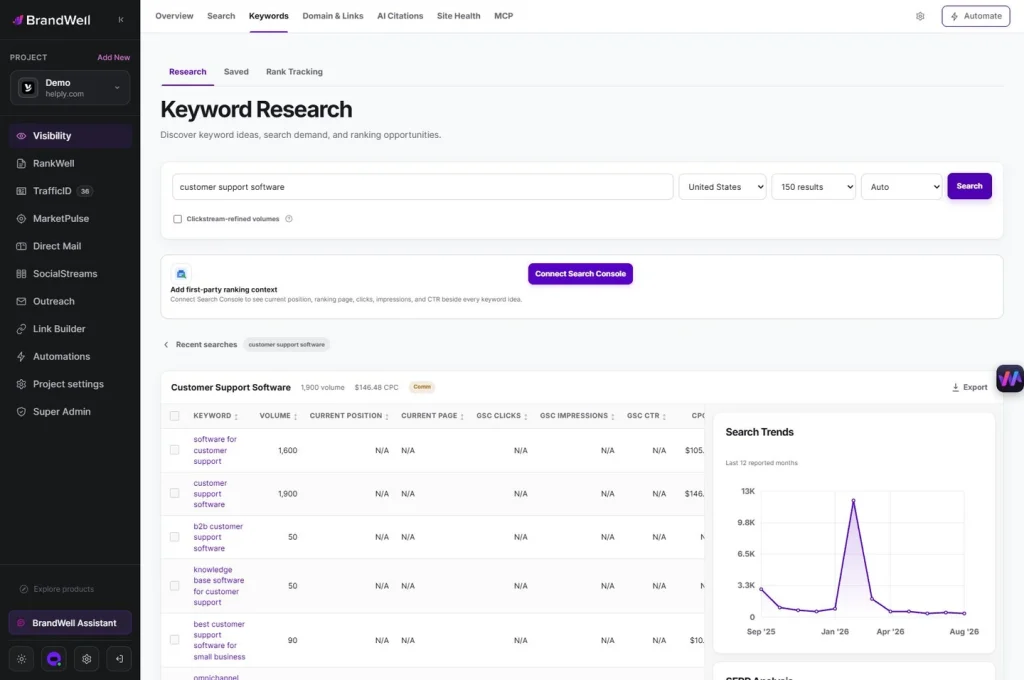
Use the evidence to choose a task: investigate a query mismatch, improve an incomplete answer, update an instruction, or clarify a destination. Then use RankWell to prepare and review the content change.
Keep a change record with the page URL, observed problem, proposed improvement, sources, publish date, and review date. AIMEE can assist with authorized research and preparation; the operator still verifies the findings and approves the action.
AI visibility observations are separate from visits, leads, and revenue. A mention in an answer is useful context, but it does not by itself establish that a person visited the site or bought anything.
Build a monthly review that leads to decisions
- Check measurement health. Inspect broken events, duplicate triggers, changed settings, and unavailable sources.
- Review discovery. Compare relevant queries and pages with a suitable prior period.
- Review the visit. Inspect meaningful engagement and the intended next action.
- Review lead quality. Connect available outcomes to CRM dispositions without overstating attribution.
- Choose a bounded change. Assign an owner and explain the expected mechanism.
- Schedule a follow-up. Allow enough observation time for the question and volume involved.
For example, a page receiving relevant impressions at a weak position may need a more complete answer and original evidence. A prominently displayed page with a mismatched title may need clearer positioning. A page with visits but failed form submissions needs a functional fix before another content rewrite.
Report content ROI without inflating it
Use a documented cost model covering research, production, review, design, distribution, software, and maintenance. If you can estimate incremental contribution reliably, an illustrative calculation is:
Content ROI = (incremental contribution attributed to the program minus program cost) divided by program cost.
State how contribution and attribution were determined. When the evidence only supports influenced pipeline or engagement, report those outcomes by name rather than converting them into assumed revenue. Brand awareness and useful customer education can be legitimate goals without inventing a monetary return.
Common questions
What is the best content marketing analytics tool?
Choose by the question and evidence required. Search Console concerns search discovery, website analytics concerns recorded behavior, CRM data concerns business outcomes, and BrandWell connects available evidence to research and content work.
Does high engagement prove an article is good?
No. Check what the metric measures and whether the reader completed the intended task. Time and scroll depth are observations, not a quality verdict.
Can one report show the entire customer journey?
Only to the extent that the underlying collection, identity, consent, and integrations support it. Keep gaps visible and avoid treating a partial journey as complete.
Reviewed and updated October 2, 2026.

Written by
Jeff Joyce has been helping brands grow online since the Myspace era, when custom HTML layouts were still a competitive advantage. What started in design quickly evolved into a career spanning social media, content strategy, video, agency ownership, and growth marketing. After building his own agency and testing countless AI tools, Jeff joined BrandWell with a clear focus: helping marketers understand how AI can actually improve the way they create, optimize, and scale content. Today, Jeff brings a CMO-level perspective to BrandWell's marketing strategy, blending brand positioning, content, video, customer education, and growth. His work centers on turning complex AI concepts into clear, practical marketing that helps brands move faster, create better content, and stay competitive without losing their voice.

 Farnaz Kia