


On this page
- Who is this for?
- 1. Use an eligibility gate before enriching any audience
- 2. Choose one of three governed data paths
- 3. Implement a ten-step governed workflow
- 4. Assemble tools and templates by control point
- 5. Calculate total cost, not price per profile
- 6. Measure matched, activated, and incremental outcomes separately
- 7. Prevent PII, consent, suppression, and policy failures
- 8. Offer governed audience operations – and put BrandWell in a bounded role
- Keep destination behavior visible
- A fictional stage-count example
- MarketPulse’s separate research role
Direct answer: Enrich a GA4 audience with intent only when an approved join connects external evidence to an eligible non-PII user property or to a governed warehouse analysis. Verify purpose, consent or lawful basis as applicable, platform policy, suppression, sensitivity, freshness, and ownership before activation. A warehouse join, hashed identifier, account signal, or identity match does not automatically make a record eligible for GA4 or Google Ads.
Current MarketPulse offer: intent-data plans start at $500/mo. See the product, demo, and current plans. Updated October 1, 2026.
Who is this for?
This guide is for Google Ads managers, PPC directors, demand-generation leaders, analytics owners, RevOps teams, privacy and security reviewers, and agencies with owned-site GA4 data. It fits organizations that have a governed identifier layer, documented notice and preferences, sufficient audience volume, and CRM outcomes. It is premature when there is no permitted join, the audience is tiny, consent management is missing, the context is sensitive, or the goal is to upload purchased third-party profiles directly.
1. Use an eligibility gate before enriching any audience
Start with a yes-or-no review for every data source, field, join key, and destination. The gate should record:
- Business purpose and expected audience utility
- Source, provenance, collection context, and observation unit
- Authorized join key and match-confidence state
- Whether the proposed GA4 field avoids personal information and sensitive detail
- Notice, consent or other lawful basis as applicable, and preference state
- Current Google Analytics and Google Ads policy eligibility
- Suppression, retention, deletion, and refresh rules
- Accountable analytics owner, privacy or legal reviewer, and rollback owner
Google’s Analytics PII guidance prohibits sending personally identifiable information through ordinary collection fields. Inspect URLs, titles, campaign parameters and custom fields as well as explicit event values. Do not put raw contact information or sensitive personal details in these fields.
Eligibility is destination-specific. A governed warehouse record is not necessarily eligible for GA4 or advertising. Record the identity-association method, evidence and limitations rather than treating every match as equally certain or probabilistic. A match alone does not establish who performed research or permission for activation.
2. Choose one of three governed data paths
Compare the paths using join key, allowed data, best fit, destination, consent and policy gate, measurement, deletion, suppression, and limitations.
Path 1: GA4 User Data Import or permitted user properties
Google’s User Data Import documentation describes joining by User ID or Stream ID with Client ID/App Instance ID. Create the relevant user-scoped custom dimensions first and keep identifiers as strings. This route does not permit associating prohibited PII.
Google documents processing time and different behavior for reporting and existing-audience criteria. It does not supply match-rate statistics for this import type. Deleting an import source does not remove already stored user-dimension values; review the appropriate deletion process and verify the result.
Best fit: a first-party user relationship with a supported join and coarse, non-sensitive metadata that has passed review. Output: an eligible user property available to GA4 analysis or audience logic. Limitation: import behavior, processing, deletion, and audience population require careful operational testing; this route does not authorize data merely because it can be technically joined.
Path 2: BigQuery, CRM, or CDP governed join
GA4 can export raw event data to BigQuery. Google’s BigQuery Export guidance explains the export and customer-managed access. A warehouse, CRM, or CDP can combine approved data for analysis, QA, fit scoring, and outcome measurement while keeping raw identity and sensitive fields outside GA4.
Best fit: governed analysis, account-level insight, model development, and a controlled decision about whether any downstream activation route is eligible. Output: a warehouse table, report, or reviewed activation file. Limitation: joining data in a warehouse does not create consent, convert third-party data into first-party data, or prove that Google Ads activation is permitted.
Path 3: Account-level planning only
Keep external intent at the account or aggregate level when there is no justified person-level join or supported activation path. Use it to guide market planning, content, sales research, creative, or contextual strategy.
Best fit: account signals, sensitive or uncertain identity contexts, low-volume audiences, and early learning. Output: an account-priority or planning brief with no GA4 person-level enrichment. Limitation: it cannot support person-level remarketing or Customer Match simply because an account appears active.
Owned-site GA4 behavior without external enrichment remains the lower-complexity alternative when it provides enough signal. A manual warehouse analysis may also be safer than activation while rules are still changing.
3. Implement a ten-step governed workflow
Step 1: Define the outcome and audience hypothesis
State the business outcome, eligible population, proposed distinction, activation destination, and evidence that would reject the idea. Failure mode: building an audience because a field exists rather than because a decision needs it.
Step 2: Inventory sources and identifiers
List GA4 events, Client IDs, user IDs, CRM identifiers, external intent records, identity services, consent evidence, suppression, and destinations. Preserve observation units. Failure mode: merging device, account, and person records without recording how the join occurred.
Step 3: Run privacy, legal, security, and platform review
Assess purpose, minimization, notice, consent or lawful basis as applicable, sensitive contexts, access, retention, deletion, processor or controller roles, and current platform rules. Perform a formal impact assessment where required. Failure mode: assuming hashing or a vendor agreement resolves every requirement.
Step 4: Join in a governed environment
Normalize identifiers, preserve source, test false matches, enforce client or property isolation, and restrict access. Raw identity and consent evidence belong in the governed system, not GA4 fields. Failure mode: sending a join table containing PII to Analytics.
Step 5: Select the eligible path
Choose User Data Import or permitted properties, warehouse-only analysis, an approved separate activation route, or account-level planning. Document why. Failure mode: using Customer Match as a workaround for ineligible third-party data.
Step 6: Map coarse fields and exclusions
Potential editorial examples include an intent topic group, recency bucket, fit tier, source class, or reviewed confidence tier. These are not guaranteed permitted fields. Keep raw topics, exact vendor source, contact data, consent evidence, and suppression history in the warehouse. Failure mode: encoding sensitive or uniquely identifying details in a “coarse” label.
Step 7: Configure import, properties, and audience logic
Google’s GA4 audience guidance describes conditions using dimensions, metrics, events, sequences, inclusion, and exclusion. Create explicit inclusion, temporary and permanent exclusion, membership duration, and change-control rules. Failure mode: building only an inclusion rule and forgetting suppression.
Step 8: Link or activate with named approval
Confirm account settings, consent signals, audience eligibility, list-size requirements, access, and the named media owner. Audience export and usable reach are not instant or identical. Failure mode: an agent or analyst changing spend merely because audience size increased.
Step 9: QA the matched-to-activated funnel and experiment
Compare source records, eligible records, accepted joins, imported properties, GA4 population, exported audiences, ad-platform reach, conversions, and qualified CRM outcomes. Use a control or holdout where feasible. Failure mode: reporting match rate as incremental pipeline.
Step 10: Refresh, suppress, delete, archive, and log
Define source refresh, membership expiration, preference propagation, deletion requests, audience archive, rollback, incident response, and version history. Failure mode: removing a person from one system while stale membership remains elsewhere.
4. Assemble tools and templates by control point
The minimum stack may include:
- GA4 and tag-management instrumentation
- BigQuery, a warehouse, CRM, or CDP
- Consent and preference management
- An identity or approved join service
- Optional external intent data
- A suppression and deletion registry
- Google Ads linkage or another supported activation path
- BI, experiment, and CRM outcome reporting
Useful templates include a source and identifier inventory, eligibility register, field-location map, audience specification, include/exclude rules, suppression test, access matrix, change log, incident runbook, and matched-versus-activated funnel.
For each capability, document controller and operator roles, inputs, identifiers, outputs, access, retention, policy gate, and failure mode. Test the data flow with synthetic or safely controlled records before broad activation. Do not treat a native-looking connector as evidence that every field or use is approved.
5. Calculate total cost, not price per profile
Budget for external signal data, identity and enrichment, warehouse and GA engineering, consent and suppression, privacy and security review, activation or media, agency or operator labor, QA, deletion and change control, and CRM outcome reporting.
Separate setup from recurring work. Setup includes inventory, eligibility review, schema, join tests, audience specification, access, baseline, and training. Recurring work includes data and usage, refresh, QA, suppression, incidents, media operations, experiments, and reporting.
Track cost per source record, eligible record, accepted join, populated audience member, reached user, qualified conversion, and accepted opportunity. The denominator should reveal where records disappear. A high match rate can still produce low eligible reach or poor outcomes.
Request a written scope covering topics, observation unit, geography, volume, match basis, supported destination, integration method, services, term, overage, retention, deletion, export, and client isolation. There is no responsible universal ROI or implementation-cost benchmark.
6. Measure matched, activated, and incremental outcomes separately
Use this funnel:
source → eligible → joined → imported or property updated → GA4 audience → exported → ad-platform list → reached → qualified conversion → opportunity → revenue
Measure data quality with eligibility rejection, join acceptance, mismatch sampling, stale properties, suppression errors, audience-population latency, and rollback time. Measure activation with exported-list size, usable reach, frequency, spend, qualified conversion, and destination rejection. Measure business value with cost per qualified opportunity, pipeline, revenue, and controlled incremental outcomes.
Google’s experiment overview describes control and treatment traffic for comparing campaign changes. Choose a supported design and sufficient sample. A baseline or staggered rollout can describe observed changes but does not automatically establish contribution or causal lift; document confounding and uncertainty.
GA4 audience size is not the same as ad-platform reach. Imported property acceptance is not the same as audience membership. Match rate is not the same as identity truth. Keep these stages visible so a team cannot claim success at an early technical milestone.
7. Prevent PII, consent, suppression, and policy failures
Consent mode communicates a user’s consent status to Google; it does not obtain consent. Google’s consent-mode guidance places responsibility on the advertiser to obtain user choice, send the signal, and ensure tags behave accordingly.
Customer Match is a separate activation route with its own eligibility and terms. Do not use it as a workaround for an ineligible Analytics field, or assume purchased research profiles become eligible because they are hashed. Have the responsible owner check the current destination policy before any proposed upload.
Use a blocklist for emails, phone numbers, names, unsupported user IDs, raw sensitive topics, purchased third-party lists in Customer Match, hidden consent defaults, stale suppressions, tiny over-specific audiences, automatic spend changes, and unclear client or agency roles.
Name human approvers: privacy or legal for source and purpose; platform-policy for route; security for access; analytics for schema; client and agency owners for uploads; paid media for campaign and spend; RevOps for CRM outcomes. Human approval is required before any audience upload, ad spend, CRM change, suppression override, or public claim. Recheck current policies before every new destination or material schema change.
8. Offer governed audience operations – and put BrandWell in a bounded role
An agency can package source eligibility review, audience specification, governed joins, refresh and suppression, pre-activation approval, QA, experiment reporting, CRM readout, incident logging, and periodic schema and policy review. It should not sell opaque list uploads or promise that external intent creates guaranteed in-market audiences.
AIMEE can help prepare source inventories, QA cases and exception briefs through configured tools and permitted access. Its output does not establish policy eligibility or permission to upload. The agency defines client responsibilities and verifies actual product and integration support.
Keep evidence for each transition and test the failure paths. A documented workflow does not prove that every record is eligible or that the program produces business impact. Use sampled review, incident handling and measurable correction behavior.
Keep destination behavior visible
Google’s audience guidance distinguishes temporary and permanent exclusions. It also explains that Google Ads list sizes can differ from GA4 sizes, that exported audiences follow the receiving product’s policies, and that archiving an audience permanently removes it. Record the specification before creating a replacement; archive is not a recoverable pause.
Do not confuse separate states: accepted file, stored property, audience membership, destination list, usable reach and business outcome. A permitted field and a successful upload are early technical checks, not proof of identity or return.
A fictional stage-count example
Suppose 100 source records contain 60 eligible records, 40 approved joins and 25 reached users after destination processing. Eligibility is 60/100, or 60%; join acceptance is 40/60, or about 67%; reach is 25/40, or 62.5% of approved joins. State the unit and window at every stage. These fictional counts are not Google or BrandWell benchmarks, and they do not imply that GA4 provides import match-rate statistics.
Keep independent QA records where a product does not expose the metric. Do not manufacture identity-truth or incremental-revenue numbers from a technical success status.
MarketPulse’s separate research role
MarketPulse supplies topic research with standard plans starting at $500/mo. Growth includes three topics with daily pulls; Scale includes ten topics with daily pulls. Audience sizes and available fields vary, and audiences can overlap.
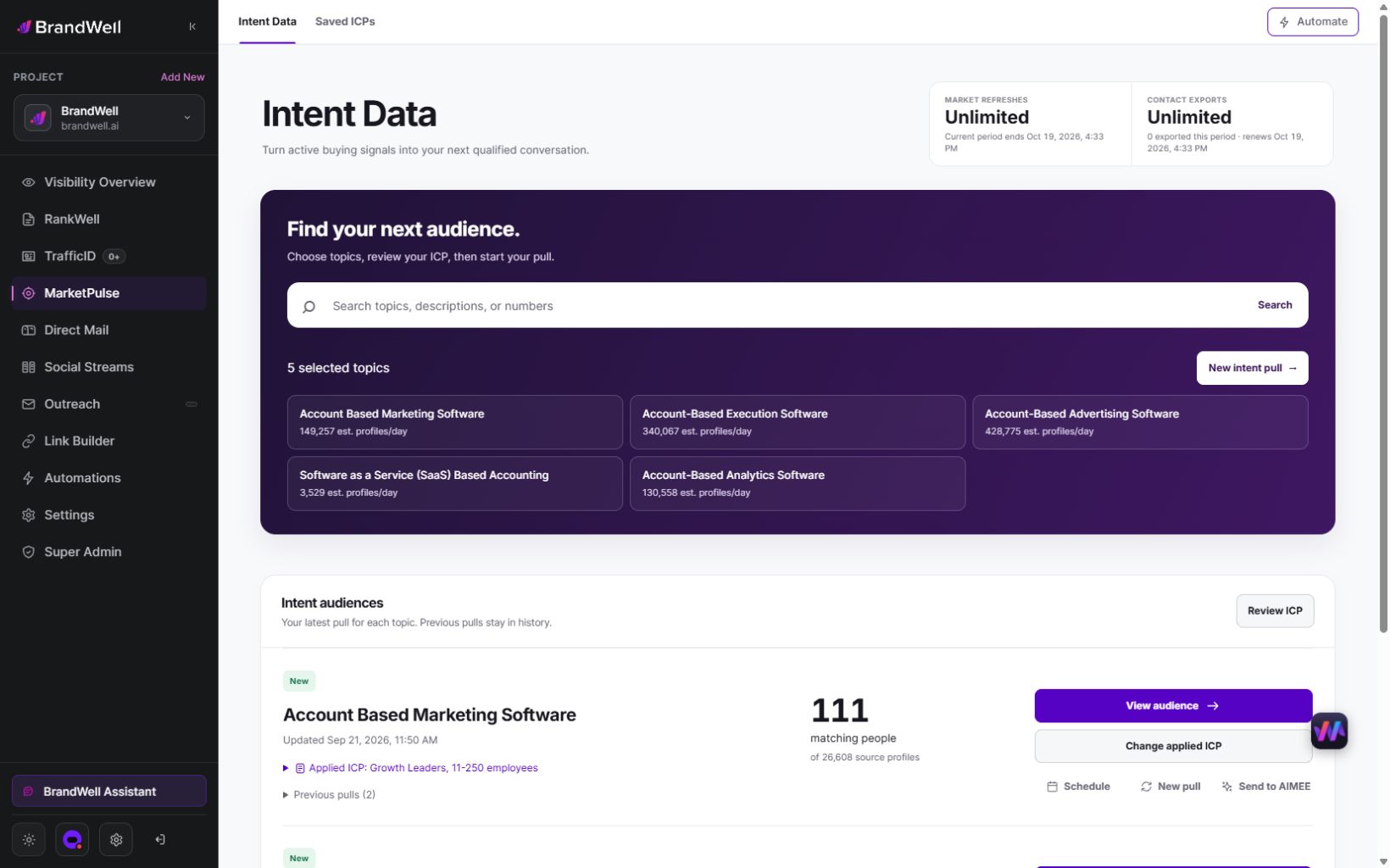
Use research for a reviewed brief or aggregate planning where appropriate. A MarketPulse subscription does not promise a native GA4 connector or authorize every external-data join. Verify the actual tools and destination requirements before combining records.
Watch the MarketPulse demo and review plans or browse current BrandWell products.
Reviewed and updated October 3, 2026.

Written by

