


On this page
- What organic keywords mean in a report
- Step 1: save a page and query baseline
- Step 2: group terms by the task
- Step 3: choose improve, create, or consolidate
- Step 4: research and build the brief in BrandWell
- Step 5: make the page clear and discoverable
- Step 6: check technical eligibility
- Step 7: evaluate what changed
- Frequently asked questions
To increase relevant organic keyword visibility, improve pages around useful audience questions, fill genuine content gaps, connect related pages, and make sure Google can access and index the content. Measure the queries and business outcomes those pages earn. Adding repeated terms or reaching an arbitrary keyword count is not the objective.
Start with the pages you already have. A specific improvement to a useful guide can be more valuable than several overlapping articles created for small keyword variations.
What organic keywords mean in a report
An organic keyword is a query associated with unpaid search visibility. A reporting tool’s count depends on its data, market, ranking range, and period. It is not a complete inventory of every phrase for which your website could appear.
Search Console reports queries that produced impressions or clicks for your site. Its query documentation explains that some queries are anonymized and that the table does not display every row. A change in a reported count can therefore reflect data coverage or filters as well as search performance.
Step 1: save a page and query baseline
- Open Search Console’s Search results performance report for the correct property.
- Select a consistent search type and date range. Record any country or device filters.
- Review pages with relevant impressions, then filter to an individual page and inspect its queries.
- Save impressions, clicks, CTR, and average position alongside the URL and audience task.
- Keep the original export so the baseline remains separate from later results.
Follow the performance-report definitions. Average position is an aggregate. A page with many impressions and low CTR may need a clearer answer or preview, but query mix and result position also influence clicks. Do not diagnose the cause from CTR alone.
Step 2: group terms by the task
For a payroll provider, “payroll migration checklist,” “switch payroll software,” and “import payroll history” might belong to one implementation guide if that page can answer the related questions coherently. “Payroll software pricing” may require a separate commercial page. Decide from the audience’s task, not an exact-match keyword formula.
Inspect the current results to understand the format and level of detail people need. Record what your own business can contribute, such as a supported import process, an original checklist, or approved product screenshots. Avoid copying result headings or creating near-duplicate pages for capitalization and minor phrasing differences.
Step 3: choose improve, create, or consolidate
| Situation | Editorial decision | Review before publishing |
|---|---|---|
| Useful existing page misses a question | Add a relevant, well-supported section | The new section fits the page’s purpose |
| No page answers a distinct audience task | Create a focused guide or commercial page | Your team has useful evidence and a meaningful next step |
| Several pages repeat the same answer | Consider a consolidated destination | Existing traffic, links, redirects, and retained useful information |
| Query has demand but no business relevance | Deprioritize it | Do not confuse traffic potential with customer fit |
| Reported visibility falls after a site change | Investigate before rewriting | Indexing, URL changes, measurement, and release timing |
Swipe the table to see all columns.
This is an editorial decision framework, not a promise that consolidation or new publishing will increase rankings. Preserve important URLs unless a planned change provides a clear benefit.
Step 4: research and build the brief in BrandWell
Use the available Keyword Research tools in the current BrandWell workspace to explore terms for your market. Check location, language, and metric definitions. An advertising Competition label should not automatically be read as organic difficulty.
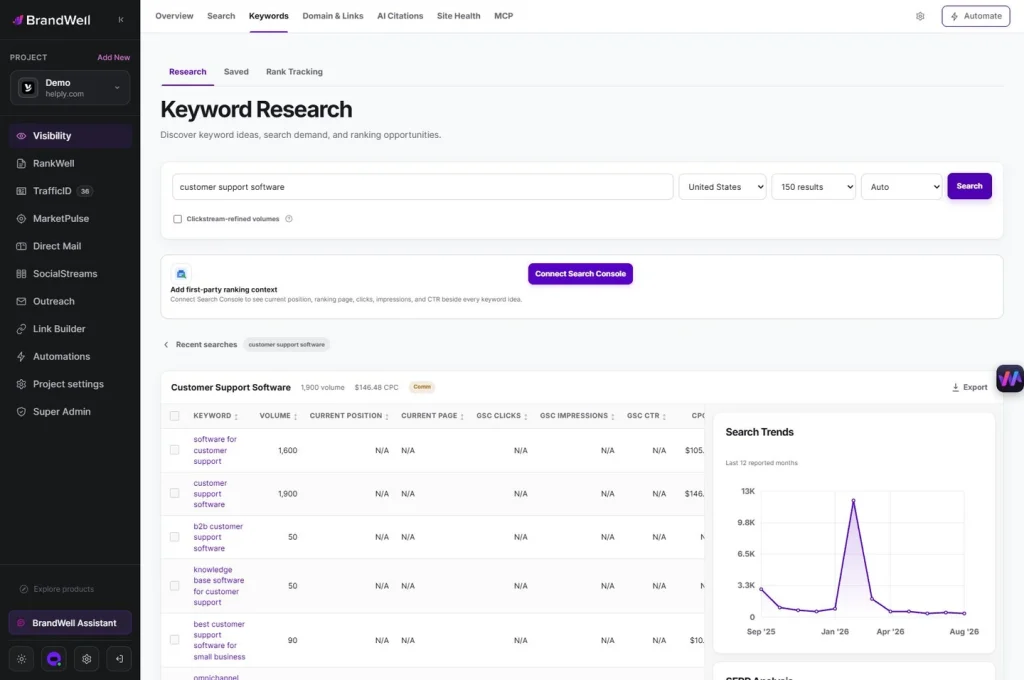
Prepare a RankWell brief with the audience, question, scope, source links, current product details, and approved next action. Review the draft in the editor, verify claims, and add original evidence. A content recommendation is a prompt for judgment, not an instruction to insert every suggested term.
For example, an implementation guide might need sections on prerequisites, supported data, validation, and rollback planning. Write those sections because they help the reader complete the task. The resulting page can be relevant to related queries without repeating each one as a separate heading.
Step 5: make the page clear and discoverable
- Title: describe the specific task and the content actually delivered.
- Headings: organize meaningful steps and questions in a logical order.
- Description: summarize the page accurately. Google may use page content instead of your supplied meta description.
- Internal links: link relevant guides and product pages with descriptive text.
- Images: use relevant, readable visuals and describe their purpose where an accessible text alternative is needed.
- Product context: check screenshots, navigation, prices, and capabilities against the current app.
Google’s SEO Starter Guide supports clear structure and useful, accessible content. There is no required keyword density or universal first-paragraph placement rule. Do not add keywords to decorative images merely to repeat a phrase.
Step 6: check technical eligibility
Inspect important URLs for successful responses, unintended noindex directives, crawl restrictions, and inconsistent canonical signals. Link to your preferred URLs and maintain the sitemap. Test the live page on mobile, including image sizing and scrollable tables.
Structured data should describe visible, eligible content accurately; adding it does not guarantee a rich result. A faster page improves usability, but performance work does not substitute for a relevant answer. Requesting a recrawl also does not guarantee indexing or a ranking position.
Step 7: evaluate what changed
Record the edit date and exactly what changed. Compare relevant query groups and page performance over comparable periods. Check whether clicks reach suitable readers and whether the next action is useful. Keep visits, inquiries, qualified opportunities, and revenue as separate measures.
If visibility falls, follow Google’s traffic-drop investigation: examine the scope, technical changes, indexing, demand changes, and search updates. Do not assume every decline is a penalty or react to a small fluctuation with a site-wide rewrite.
Social distribution can bring readers to an article, but shares do not establish that Google will rank it higher. Similarly, links should be earned through useful work rather than purchased to manipulate rankings. Focus the review on demonstrated outcomes and documented causes.
Frequently asked questions
How many organic keywords should my website have?
There is no universal healthy number. Reporting coverage varies, and relevance to your audience and business matters more than the raw count.
Do long-tail keywords always convert better?
No. A specific phrase can clarify a task, but suitability and conversion depend on the audience, answer, and offer. Measure the actual results.
Should I add a page for every keyword?
No. Group related questions that one useful page can answer, and create a separate page when the task is meaningfully different.
Will updating an article immediately increase rankings?
No. Search processing and competitive conditions vary. Save a baseline, verify the published change, and measure without assuming an outcome.
Reviewed and updated October 2, 2026.

Written by

