




On this page
Reviewed and updated by the BrandWell team on October 1, 2026.
Current product context , September 2026: BrandWell now combines content, buyer intent, website audiences, and execution in complete growth automation software. RankWell supports the content workflow, and AIMEE is the agent-powered desktop app that helps complete work through connected tools. MarketPulse intent data starts at $250/month; other capabilities and usage depend on the selected package. Explore the current content workflow or see a demand scan and demo.
In a digital world where visibility is crucial, keyword research has become an essential tool for achieving online success. And the key to an effective keyword research strategy is having the right keyword tools. This begs the question, can you do keyword research without a tool? Can you find lucrative keywords without spending a dime?
The answer is a resounding yes. While paid tools offer advanced features and comprehensive data analysis, there are free keyword research methods and resources available for conducting impactful keyword research.
If you are willing to put in the work, this guide will show you how to do keyword research without a tool and find untapped keyword opportunities. We will share seven free keyword tools for building your keyword list, unearthing data on keyword search volume and keyword difficulty, and analyzing keyword results, demonstrating that successful keyword research is within reach for everyone.
Ready? Let’s dive right in.
Table Of Contents:
- What is Keyword Research?
- How Do You Conduct Keyword Research?
- How to Do Keyword Research Without a Tool
- 1. Analyze Your Target Audience
- 2. Brainstorm Keyword Ideas
- Best Free Keyword Research Tools
- 1. Google Autosuggest
- 2. Google Wild Card Search
- 3. Google’s People Also Ask
- 4. Google’s Related Searches
- 5. Quora
- 6. Forums
- 7. Google Search Console
- Alternative Keyword Resources
- The Rise of User-Generated Keywords
- The Search Bar Autocomplete Feature
- Importance of Niche Websites in Discovering Keywords
- Keyword Terms within Content
- Customer Queries
- Competitor Research
- Combining Keywords Creatively
- Keyword Research Tools Are Nice to Have But Not A Must-Have
What is Keyword Research?
Keyword research is the process of finding the words and phrases that people type into search engines when searching for information online. Those words and phrases are commonly known in Search Engine Optimization (SEO) and Search Engine Marketing (SEM) circles as keywords or search queries.
Anyone who wishes to be found online must care about how that might happen. If you are a business, you would conduct keyword research to find out how your target customers search for solutions that your products or services provide.
When you know how people search for your products online, you can tailor your content to target those specific searches. Unless you are not targeting organic traffic from Google, you want to write content on topics that people are searching for online.
If you publish a well-written page on a keyword that many people are searching Google for and you end up ranking high for it, you can drive a lot of traffic to your website. This is traffic that you can nurture into paying customers.
How Do You Conduct Keyword Research?
There are two ways of conducting keyword research.
There is the manual process of keyword analysis using free tools and the automated (usually paid) way. With the automated process, you use a software tool that pulls keyword ideas from its database.
Your choice between manual and automated keyword research methods depends on your skill level, budget, and the amount of time you can devote to the task.
But who does not want to save time if they have the budget?
The truth, though, is that a lot of people cannot afford to pay for premium keyword research tools, even though they are a good investment.
The cheapest plan for the Semrush keyword tool costs $130 per month while Ahrefs plans start at $99. These two SEO tools are generally considered the best keyword research tools around. Both are not cheap, especially for one who is just starting as a blogger, affiliate marketer, or niche website builder.
We are big fans of automating content marketing here at BrandWell, which is why we have now made it possible to automate both keyword research and content creation from a single app.
Right beside our best-in-class long-form content writer is a keyword research tool that generates keyword lists and topic clusters from specific seed keywords. Here you will find all the related keyword terms, keyword search volume, keyword difficulty, cost per click, and trends.
From these keyword lists, you can create complete, long-form blog posts in bulk with just the click of a button.
The keyword research tool comes with your BrandWell subscription so you don’t have to pay anything extra.
But if you cannot afford automation right now, then you’re probably wondering how to do keyword research without a tool.
It is entirely possible to research keywords for your blog posts, website copy, and PPC campaigns without a paid tool. In fact, when starting out in web publishing, you hardly need a keyword research tool.
That’s not to say keyword research tools are not important. They are and can tell you a lot more about your target keywords and audience than you can find out researching manually, including:
- How many people are searching Google for that keyword,
- How the search query has trended over time,
- Your chances of ranking in search engines for that keyword.
That said, you don’t need all that information to publish successful web content. In fact, it can bog you down if you pay too much attention to it, especially if you have yet to publish any content.
Keyword research is actually not that complicated. That is why I would advise anyone starting out as a blogger to change their mindset from keyword research tools to keyword research resources.
Your two biggest resources for keyword research are yourself and your target audience. Let’s see how you can use those two resources to conduct keyword research without a tool:
How to Do Keyword Research Without a Tool
The most critical component of your SEO strategy is your readers. If you don’t know who your target audience is, a keyword research tool is not going to help you. You aren’t even ready to start writing.
Let’s assume your target audience is people looking to lose weight. Here’s the first step when doing keyword research without a tool:
1. Analyze Your Target Audience
Knowing who you are targeting and what they are looking for can help you determine which keywords will be most effective in reaching them.
The first step in analyzing your target audience is to identify their demographics such as age, gender, location, education level, etc. This tells you how they might phrase their searches.
Knowing where people live also tells you a lot about the types of products or services they may be interested in based on local trends and preferences.
Your target audience’s demographic information is essential in knowing what specifically about weight loss they are interested in learning.
But their psychographic information is essential, too.
Specifically, your target readers’ values, beliefs, and lifestyle choices will give you useful insights into their biases, weaknesses, and struggles, which can all shape how they search for information about your blog’s topic.
Key Takeaway: With accurate demographic and psychographic data, it’s possible to conduct effective keyword research without the aid of a tool.
2. Brainstorm Keyword Ideas
To brainstorm keyword ideas is to imagine the words your target readers use when researching the topic you intend to cover. This includes questions they might ask Google, a friend, a colleague, or anyone who appears knowledgeable about the subject.
Whether you do it in a group setting or on your own, brainstorming achieves the same goal. In this case, you are imagining yourself as overweight, concerned about all the health complications associated with uncontrolled weight gain.
What questions could you be looking to get answers for?
On a basic level, we know that a person struggling with weight gain would want to know its:
- causes,
- effects, and
- remedies.
So they would type into Google queries like:
- causes of weight gain
- effects of weight gain
- weight gain remedies.
They can even phrase these queries as questions. However they phrase them, these are actual keywords people are typing into Google hoping to find helpful information.
With these keywords, you have foundational topics with which to launch your blog. But after analyzing the pages Google is ranking for these keywords, you might decide you are better off targeting less competitive keywords.
The good news is that these long-tail keywords are usually more focused because they are searched for by people who are looking for information on a topic they are not totally ignorant about. They aren’t just random searches.

Analyzing the search results for the keyword ‘causes of weight gain’, you will see websites like Healthline, Mayo Clinic, NHS, and WebMD ranking. Those are massive sites that you are not going to displace from the first page with an article on your freshly launched website.
So you go granular and look for keyword phrases that not a lot of people are searching for. It’s at this point of your keyword research that you might think you would need a paid tool. But you would be wrong.
It’s the point you move on from the keyword research resources we have been discussing to ‘manual’ keyword research tools. These are resources that are, technically, tools but are available to everyone to use for free. So let’s look into those next.
Key Takeaway: By understanding your readers’ values, beliefs, and lifestyle choices, you can easily brainstorm and find lucrative keyword ideas to target with your content.
Best Free Keyword Research Tools
The biggest keyword research tool – whether paid or free – is Google itself. By simply searching Google for a root keyword like weight loss, there are a ton of potential keywords and insights you can gain.
The UK’s NHS ranks number 1 for the keyword. When you click through to the website and analyze it, there are many less competitive keywords you can find.
Pages that rank for high-value, competitive keywords typically also rank for hundreds of lower-volume keywords you could target with a whole article of your own.
Let’s click through and see what we can find:
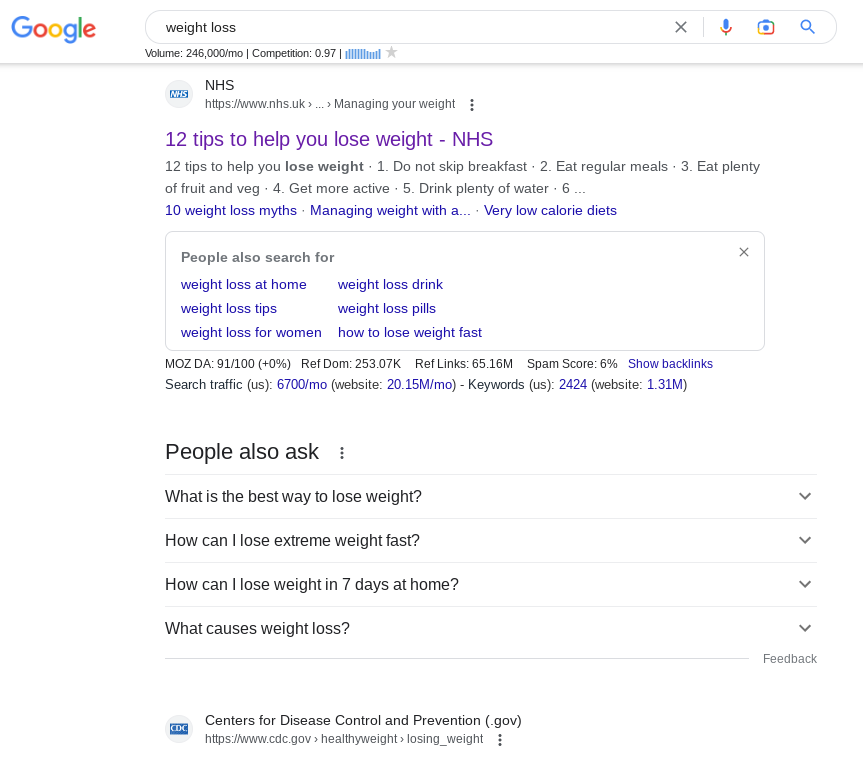
There is not a lot of text on that part of the page, but there are possible related keywords that can be the basis of our keyword research. Let’s scroll down for some more ideas:
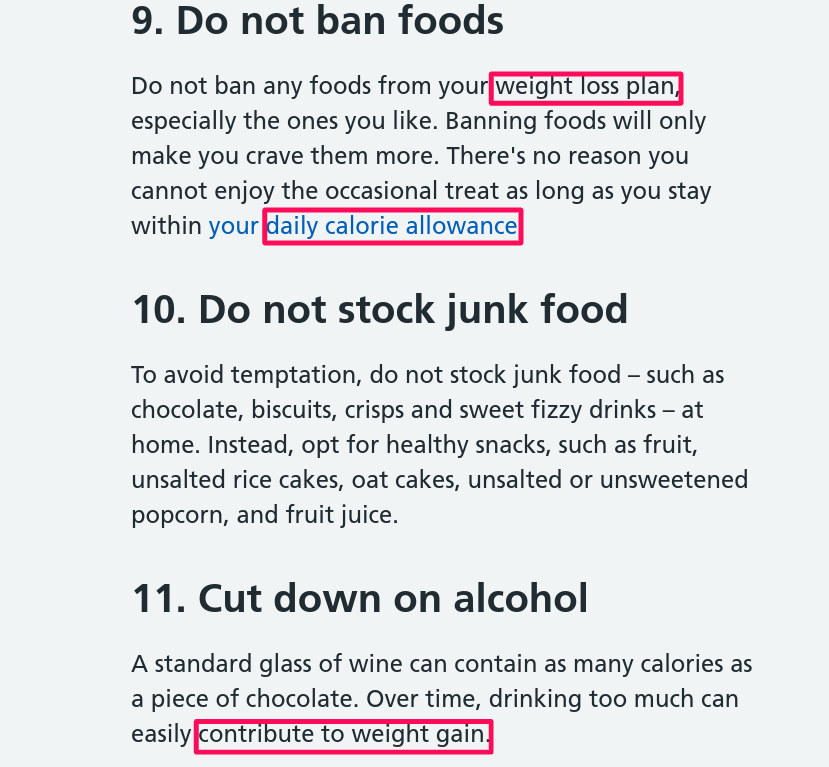
And down again:
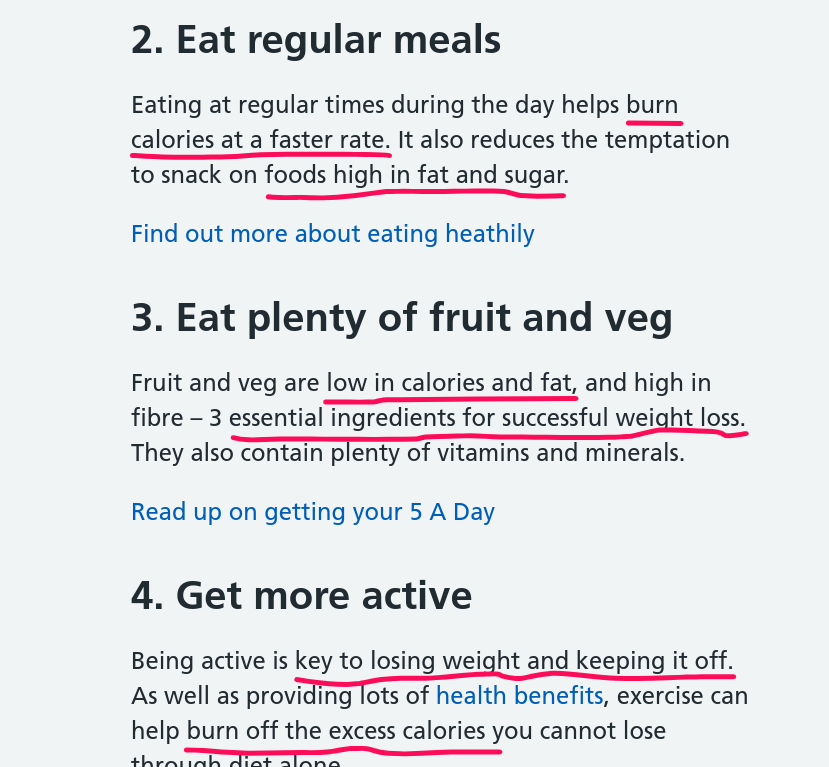
If we write down all the possible keywords we found on the NHS page, we will see a keyword list starting to form.
Those keyword ideas can be refined further using the free keyword research tools we will share below:
1. Google Autosuggest
Google’s autosuggest feature works by suggesting variations of what you may be looking to type into the search bar.
Autocomplete is not just a time-saving tool; it can be used to uncover user queries related to your primary topic, making keyword research easy.
This free and handy tool reflects what others have searched before, offering invaluable insight into trending topics and commonly asked questions related to your primary topic.
The good thing is these suggestions are searches people are actually making on Google. The suggested searches are related to what you are searching for, which means they are good keywords to add to your list.
As you type in your primary term or phrase, observe the choices that appear below, these could be lucrative long-tail keywords ready to use.
Pay close attention to the suggestions that drop down, these are potentially profitable long-tail keywords ripe for picking.
Let’s suppose you are anxious to know whether it’s some of your lifestyle choices or habits that are causing you to gain weight. Naturally, you ask Google:

I counted nine potential keywords there. We will add them to our keyword list. We could take it in a different direction and check for how other people are trying to lose weight:

That’s several more keyword ideas. Let’s add them to our growing list. There are other directions we can go with this and uncover even more keyword ideas, but I think you get the picture.
Before we leave the Google search bar, here’s another useful keyword research trick that works the same way as Google autosuggest:
2. Google Wild Card Search
The Google wild card search is useful when conducting a partial search, or when you are not sure what words to type into Google to find the information you are looking for. It is an advanced search technique but the way it works is simple.
You simply put an asterisk (*) in front of or after your seed keyword and Google will fill in what may be missing from your keyphrase.
In our case, since we are approaching the weight loss niche as complete beginners, it is safe to start our keyword research with just ‘weight loss’. Let’s attempt a wild card search by putting an asterisk in front of the keyword:

Those are great keyword suggestions for affiliate marketing content. I figure many people will be keen to try out the different weight loss programs that are out there. So each of those keywords could be a review article on its own.
I am a big fan of question queries. They are good sources of traffic and are fairly easy to target with new content. For highly competitive keywords, they also provide a shortcut route to the top of Google if you manage to snag a featured snippet for them.
Wild card searches are my favorite tool for finding question keywords. To find these valuable keywords with a wild card search, you will put an asterisk between any word you would prefix a question with and your seed keyword.
We want to see what other ‘can’ question keywords we can add to those Google autosuggest gave us above. But to get a wider variety of question keywords we will just search for ‘weight’, which is broader than ’weight loss’:

As you can see, we got keyword suggestions for both ‘weight loss’ and ‘weight gain’. That’s because of the broader seed keyword we used. Our list of keyword ideas just got longer.
3. Google’s People Also Ask
Beyond autocomplete, another goldmine for keyword data within Google Search is the ‘People Also Ask’ section which offers question-based keywords often overlooked during regular keyword research.
The People Also Ask (PAA) carousel has become a prominent feature of Google search results. The carousel appears anywhere on the SERP and shows a list of questions that people ask that are related to the keyword you are searching.
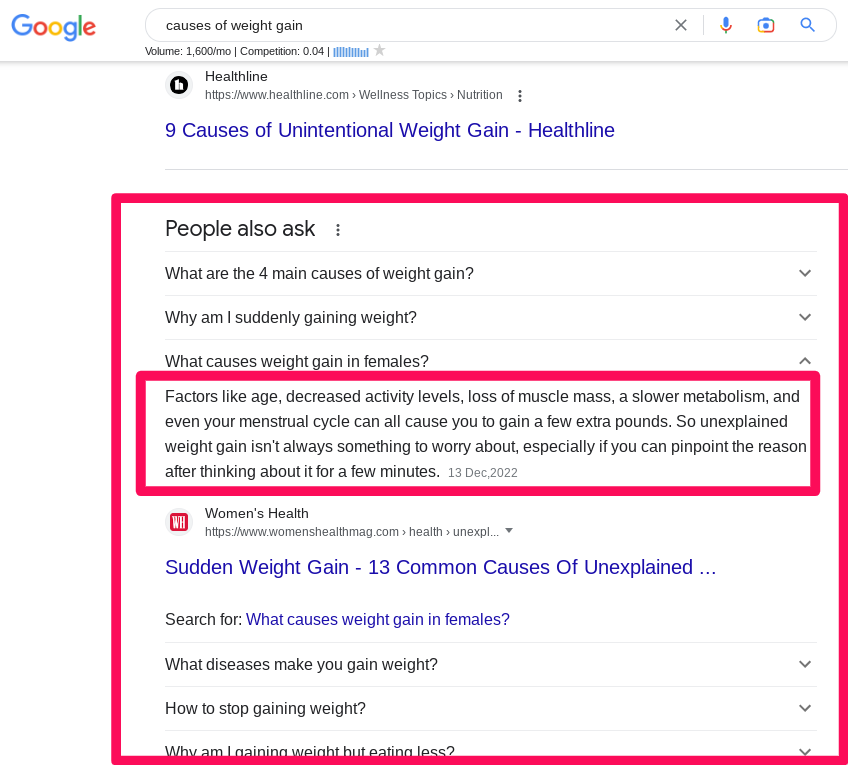
PAA questions are meant to provide quick and straightforward answers without the searcher actually clicking through to the page. The answers they show are excerpts pulled from the page.
More often than not searchers end up clicking through to the page anyway, which is why PAA queries are such useful sources of traffic.
In the example above, the PAA box is what people see immediately below the featured snippet, which is the first result. So you could be ranking number 9 for the primary keyword and yet end up getting the click ahead of the page ranking second if you had targeted the question keyword in your article.
The more you toggle the questions on the PAA carousel to see the answers the more questions Google opens up. Keep toggling and copying and pasting to your list all the question queries that make sense for you to target. Targeting as many of them as possible in your article on causes of weight gain will widen its traffic sources.
What if your keyword analysis shows ‘causes of weight gain’ to be too competitive to target with your new blog?
4. Google’s Related Searches
Last but not least is scrolling down to see ‘related searches’. This gives additional perspective on what users are searching around your target term. It’s like having access to parts of a premium SEO keyword planner but without any cost involved. A little creativity goes a long way when conducting keyword research without tools.
At the bottom of the SERP, you will usually see a section labeled ‘Related searches’. These are search terms that are semantically related or which are related in meaning to your actual search term.
For example, just as the words automobile and car, gasoline and petrol mean the same thing.
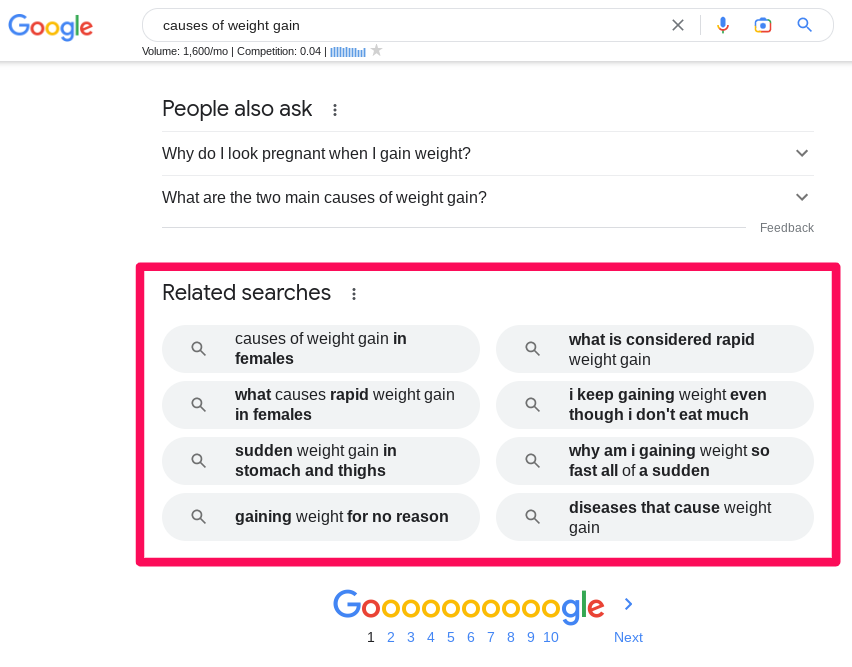
Related searches can reveal additional questions and phrasing. Review them for shared intent before adding a topic to your outline; they are not a required LSI keyword list.
So related searches in this case are long-tail versions of the primary keyword. For a website with low domain authority, these specific keywords are great to target early on because they are more focused and have less competition.
You have a far harder job ranking for ‘causes of weight gain’ than:
- causes of weight gain in females
- what causes rapid weight gain in females
- sudden weight gain in stomach and thighs
- gaining weight for no reason
- what is considered rapid weight gain
- I keep gaining weight even though I don’t eat much
- why am I gaining weight so fast all of a sudden
- diseases that cause weight gain
If we search any of those in Google and scroll down to the ‘Related searches’ section, we will uncover more or even less competitive keywords:
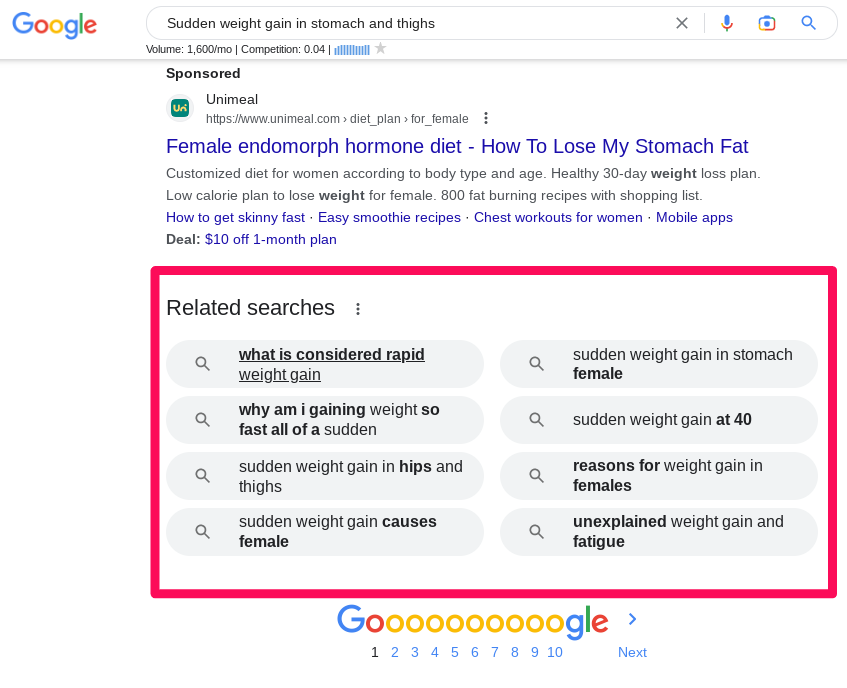
You can rinse and repeat the process for the other harder-to-rank-for keywords on your list until you have related keywords to fill your content calendar for the month, quarter, or year.
As you can see, Google is an absolute gold mine for keyword ideas. We will step away from the search engine for a bit, but I know part of you want to know the search volumes for your target keywords.
So I will come back to Google and share a free tool with search volumes and other data points that are more reliable than any paid keyword tool.
5. Quora
Keywords are essentially Google searches in the exact words your target readers use when using search engines. Besides the search engines themselves, one of the platforms that people go to find answers to pressing questions is Quora.
Quora is a globally accessible platform for asking and answering questions. So anyone can ask and answer a question on Quora. For our weight loss blog, the questions that users ask on weight loss are all keyword ideas.
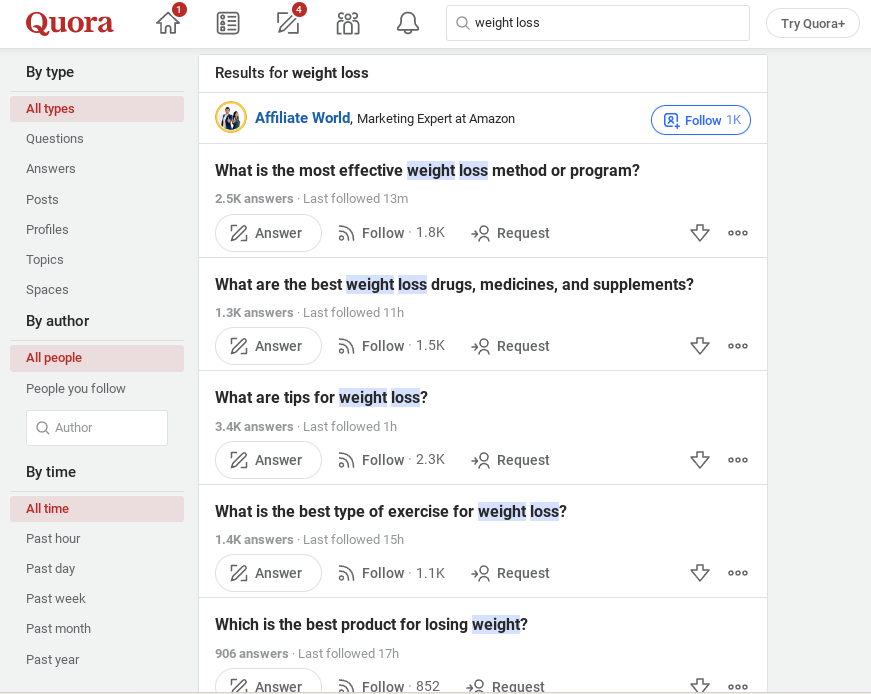
The engagement on the questions shown above as seen in the answers that number in the thousands tells you all you need to know about the level of interest in the weight loss niche. If you are worried about search volume, know that there are likely as many people searching Google for the same answers.
When you click on a question to check the answers, Quora will show on the sidebar a list of questions related to the question whose answers you are reading:
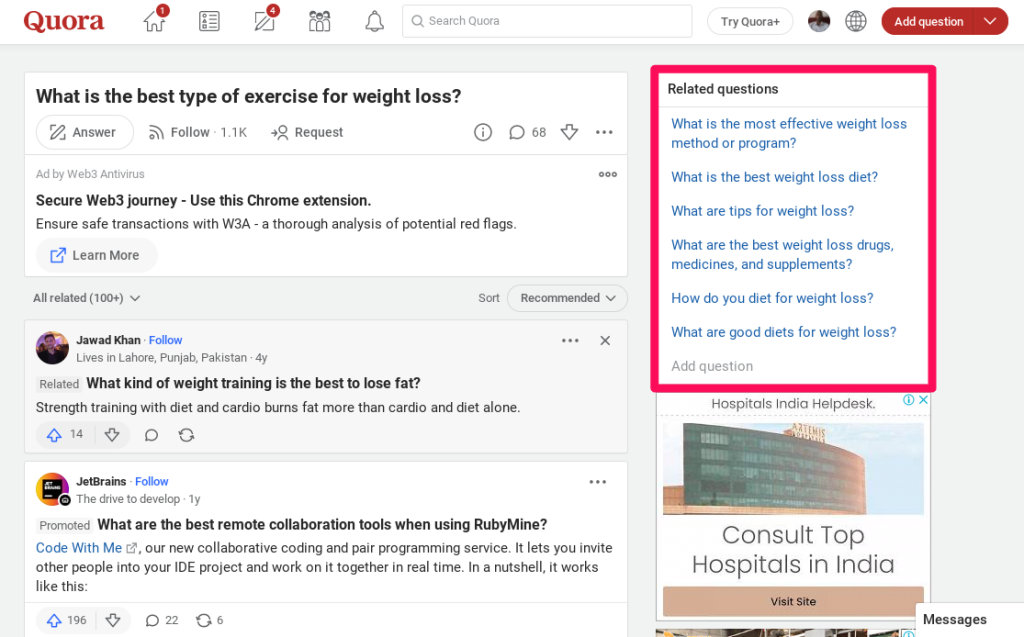
When you read the top answers, it’s also important to pay attention to the words and phrases people who have overcome weight gain use to describe the problems they faced and the remedies that worked for them. Those are all keyword ideas.
Related Reading: How to Use Quora to Get More Traffic to Your Blog
6. Forums
Forums are online platforms where people who share common interests, struggles, and goals hang out, sharing ideas and encouraging each other through their journeys.
There are forums on different topics and some, like Reddit, have thousands of communities on the same platform, including some on weird and hilariously specific topics.
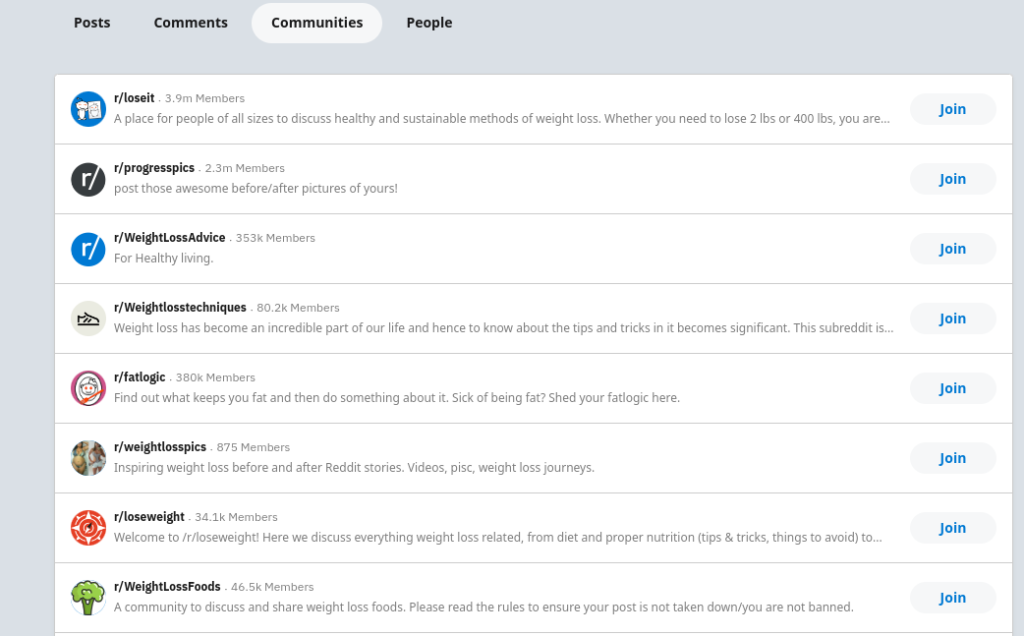
There are over 200 communities on weight loss on Reddit. The biggest, r/loseit/, has over 3.9 million members. That is a large number of people congregating in one place to talk about one topic. Forget keyword ideas, the content from this one subreddit can make any newbie an actual authority on weight loss.
To find specific keywords, look at the questions people ask and the answers members give. Again, pay attention to the way they phrase their questions because how they describe their problems matters. For articles that resonate with target readers, you want to use the language they use.
7. Google Search Console
Google Search Console, formerly Google Webmaster Tools, is a free tool that allows you among many other data points to check indexing status, crawl issues, and – importantly for keyword research, the searches your articles are appearing in Google for.
Google Search Console is hands down the best free keyword research tool there is. The tool gives you an overview of your site’s search performance, including total impressions, average position, total clicks, and CTR. In other words, the tool tells you how people are getting to your site, primarily the keywords they are using.
GSC also enables you to drill down into each page to find what keywords you are ranking for and at what position. It shows how many searches each keyword you are appearing for gets per month. This is valuable information that you can use to reoptimize your pages and boost the traffic coming to your site.
The search volume data you get from GSC is more reliable than what you can get from any other tool because it is coming from Google itself. The only caveats are that you need to have a sizable number of articles published and connect GSC to your website by verifying ownership for it to start using it.
Alternative Keyword Resources
If you’re looking for alternatives to premium keyword tools, there are a surprising number of free options out there. Let’s dig into some that can give you the help you need in conducting your keyword research.
The Rise of User-Generated Keywords
In addition to traditional SEO methods like using Google Search Console or other SEO software, consider leveraging user-generated content from social media platforms and blog post comment sections. These spaces often hold a wealth of untapped long-tail keywords and phrases directly from potential customers’ mouths.
The Search Bar Autocomplete Feature
Sometimes, we overlook simple solutions right under our noses – or fingertips rather. Try typing slowly in any search bar on websites such as Amazon or YouTube; they will suggest autocomplete results based on popular searches by users worldwide – essentially serving up high-volume monthly search terms on a silver platter.
Importance of Niche Websites in Discovering Keywords
Niche websites can be an invaluable source for discovering valuable long-tail keywords. They often target very specific topics and hence tend to rank for highly specialized terms.
You might ask why niche sites? Because they offer unique insights into your industry’s language, helping you better understand what users may type into the search bar when looking for products or services similar to yours.
This method ensures that your content matches search intent, increasing its relevance and chances of ranking higher on Google’s algorithm-driven SERPs.
Keyword Terms within Content
To discover these elusive yet powerful long-tails, start by examining popular blog posts or social media discussions related to your topic. Look out especially for recurring phrases which could indicate commonly searched queries.
Customer Queries
Analyze customer emails or support tickets if you have access to them; they offer insights into what customers are actively seeking information about.
Competitor Research
Analyzing competitor sites gives us insight into what works well within our industry niche. This approach can uncover both high-performing keywords as well as successful types of content formats or structures – giving us plenty of ideas we could emulate or improve upon for our own websites.
Bear in mind that blindly copying competitors won’t help. It’s about finding what works for them and adapting it to our unique voice and brand.
Combining Keywords Creatively
Another way to build your keyword planner is to creatively combine short tail words with additional modifiers like locations or adjectives , turning “dog food” into “organic dog food Seattle,” as an example.
By exploring these techniques and applying a little creativity, you’ll soon be unearthing long-tail keywords that not only drive traffic but also enhance the user experience.
Keyword Research Tools Are Nice to Have But Not A Must-Have
In this article, we have shown you how to do keyword research without a tool. You don’t need to pay for expensive keyword research tools, especially in the beginning. The keyword results we have researched with the manual processes we shared above will give you topics to write on for months.
Once that content has stewed and started to rank, Google Search Console will give you more useful keyword data than most tools will provide, down to the less searched keywords and their search volume data.
Instead of wasting time testing every shiny new keyword research tool, use the manual tools we have shared here and get down to the business of running.
Finding the best keywords takes effort – a lot of digging – and not necessarily a tool. And as time-consuming as these manual keyword research techniques are, they are the best way to learn about your niche if you are not approaching it as an expert.
When you have good traffic coming to your site that you can monetize, perhaps only then should you look into paid, premium keyword research tools.
Explore the current BrandWell content workflow and see how RankWell connects content work with audience signals and AIMEE’s agent-powered desktop execution.
Try it today!
Explore BrandWell and request a demo
BrandWell’s current workflow
RankWell is the content workflow within BrandWell’s complete growth automation software. The current Content Hub organizes articles, strategy, queue, and calendar work. The editor brings together the article, search preview, SEO recommendations, NLP, media, sources, and history.
Start with the buyer’s question and inspect existing content before commissioning a new page. The Content Hub exposes a keyword, topic, or buyer-question field for checking an opportunity. Review the evidence and decide whether to create, optimize, or merge content; keyword presence alone is not a ranking strategy.


Written by
Julia McCoy has contributed articles to BrandWell on content marketing, writing, and search engine optimization. This archive retains her original bylines; individual articles may be updated by the BrandWell editorial team.
