


On this page
Personalize outreach by using verified business context, an appropriate reason to contact the recipient and one useful next step. Website activity can help you prioritize research, but a visit does not prove purchase intent or permission to send a message. Good personalization makes the offer relevant without pretending to know a person’s motives.
This guide explains how to review visitor evidence in BrandWell, prepare messages and assess the resulting conversations. The examples below are fictional templates, not customer outcomes.
What is personalized outreach?
Personalized outreach adapts a message to relevant, supported information about the recipient or their business. That may include a publicly described service, an explicitly requested resource or a question already raised in a conversation. Adding a first name is a small formatting change; explaining a relevant use case is the substantive work.
Keep three things separate: what the system recorded, what you verified about the business and what you suspect might interest the recipient. A pricing-page visit, where recorded, can justify further review. It does not establish budget, decision-making authority or an imminent purchase.
Use the current TrafficID workflow
- Select the intended project. Review TrafficID settings, the website tag and installation status.
- Check installation and exclusions. Confirm that the intended pages are covered and internal or excluded traffic is handled appropriately.
- Review Identified visitors. Inspect available person, role, company, audience-source and activity fields. Identification and field coverage vary.
- Assess fit. Check the company’s current website and the relevance of your offer. Resolve conflicting or missing information.
- Apply eligibility and suppression. Review the destination, contact permissions, existing customer status and opt-outs before preparing activation.
- Choose the next action. Research, prepare content or review a configured follow-up through Automate or the relevant campaign workflow.
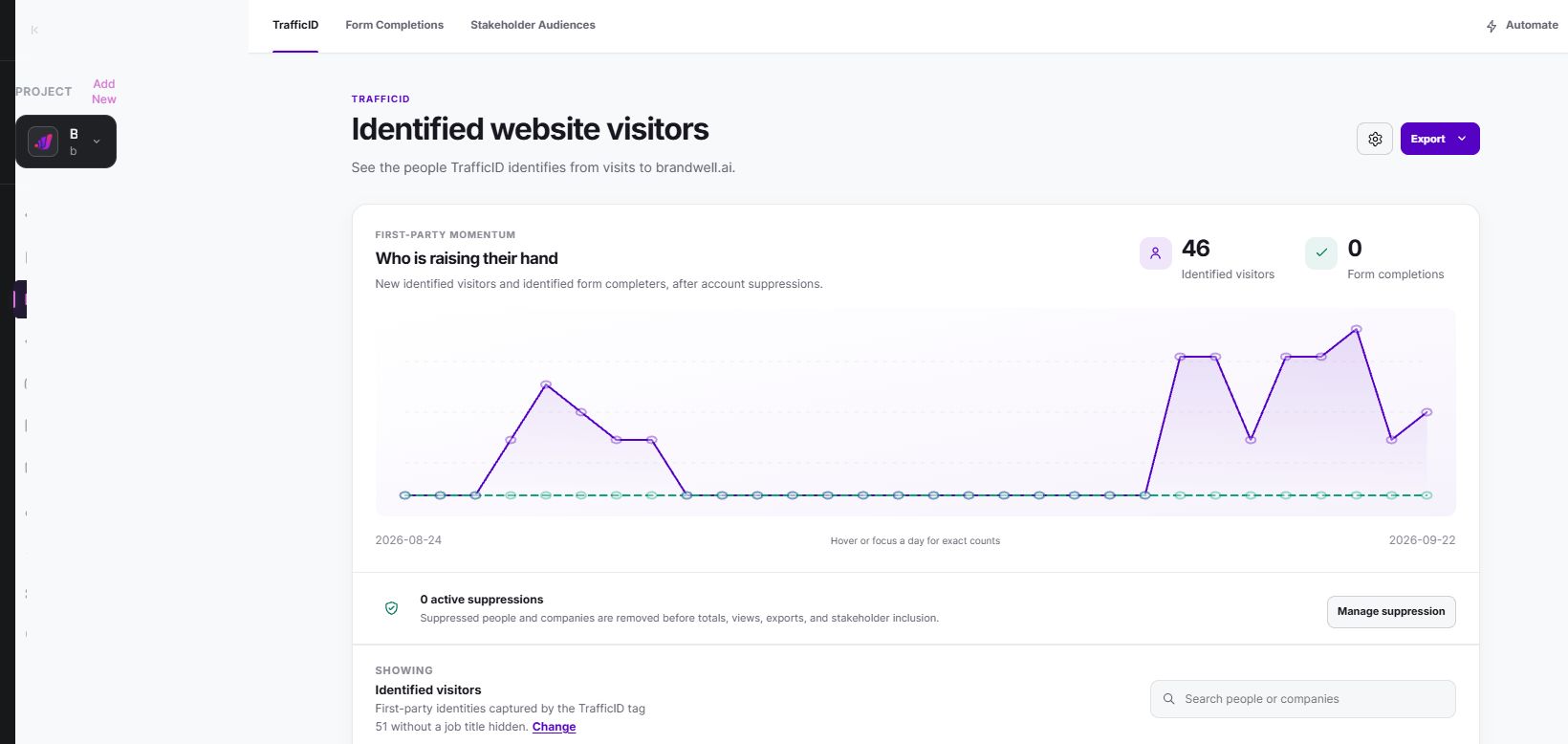
Form Completions and Stakeholder Audiences are separate views. Do not assume every contact originated from a form or that every visitor has complete activity history. TrafficID concerns your own website audience; it does not establish that a person clicked an ad elsewhere or researched a particular offsite topic.
Build a short evidence note
Before drafting, record the business, source, observed event where available, verification date, intended channel and reason the message would be useful. Keep unknown fields unknown. An enriched mobile number is not an SMS opt-in.
Fictional example: a company website describes payroll implementation services. Your evidence note can say that those services appear on its public website. It should not say the contact has a payroll problem or is ready to replace its software unless the contact actually told you that.
The FTC’s privacy and security guidance emphasizes clear data practices, honoring privacy promises and collecting only what is needed. Review your actual disclosures and use of information rather than treating available data as unrestricted.
Write a useful message
- Lead with relevant context. Refer to a verified business offering or the recipient’s request.
- Explain the connection. Describe one task your offer could help with, without claiming guaranteed results.
- Offer something concrete. A short example, checklist or answer is easier to assess than a broad promise.
- Ask one question. Make it easy to respond or decline.
- Check the details. Confirm names, links, claims and the required sender and opt-out information for your channel.
Avoid messages that announce surveillance or claim to know why someone browsed. Do not insert fabricated case-study numbers, savings percentages, testimonials or compliance guarantees into a template.
Three adaptable outreach examples
1. A verified service-business use case
Subject: A topic-research example for your payroll services
Hi {first_name},
Your website describes payroll implementation services. We put together an example of how a service business could organize relevant topic research and decide which accounts merit a closer look.
Would that example be useful? I can send the short version.
{sender_name}
Use this only when the business description is verified and contact is appropriate. If the website is unavailable, omit the industry sentence and use an honest general description of your offer.
2. Responding to a requested resource
Subject: The checklist you requested
Hi {first_name},
Here is the checklist you requested: {resource_link}.
The section on {relevant_section} explains the first review step. If you have a question about applying it to your business, reply and tell me what you are trying to do.
{sender_name}
Do not use this wording for an identified visit alone. It explicitly says the recipient requested a resource, so your records must support that statement.
3. Post-purchase help
Subject: Your first setup step
Hi {first_name},
Thanks for joining. Your next step is {actual_setup_step}. This guide shows where to start: {help_link}.
If anything is unclear, reply with the step you are on and we can help.
{sender_name}
Populate the step from the purchased product and actual account status. Do not promise immediate access if setup is still in progress, or continue acquisition messages after the purchase.
Use automation with clear boundaries
Configured BrandWell workflows and AIMEE can help prepare and carry approved work into connected tools. Specify the trigger, eligible audience, suppression conditions, message owner and destination. Review the delivered result rather than assuming that preparing a draft means a message was sent.
Stop or change the sequence when the recipient replies, purchases, opts out or becomes ineligible. Assign replies to a person who can answer the question. SMS requires its own appropriate permission; do not substitute a discovered phone number for recorded consent.
Measure conversations rather than assumed intent
Use delivery, replies, qualified conversations, meetings held and purchases as separate measures. Record the denominator and reporting period. A message open or link event may help describe activity, but it is not a sale or a reliable statement of motivation.
Hypothetical example: 80 delivered messages produce eight replies, three qualified conversations and one purchase. That is a 10% reply rate and a 1.25% purchase rate among delivered messages. It does not prove personalization caused the purchase; audience selection, timing and the offer may also matter.
Compare similar groups and document changes to copy, eligibility and cadence. Learn from declined replies as well as positive ones. A precise reason for contacting fewer appropriate people is more useful than confident language attached to uncertain data.
Common questions
Does visitor identification mean a person is ready to buy?
No. Identification and observed activity are inputs to review. Fit, need, timing and permission remain separate questions.
Can TrafficID automatically personalize every landing page or ad?
Do not assume universal integrations or dynamic page capabilities. Check your package, configured tools and destination requirements before planning activation.
Where does MarketPulse fit?
MarketPulse provides topic-based intent research, while TrafficID supports review of your own website visitors. MarketPulse plans are starting at $500/mo. Neither source removes the need to verify fit and review the next action.
Reviewed and updated October 3, 2026.

Written by
Jeff Joyce has been helping brands grow online since the Myspace era, when custom HTML layouts were still a competitive advantage. What started in design quickly evolved into a career spanning social media, content strategy, video, agency ownership, and growth marketing. After building his own agency and testing countless AI tools, Jeff joined BrandWell with a clear focus: helping marketers understand how AI can actually improve the way they create, optimize, and scale content. Today, Jeff brings a CMO-level perspective to BrandWell's marketing strategy, blending brand positioning, content, video, customer education, and growth. His work centers on turning complex AI concepts into clear, practical marketing that helps brands move faster, create better content, and stay competitive without losing their voice.

 Farnaz Kia