


On this page
- What is an inbound lead?
- Choose the first campaign from a real question
- Thirteen channels and assets to consider
- An original campaign and handoff plan
- Make the capture experience work on mobile
- Review visitor evidence in TrafficID
- Assign and configure the follow-up
- Measure each step with a consistent denominator
- Common questions
Inbound lead generation connects useful information and relevant offers to people who choose to engage with your business. The strategy needs an audience, a useful asset, a clear next step and a process for handling the response. A visit is not automatically a qualified inquiry.
Start with one supported customer need. Build the page and follow-up around that need before expanding into more channels.
What is an inbound lead?
An inbound lead usually originates from a person’s interaction with your business, such as a consultation request, trial signup or response to content. Document your exact threshold. Newsletter subscribers, identified visitors and demo requests should not all receive the same qualification label.
Keep three separate records of meaning: what activity occurred, whether the person fits your offer and which next actions are permitted. Knowing a name or observing a page visit does not create a requested consultation or marketing consent.
Choose the first campaign from a real question
Use customer conversations, sales questions and search research to identify an important decision. A good campaign brief states who asks the question, what they need to understand, which facts support the answer and what a relevant next step looks like.
Research opportunities in Visibility, then use RankWell to prepare and review the draft. Check current product details, evidence and the published destination. Do not substitute search volume for audience fit.
Thirteen channels and assets to consider
- Public guides: answer a practical question and show a relevant next step.
- Search: publish accessible, useful pages that match the question being asked. Rankings are not guaranteed.
- Social content: share a clear explanation or demonstration suited to the audience and platform.
- Subscribed email: send the information people requested, with an appropriate preference and unsubscribe process.
- Downloadable resources: offer a genuinely useful template or checklist and explain any information exchange.
- Interactive tools: state the assumptions behind an estimate or assessment; avoid presenting invented results as personalized research.
- Webinars: describe the subject, intended audience, schedule and recording arrangements.
- Focused landing pages: align the headline, offer and form with the source of the visit.
- Customer evidence: use authorized, verifiable examples with dates and relevant context.
- Referrals: make the introduction and any reward transparent, with clear ownership.
- Guest contributions: contribute useful editorial material to a relevant publication; do not promise automatic backlinks or ranking gains.
- Creator partnerships: define the audience, deliverable, evidence and disclosure of the relationship.
- Chat or live assistance: answer questions, state availability and provide a route to a person when needed.
You do not need all thirteen at once. Choose a manageable combination and measure the qualified outcomes, including production and maintenance costs.
An original campaign and handoff plan
For a hypothetical commercial cleaning business, the customer question is how to plan cleaning during an office move. The following plan is illustrative, not a reported client result:
- Guide: explain move dates, building access, waste removal, cleaning scope and who signs off.
- Worksheet: provide an example handover checklist without inventing a site-specific quote.
- Service page: explain supported locations, exclusions, quotation requirements and availability.
- Form: request the information needed to assess the project and clearly label optional fields.
- Confirmation: acknowledge the request, explain the expected response and provide a correction route.
- Owner: assign a person to check location, scope and schedule before proposing a next step.
Record a rejected or postponed inquiry as such. Do not count a form completion as a confirmed contract.
Make the capture experience work on mobile
The W3C form-label tutorial explains associating labels with their controls, including checkboxes. A placeholder alone should not carry essential instructions.
- Labels: make each field’s purpose and required status clear.
- Errors: explain what needs correction without deleting usable answers.
- Permission: keep an optional communication choice separate from the service inquiry.
- Keyboard: test focus order and the submit action.
- Small screens: check text, inputs, buttons and overlays on a phone.
- Completion: verify that a successful request reaches the intended owner and confirmation.
Do not require a phone number merely to inflate the contact record. If SMS is offered, preserve the actual program-specific opt-in; an enriched number is not that choice.
Review visitor evidence in TrafficID
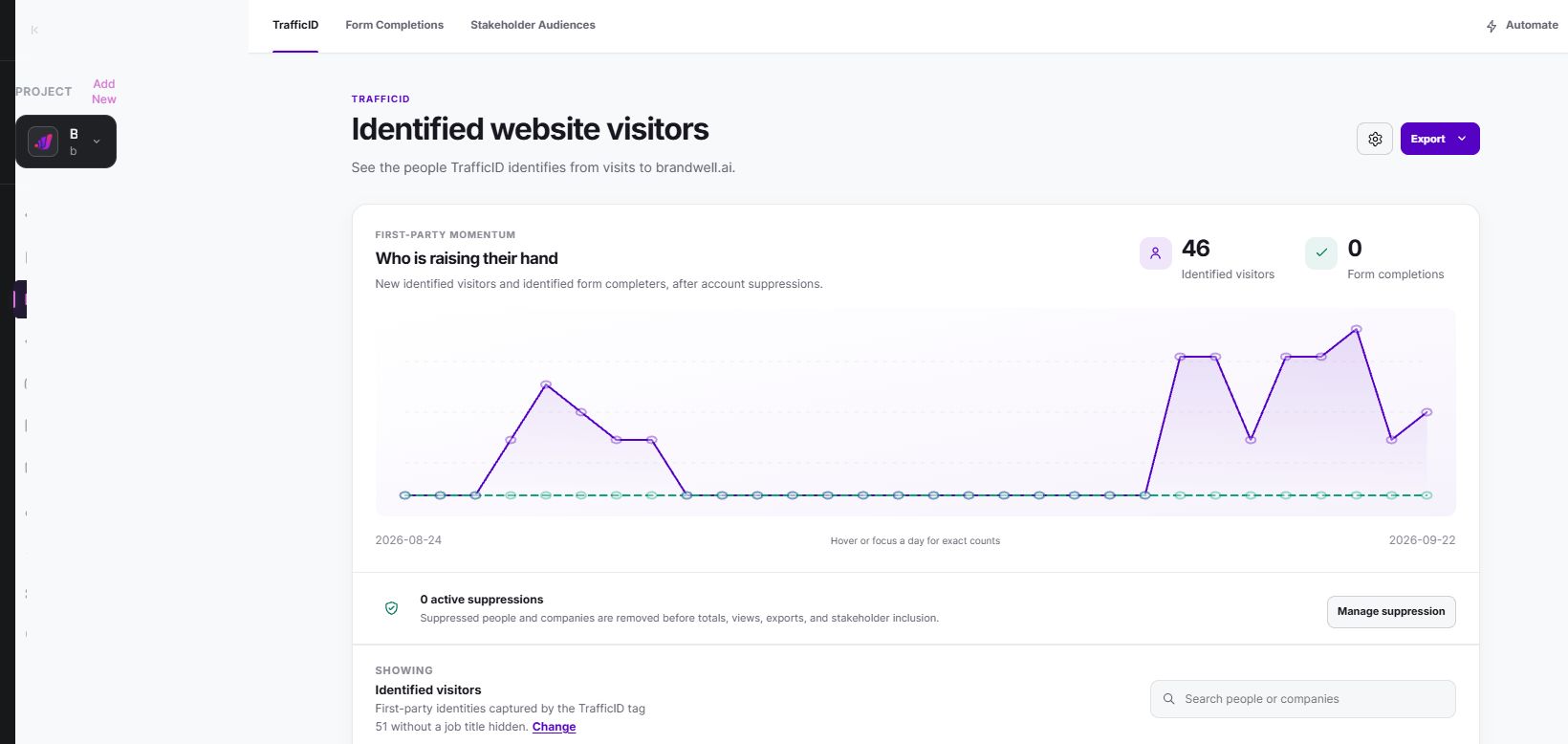
TrafficID surfaces identified website visitors and available profile, company, source and activity information. It does not identify every visitor, establish a buying need or reveal every person’s search keyword.
- Select the intended project and review TrafficID settings.
- Check the website tag, installation status, exclusions and applicable tracking choices.
- Review Identified visitors and available filters and suppression controls.
- Keep Form Completions and Stakeholder Audiences distinct from visitor activity.
- Check fit and recipient eligibility before using Automate or a configured campaign.
A visitor viewing a guide may justify further research into the audience or content. It does not mean that a sales-ready person asked to be contacted. Keep missing fields and uncertain interpretations visible.
Assign and configure the follow-up
For BrandWell Automations, define the trigger, permitted recipients, wait conditions, suppression behavior and responsible owner. Verify the destination and connected tools; do not assume every CRM or marketing platform is connected.
After an inquiry, respond to the stated need. Include the appropriate guide or demonstration, answer questions and explain the next step. Pause when a person declines or when the use case does not fit. Repeated visits should not override suppression.
Measure each step with a consistent denominator
Track useful visits, successful inquiries, qualified conversations and customers separately. Document the date range, source, counting policy and attribution window. Compare analytics events with actual request records.
In an invented campaign, 1,500 landing-page visits produce 45 inquiries, 18 qualified conversations and three customers. That is a 3% visit-to-inquiry rate, a 40% inquiry-to-qualified rate and a 0.2% visit-to-customer rate. With $1,200 total campaign costs, cost per inquiry is about $26.67 and cost per customer is $400. These figures are calculations, not benchmarks.
If video viewers convert more often, that association alone does not show that the video caused the difference. They may already be more interested. Separate observational findings from a controlled test.
Common questions
Is visitor identification the same as inbound lead capture?
No. Identification supplies available evidence; capture records the person’s actual submitted request or choice. Preserve the distinction in reports and follow-up rules.
Should I publish more articles before fixing the form?
Verify the complete journey first. Useful content cannot compensate for an unusable form, misleading offer or unassigned request.
Where does MarketPulse fit?
MarketPulse provides available topic-intent research, with plans starting at $500/mo. It is separate from your own inbound form requests. Counts, contact coverage and filters vary, and audiences can overlap; review eligibility before activation.
Reviewed and updated October 3, 2026.

Written by
Jeff Joyce has been helping brands grow online since the Myspace era, when custom HTML layouts were still a competitive advantage. What started in design quickly evolved into a career spanning social media, content strategy, video, agency ownership, and growth marketing. After building his own agency and testing countless AI tools, Jeff joined BrandWell with a clear focus: helping marketers understand how AI can actually improve the way they create, optimize, and scale content. Today, Jeff brings a CMO-level perspective to BrandWell's marketing strategy, blending brand positioning, content, video, customer education, and growth. His work centers on turning complex AI concepts into clear, practical marketing that helps brands move faster, create better content, and stay competitive without losing their voice.

 Farnaz Kia