


On this page
- When a Sheets pilot fits
- 1. Design the record
- 2. Define review states
- 3. Choose a workflow pattern
- 4. Deduplicate and confirm delivery
- 5. Review access and decision history
- 6. Assign owners and test the handoff
- 7. Budget and measure the workflow
- 8. Scope a client service
- A fictional queue reconciliation
- Prepare topic research with MarketPulse
- Common questions
Use Google Sheets to review intent records and track decisions before handing them to a CRM or another destination. Define stable identifiers, review states, owners, suppression checks and outcome fields first. A spreadsheet can support a small pilot, but protected ranges and filtered views do not provide client-level data isolation.
The schema, states and seven patterns below are proposed implementation designs. They require configuration and testing; they are not a ready-made BrandWell connector or an immutable database.
When a Sheets pilot fits
This guide is for RevOps, marketing ops, sales ops, data ops, and agencies implementing an intent workflow before a full CRM, warehouse, or custom application is justified. A Sheet is a strong pilot surface when the record volume is moderate, a small group owns review, rules are still being learned, and transparency matters more than complex automation.
It is a poor fit when many systems write concurrently, row-level access control is required, personal data is broadly shared, workflows need guaranteed delivery, the file approaches technical or performance limits, or an immutable audit trail is mandatory.
The pilot’s goal is to record a review decision: reject, monitor, investigate, approve, route or close the loop. Identify which fields are observed and which are inferred; do not assume every identifier or signal has the same uncertainty.
1. Design the record
A useful intent-data integration with Google Sheets separates evidence, decisions, and outcomes. Use stable columns rather than relying on cell color, comments, or row position.
Record identity
event_id: immutable ID for the original signal eventaccount_id: stable domain, CRM ID, or another approved account keycontact_id: optional separate person key; blank when identity is unresolvedsource_systemandsource_record_id: origin and lineage
Signal evidence
- signal type, topic or event, observation unit, observed time, ingestion time
- source class, provenance note, confidence, and permitted-use code
- raw payload reference rather than repeated copied values where practical
Fit and identity
- ICP status and reason
- firmographic facts and their refresh time
- identity level: anonymous, device, account, authenticated contact, or externally resolved contact
- match confidence and match source
Governance
- jurisdiction or policy route, sensitive-topic flag, suppression status and source
- retention deadline, client or workspace, owner, and access class
- action eligibility and the reason an action is blocked
Review and outcome
- review state, reviewer, review time, reason code, recommended action, approval status
- destination record ID, routing time, delivery status, retry count, and error
- seller disposition, qualified stage, opportunity ID, revenue status, and outcome time
Never overwrite the original evidence to make a later score look cleaner. Append decisions and corrections with their owner and reason. A contact match belongs in a different field from the account signal because the match does not prove the person generated the event.
2. Define review states
A lightweight workflow becomes reliable when every row can occupy only one valid state:
- Ingested: raw evidence arrived and passed schema validation.
- Needs review: the account, fit, freshness, identity, or permitted use is unresolved.
- Rejected: a reviewer chose a reason such as non-ICP, stale, duplicate, customer, partner, sensitive, suppressed, or insufficient evidence.
- Eligible: the record passed fit, freshness, provenance, and policy checks but has not been approved for an action.
- Approved: a named human approved one specific action and destination.
- Routed: the destination acknowledged the write and returned an external ID.
- Outcome pending: the team is waiting for a seller or campaign disposition.
- Closed: the row has a recorded business outcome or a documented no-outcome reason.
- Error: validation, quota, permission, mapping, or destination failure requires repair.
Define which roles can move a row between states. An analyst may move needs review to eligible; a campaign owner may approve an audience action; a sales leader may approve an outreach task; a privacy owner may block or suppress; the integration may mark routed only after an acknowledgement.
A formula or checkbox is not sufficient evidence of approval if anyone can change it without accountability. Store approver identity, time, action, destination, and the rule version used.
3. Choose a workflow pattern
These Google Sheets intent workflow use cases use the same criteria: decision, evidence gate, best fit, action, limitation, and measurement.
Pattern 1: Report-only sheet
Decision: What changed, and what should the team investigate?
Evidence gate: Aggregated or appropriately minimized data, stable topics, source notes, and a clear refresh time.
Best fit and action: Use for client or leadership reporting. Summarize counts, quality, exceptions, and recommendations without person-level activation.
Limitation and measurement: A report can become a stale data dump. Measure review completion, decisions made, questions resolved, and the age of the latest refresh.
Pattern 2: Human-review queue
Decision: Which account signals deserve an explicit disposition?
Evidence gate: Stable account key, fit facts, signal timestamp, reason codes, owner, and suppression state.
Best fit and action: Give a small team filtered views of pending records. Require accept, reject, defer, or investigate with a reason.
Limitation and measurement: Multiple editors can overwrite or reorder data. Measure review latency, acceptance rate, rejection reasons, unresolved rows, and accidental-edit exceptions.
Pattern 3: Enrichment queue
Decision: Which eligible records need additional account or contact facts?
Evidence gate: A minimum-data rule, approved supplier, documented purpose, dedupe key, confidence output, and budget limit.
Best fit and action: Enrich only records that pass the initial fit and action-value gate. Write new fields beside, not over, the original evidence.
Limitation and measurement: Enrichment can be wrong and does not prove identity or intent. Track match coverage, verified accuracy samples, corrections, cost per usable record, and suppression conflicts.
Pattern 4: Qualified lead handoff
Decision: Has a reviewed record earned a CRM or seller task?
Evidence gate: Approved qualification definition, eligible contact or account, owner, suppression, destination mapping, and named approval.
Best fit and action: Route a compact payload with evidence reason codes and the destination’s returned record ID.
Limitation and measurement: A routed row is not a qualified opportunity. Measure acknowledgement, duplicates, seller acceptance, qualified stages, latency, and rejection reasons.
Pattern 5: Opportunity feedback ledger
Decision: Which signals and rules are associated with accepted opportunities and revenue outcomes?
Evidence gate: Stable opportunity IDs, stage definitions, disposition owners, outcome times, and an attribution rule.
Best fit and action: Join outcome status back to the original event and review decision without rewriting history.
Limitation and measurement: Association is not causation, and opportunity data may arrive late. Measure match coverage, stage progression, win/loss, lag, and unresolved records; use comparisons when feasible.
Pattern 6: Approved automation
Decision: Which repetitive actions have rules stable enough to automate?
Evidence gate: Idempotency key, validation, permission and policy check, human approval for consequential action, retry limit, dead-letter state, and audit record.
Best fit and action: Automate refresh, dedupe, formatting, summaries, or approved routing. Default to preparation rather than autonomous outreach or spend changes.
Limitation and measurement: Triggers can duplicate writes, hit quotas, or act on stale data. Track success, retries, duplicate prevention, blocked actions, errors, and manual overrides.
Pattern 7: CRM or warehouse migration
Decision: Has the Sheet outgrown its role as the operating surface?
Evidence gate: Documented scale, concurrency, security, audit, relationship, performance, or reliability requirements.
Best fit and action: Move the system of record to a CRM, database, or warehouse while retaining a Sheet as an analysis or review view if useful.
Limitation and measurement: Migration can carry dirty keys and unclear states into a more expensive system. Measure field completeness, reconciliation, duplicate rate, permission parity, and rollback readiness.
4. Deduplicate and confirm delivery
Use two dedupe levels. Event dedupe prevents the same supplier record or retry from creating a duplicate row. Account-contact dedupe prevents repeated actions against the same entity within a defined window. Do not delete duplicates silently; mark the canonical record and duplicate reason.
Suppression should run before enrichment, approval, and destination writes – not as a cleanup step. Maintain the suppression source, scope, effective time, reason, and systems that received it. When a record is suppressed, block downstream automation and propagate the change to every approved destination.
For routing, generate an idempotency key from the approved action, destination, entity, and rule version. Write the destination ID and acknowledgement back only after success. Failed writes move to an error queue with a bounded retry count. Never let a partial failure appear as a completed handoff.
Google’s Sheets API limits guidance describes atomic updates, quotas, processing timeouts and backoff for quota errors. Atomicity applies to the Sheets update; it does not make a separate CRM write and sheet update one transaction. Reconcile destination acknowledgements separately.
5. Review access and decision history
Share the smallest dataset with the fewest people needed. Separate client workspaces. Remove unused editors. Avoid placing unnecessary personal data in broadly accessible tabs or copied client reports.
Drive sharing controls distinguish viewer, commenter and editor access. Review file and inherited folder permissions. Do not assume a filtered view creates a client-specific access boundary.
Google warns that protected ranges are not a security boundary: users may still copy or export data. Hiding a tab does not prevent its contents from being accessed.
Preserve a separate controlled decision log if you need dependable approval evidence. A manually editable workbook is not an immutable ledger. Record who approved an action, its scope and the acknowledgement received from the destination.
Apply retention by purpose. Delete or minimize data when the business purpose ends, propagate suppression and deletion to destinations, and document exceptions. A colored tab named “archive” is not a retention control.
6. Assign owners and test the handoff
Before launch, verify:
- schema and field dictionary approved;
- stable event, account, contact, and destination keys;
- topic, fit, identity, freshness, and permitted-use fields kept separate;
- validation and rejection reasons configured;
- suppression runs before enrichment and activation;
- access and client isolation reviewed;
- state transitions and approvers assigned;
- idempotency, retries, error queue, and acknowledgements tested;
- outcome fields match CRM definitions;
- retention, correction, export, and deletion procedures documented;
- daily reconciliation and owner alerts scheduled;
- migration triggers agreed before urgency forces the decision.
Tools should match the job: Sheets for visible review, Apps Script or an integration layer for controlled automation, a CRM for relationships and ownership, a warehouse for scale and analysis, and a ticket or approval system for consequential changes. Do not imply that a Sheet connector creates a native BrandWell integration or makes the underlying data eligible for every destination.
7. Budget and measure the workflow
The Sheet license is rarely the main cost. Budget for data, enrichment, integration, operator review, QA, privacy and security work, destination setup, measurement, error handling, and migration. Include the cost of manual reconciliation and the risk of an incorrect or duplicate action.
Track four layers:
Data quality: schema failures, duplicates, freshness, match confidence, corrections, and suppression conflicts.
Workflow quality: pending age, review latency, acceptance rate, routing success, retries, blocked actions, and manual overrides.
Pipeline quality: seller acceptance, qualified lead, accepted opportunity, stage progression, and revenue status with stable definitions.
System health: rows and formulas, API or script errors, editor count, permission exceptions, performance, and time spent maintaining the file.
Migrate when concurrency, access segmentation, relationship complexity, audit needs, failure recovery, or maintenance cost exceeds the value of spreadsheet transparency. A hard platform limit is a ceiling, not a recommended operating target.
8. Scope a client service
An agency can sell a governed Sheets-based service that includes schema setup, topic and fit mapping, branded reports, a human-review queue, approved enrichment, qualified handoff, opportunity feedback, QA, and migration planning. The recurring value is the operating discipline and outcome feedback – not simply delivering more rows.
Record observed facts and inferred judgments separately. Assign owners for data corrections, permitted use, suppression and consequential actions. Automation should stop or request review when the required evidence is missing.
Treat the workbook as a review surface with a defined scope. Verify source fields, access and destinations before use. A connector does not establish identity, permitted activation or database-grade delivery guarantees.
A fictional queue reconciliation
Suppose a file receives 100 rows. Review identifies ten duplicate events and fifteen suppressed records, leaving seventy-five rows for further review. Thirty records become eligible and twenty are approved for a specific handoff. Eighteen destination writes are acknowledged; two remain in error.
Routing success is 18/20, or 90% of approved handoffs. Eligibility is 30/75, or 40% of reviewed candidates. Neither percentage is a purchase conversion rate. If four acknowledged records later correspond to opportunities, record those opportunity IDs and the review window; do not assume the source caused them.
At an assumed $500 data cost plus eight operator hours at $50/hour, the pilot costs $900. Dividing by eighteen acknowledged handoffs gives $50 per acknowledged handoff, not customer acquisition cost or ROAS. These figures are hypothetical and exclude separate destination and campaign costs.
Prepare topic research with MarketPulse
MarketPulse supports topic research, with standard plans starting at $500/mo. Growth includes three topics with daily pulls; Scale includes ten topics with daily pulls. Available contact fields and counts vary, and audiences can overlap.
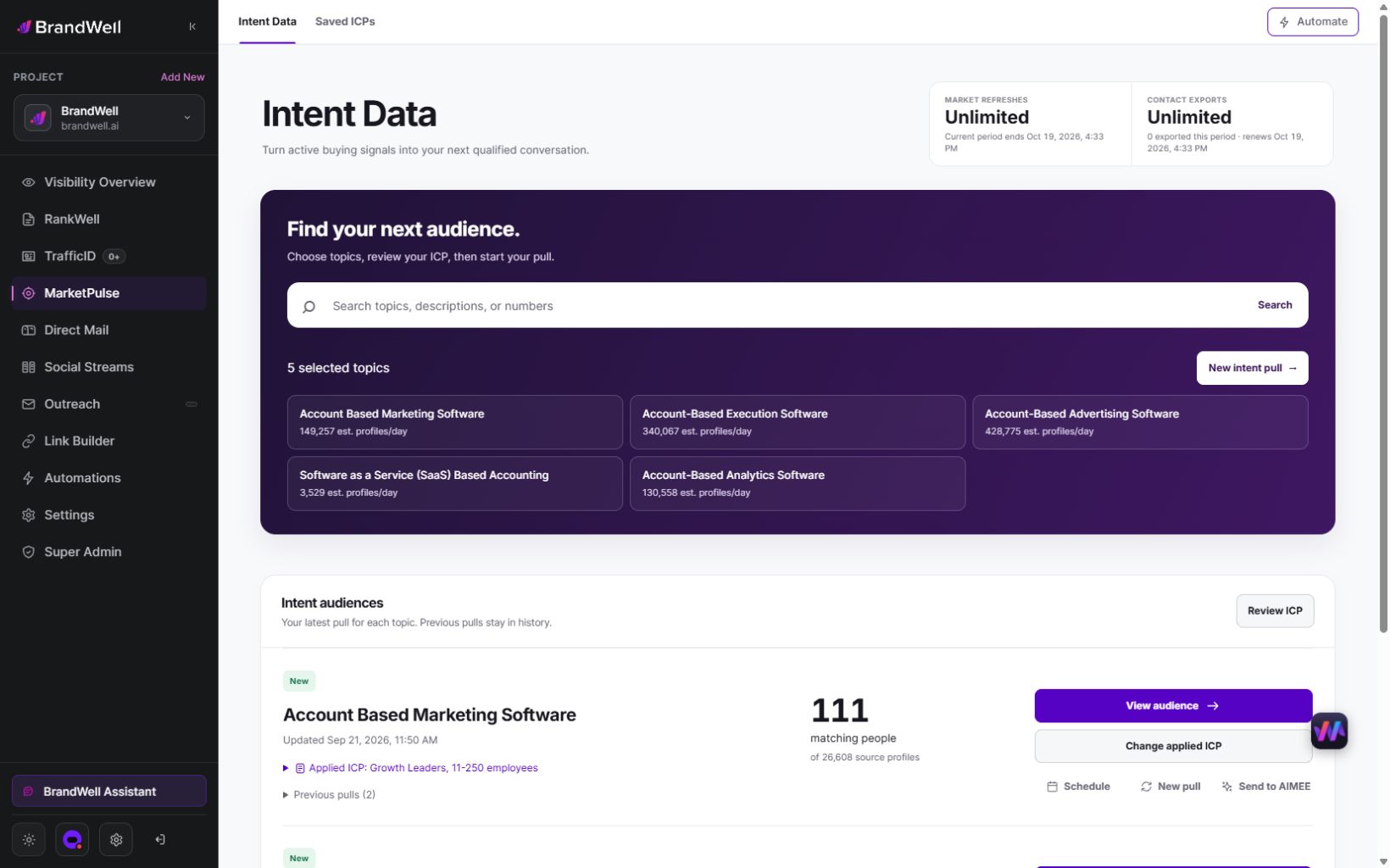
Choose a relevant topic, review the audience with your ICP and confirm available export fields before designing an import. Use stable keys supported by the actual source. Do not invent an event timestamp or a unique person ID when the supplied data does not provide it.
AIMEE can help prepare research and connected tasks through configured tools and access. Verify every proposed destination and approval before routing. Current export allowances do not establish a native Sheets connector, row-level security or white-label client workspaces.
Common questions
Is protecting a range enough to secure client records?
No. Review the actual file-access boundary and use an appropriate system if different users must not see different records.
Does an atomic Sheets update confirm a CRM handoff?
No. Record the destination’s acknowledgement and reconcile failures separately.
Should a retry create another lead?
Design and test a stable duplicate-prevention key for the approved action. Preserve unresolved writes for reconciliation.
When should the system move beyond a spreadsheet?
Move when access boundaries, concurrent writes, relationships, audit requirements or recovery needs exceed the pilot’s tested design.
Review MarketPulse’s current plans or the BrandWell product directory.
Reviewed and updated October 3, 2026.

Written by

