


On this page
- Write a signal-to-cadence eligibility contract
- Route to the right owner before choosing a cadence
- Implement the integration in controlled stages
- Use MarketPulse to prepare a qualified sales queue
- When a CSV, seller dashboard, or manual alert is better
- Budget and total-cost questions
- Measure the queue before claiming pipeline impact
- Fit, identity, freshness, and safe messaging
- Use an approval matrix instead of one global automation switch
- Turn the workflow into a recurring agency module
- Agent-ready integration instructions
- Test delivery, retries and client separation
- A queue-quality example with honest denominators
- Integration questions to settle before launch
- Put buyer intent to work with MarketPulse
Intent data sales engagement integration should decide who is eligible for a sales queue, why, for how long, under which owner, and with what approval. It should not automatically enroll every account showing research activity. A controlled design separates signal qualification from message generation and from sending, so a human can challenge identity, relevance, timing, and suppression before a prospect enters a cadence.
Who this is for: RevOps, sales operations, SDR leadership, marketing operations, demand generation, privacy teams, and agencies connecting intent signals to their CRM and sales-engagement systems. The scope is the integration contract between an eligible signal and a controlled queue – not sequence copywriting, general lead scoring, or CRM object design.
Current MarketPulse offer: intent-data plans start at $500/mo. See the product, demo, and current plans. Updated October 1, 2026.
Write a signal-to-cadence eligibility contract
A salesperson needs more than a score. The integration should deliver a compact decision record that answers: what happened, at which account, how confidently it was resolved, why the account fits, who may act, what is prohibited, and when the recommendation expires.
Define the following fields before building the workflow:
- Signal ID and evidence: source, topic or event, observation time, strength band, recent pattern, and a short evidence summary that does not expose sensitive browsing detail.
- Account identity: normalized domain, CRM account ID, parent or subsidiary relationship, identity-confidence status, and any unresolved ambiguity.
- Person eligibility: existing lead or contact ID, business role fit, contact validation, opt-out state, and relationship to the account. Company-level intent alone does not prove which employee researched a topic.
- Commercial fit: territory, segment, industry, account status, estimated value, product line, and client-specific exclusions.
- Cadence decision: proposed sales-engagement platform, approved cadence family, owner, priority, SLA, maximum contacts, and expiry.
- Suppression: customer, open opportunity, active sequence, recent touch, reply, unsubscribe, competitor, employee, wrong geography, role mismatch, duplicate, or low identity confidence.
- Approval: proposed, approved, rejected, executed, failed, paused, or expired, with reviewer and reason.
- Acknowledgement and outcome: task or cadence ID, platform response, first action, reply, meeting, opportunity, disqualification, and complaint or opt-out.
This record is the integration’s unit of work. It lets the team audit why a prospect entered a queue even if the source score changes later. It also creates a clean boundary: the intent system proposes eligibility; the sales-engagement platform executes approved work; the CRM remains the durable record of ownership and outcomes.
Route to the right owner before choosing a cadence
Ownership errors create duplicate outreach faster than poor copy does. Apply routing in a fixed order:
- Existing account owner with an active relationship, unless a documented exception applies.
- Open-opportunity owner or account team, with outbound automation suppressed by default.
- Named-account or territory owner based on the current CRM assignment table.
- Agency client-specific queue, never a shared cross-client round robin.
- Controlled unassigned queue with an SLA and escalation owner.
After ownership, evaluate cadence eligibility. Do not use an “intent” cadence merely because it exists. Match the evidence to a treatment family: first-party revisit, third-party topic research, review-site activity, hiring or technology change, or a combined signal. The message itself should reference the prospect’s business context, not claim that a named person performed an anonymous action.
A time-to-live matters. A research spike may justify attention for days or weeks depending on the product and source, not permanent priority. Expired recommendations should leave the active queue even if the underlying event remains in historical reporting.
Implement the integration in controlled stages
Stage one: observe. Send qualified signals to a private analyst queue. Compare the proposed accounts with CRM status, recent activity, and seller knowledge. Record rejection reasons using controlled values.
Stage two: create tasks, not cadences. Route approved recommendations as research or review tasks. Measure owner accuracy, SLA performance, and duplicate avoidance. No automatic prospect contact is needed to validate the integration.
Stage three: permit manual enrollment. Let an authorized rep choose from approved cadence families after reviewing the account and contact. Capture the person, cadence, and rationale.
Stage four: automate only bounded cases. If evidence shows consistent acceptance and low risk, automation may prepare or execute a narrow action – for example, add a verified existing contact to a low-volume sequence when no suppression applies. Keep a holdout and a kill switch.
Stage five: monitor acknowledgement. The source system should know whether the sales-engagement platform accepted the request, rejected it, created a duplicate, or later removed the person. A one-way “success” message is insufficient.
Acceptance testing should include wrong owners, duplicate contacts, an existing active cadence, a recent reply, an opt-out, an open opportunity, a customer, a missing email, a malformed identifier, a revoked credential, a platform rate limit, and an expired signal. Verify removals as well as additions.
Use MarketPulse to prepare a qualified sales queue
BrandWell MarketPulse: intent data starting at $500/mo. Find people researching topics relevant to what you sell, apply saved ICP filters, and review available contact details before taking action.
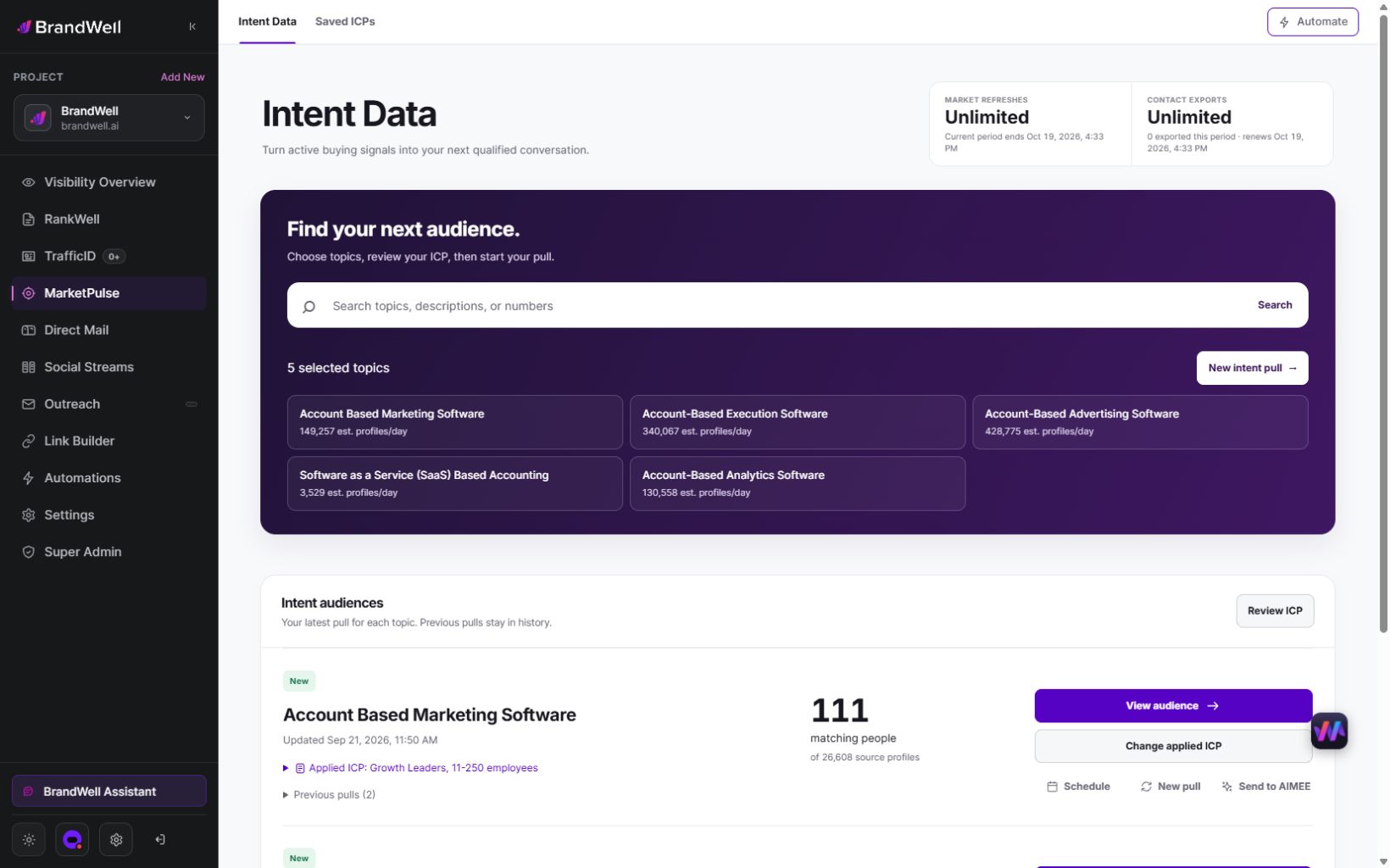
MarketPulse plans are starting at $500/mo. Verify current package scope and offers on the product page.
| Plan | Topics and refreshes | Monthly exports |
|---|---|---|
| Starter | 1 topic, weekly | 25,000 contacts |
| Growth | 3 topics, daily | 100,000 contacts |
| Scale | 10 topics, daily | Unlimited contacts |
Swipe the table to see all columns.
A pull retrieves available data from the previous 24 hours for one topic. Daily use across all included topics provides 90 Growth pulls or 300 Scale pulls in a 30-day month. Weekly Starter pulls vary by calendar month. Available audience size and contact fields vary, and audiences may overlap. Refreshes stop at the plan limit without overage charges.
- Find and qualify: search the topic catalog, save your ICP, and review the people and companies that match.
- Act on the research: export qualified contacts or prepare an Outreach or Direct Mail workflow. Connected products, channel usage, and fulfillment may cost extra.
- Get help from AIMEE: Growth and Scale include AIMEE for the initial user to research accounts and prepare the next step through connected tools.
Agencies and other service businesses can build client deliverables around their available Intent Scans and exports. Keep each client’s scope, permissions, and service fees clear. A subscription is not a promise of a white-label platform or exclusive access to a market.
Explore MarketPulse and watch the demo or compare plans starting at $500/mo. Any early-access discount is a separate, time-limited offer shown to an eligible recipient.
When a CSV, seller dashboard, or manual alert is better
A CSV works for a short pilot where an operator deduplicates records and sellers select contacts manually. A seller dashboard works when reps will consistently inspect a small number of named accounts and no automatic action is required. A manual Slack or email alert can be sufficient when the response window is not strict and one owner handles exceptions.
Use an integration when manual review misses SLAs, ownership changes frequently, multiple signal sources collide, contacts enter more than one cadence, or the team needs a reliable audit from signal to outcome. Keep human choice even after integration if signal ambiguity is high. Automation should remove clerical work, not remove judgment.
Budget and total-cost questions
Total cost includes intent data, contact validation, CRM administration, the sales-engagement platform, connector or automation tooling, implementation, permission design, sequence governance, seller training, monitoring, compliance review, and the cost of bad or duplicate outreach. Agencies also need client separation, branded reporting, support, and change management.
MarketPulse plans are starting at $500/mo. Starter includes 1 topic, weekly refreshes, and 25,000 exportable contacts per month. Growth includes 3 topics, daily refreshes, and 100,000 exportable contacts. Scale includes 10 topics, daily refreshes, and unlimited contact exports. AIMEE for the initial user is included with Growth and Scale. Compare MarketPulse plans and current offers.
Measure the queue before claiming pipeline impact
Track input quality: eligible signals, identity-confidence distribution, verified contacts, freshness, and rejected evidence. Track workflow quality: correct-owner rate, duplicate-prevention rate, suppression rate, review time, acceptance rate, platform acknowledgement, enrollment failure, and time to first approved action. Track buyer response: delivery, reply, positive reply, unsubscribe, complaint, meeting, and disqualification. Then connect commercial outcomes: opportunity creation, pipeline, wins, gross margin, and sales-cycle movement.
Use a phased rollout or holdout of equally fit and similarly signaled accounts. Otherwise the team may credit the integration for demand that already existed. Review results by signal source, topic, segment, owner, and cadence family, and report small samples honestly.
Fit, identity, freshness, and safe messaging
This integration fits teams with a defined ICP, reliable CRM ownership, approved cadence families, enough account volume to need prioritization, and managers willing to review rejection reasons. It is especially useful when a service provider needs repeatable client-specific controls.
It is not ready when lead and contact duplicates are unresolved, topics are vague, opt-outs do not synchronize, reps ignore the CRM, or leaders want fully autonomous sending before relevance has been proven. The solution is not a more aggressive sequence; it is better governance.
Use an approval matrix instead of one global automation switch
Approval should depend on the action and evidence, not a single “automation enabled” setting. Create a matrix with signal class, identity confidence, contact status, commercial relationship, proposed action, risk level, permitted role, and required approver. A high-fit account with an existing verified contact may be eligible for a seller task; the same account with only company-level research may be eligible for account review or advertising, not direct cadence enrollment.
Use at least four permission bands. Observe allows dashboards and private analysis. Prepare allows an agent to assemble research, draft a task, or propose a cadence without changing a live system. Approve and execute permits a trained user to perform the bounded action. Automate is reserved for a mature rule with monitored acknowledgement, low rejection, clear rollback, and no unresolved compliance concern. The default for new signal sources is observe or prepare.
The matrix should become stricter when the account is a customer, has an open opportunity, recently replied, belongs to a sensitive or regulated segment, has uncertain geography, or carries an ambiguous identity match. It should also distinguish adding a person from removing one: suppression and opt-out removals should propagate promptly, while enrollment requires positive eligibility.
Review permissions whenever the sales-engagement platform, CRM schema, territory model, cadence catalog, vendor feed, client instruction, or legal assessment changes. Test with a marked non-production contact and retain the platform acknowledgement. If a tool cannot show who approved an action or whether it succeeded, route through a queue that can.
Evaluate whether this approval architecture reduces review effort and routing errors. Reps receive fewer ambiguous recommendations, operations can automate clerical preparation, and managers know exactly which decision remains human. It also gives an agency a concrete service boundary: the agency may supply evidence and a proposed queue while the client controls enrollment and sending.
Turn the workflow into a recurring agency module
An agency can sell monthly signal-to-engagement operations: topic and ICP calibration, validated prospect queues, owner and suppression administration, human review, cadence handoff, exception management, and a branded outcome report. Price the data module separately from copywriting, sending infrastructure, SDR labor, and meeting-generation services. That preserves clear responsibility and margin.
Evaluate MarketPulse with a relevant topic and a defined ICP. Review matching people, source coverage, and the next action, then use BrandWell’s connected growth tools and AIMEE assistance through connected tools to prepare the work. Measure audience usefulness and operating effort before expanding the program.
Agent-ready integration instructions
Use these steps with Claude or ChatGPT for analysis and queue preparation, or translate approved actions into browser execution through AIMEE. Do not give any agent independent authority to contact prospects.
- Load approved signal sources, ICP rules, freshness windows, CRM ownership, existing opportunities, customer list, opt-outs, recent contacts, active cadences, and permitted cadence families.
- Resolve the account first. Assign a confidence status and stop ambiguous parent, subsidiary, or shared-domain matches.
- Select only existing or validated business contacts whose role fits. Never infer that a person generated an account-level signal.
- Apply suppression before routing. Record a structured stop reason for every customer, opportunity, active cadence, reply, opt-out, recent touch, duplicate, or policy exclusion.
- Create a proposed eligibility record with source, evidence summary, owner, priority, SLA, cadence family, expiry, and rule version.
- Send the proposal to a named human reviewer. Do not draft “I saw you researching” language, enroll a cadence, send a message, or change CRM ownership automatically.
- After approval, execute the limited permitted action and confirm both sales-engagement acknowledgement and CRM record. Route failures to an exception queue.
- Report acceptance, owner accuracy, suppression, first action, replies, complaints, meetings, and opportunities. Suggest changes, but require human approval and a rollback condition before modifying rules.
Start by reviewing the MarketPulse demo and plans, starting at $500/mo. Choose a relevant topic and ICP, then evaluate audience fit, available contact fields, and the workflow you will use. The first-purchase 3-day satisfaction guarantee requires no data exports and no more than 2 Intent Scans; review the current guarantee terms before testing. A short evaluation can establish fit, but cannot prove future pipeline or revenue.
Reviewed and updated October 3, 2026.

Written by

