



On this page
A keyword opportunity is a search your business can answer usefully for an audience that matters to you. It does not have to combine high volume with low competition. Improving an existing page for a specific customer question can be more valuable than publishing another broad article.
Use the workflow below to combine Search Console evidence, keyword research, and a review of the actual search results. The output is a decision and a content brief, not just a longer keyword list.
1. Start with pages already receiving impressions
In Search Console’s Search results performance report, choose a consistent period and inspect the Pages and Queries views. Filter a relevant page, then look at its queries. Record clicks, impressions, CTR, and average position together.
A page with many impressions and few clicks deserves investigation, but the cause may be its position, intent mismatch, result format, or weak search presentation. Do not assume that changing the title alone will solve it. Google’s metric definitions explain why averages need context.
2. Match the query to a real task
Describe what the reader needs to do after the search. “Payroll software pricing” asks for a different answer from “how to prepare payroll for a first employee.” A product page and a checklist may both be useful, but they should not make the same promise.
Read current results in the target market. Note the formats, questions answered, sources, and missing practical details. A forum result does not prove the keyword is easy; the reader may specifically want first-hand experiences.
3. Choose an action for the existing content
| Situation | Useful action | Check before proceeding |
|---|---|---|
| A relevant page lacks an important step | Improve that page | Keep valuable existing examples and its established URL |
| Several pages answer the same task poorly | Evaluate consolidation | Review traffic, links, and unique information before redirects |
| No page answers a relevant customer question | Create a focused page | Confirm expertise, evidence, and a useful next step |
| The query is unrelated to the business | Leave it out of the plan | Do not chase impressions alone |
Swipe the table to see all columns.
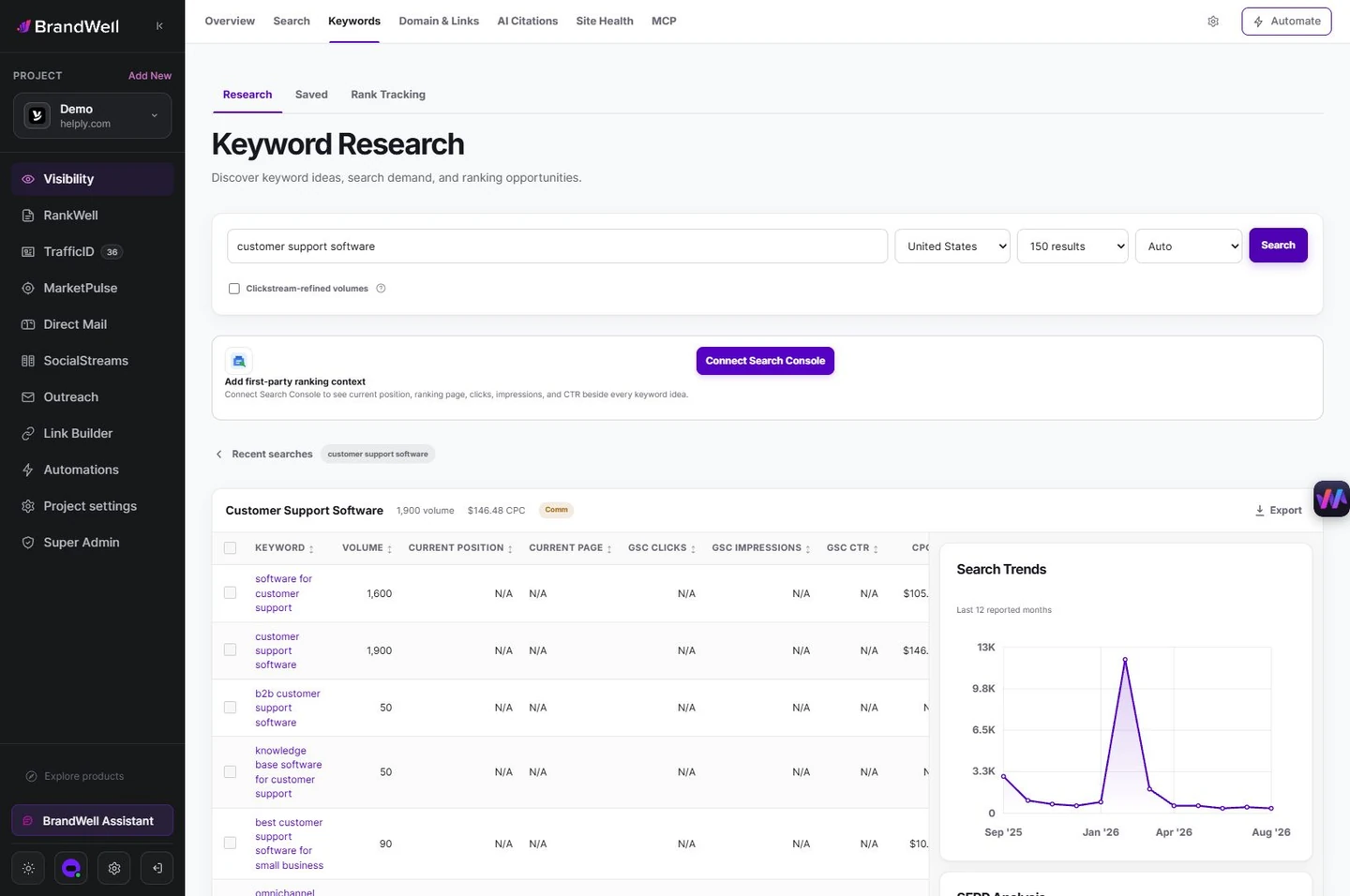
4. Research the market in BrandWell
Open Visibility > Keywords > Research, select the intended market, and investigate the topic. Review available signals and save useful ideas. Keep the source and collection date with your shortlist.
Search volume is an estimate, advertising competition is not organic difficulty, and a blank score does not establish an easy keyword. Our search-volume guide explains these distinctions.
5. Prioritize with evidence, not a magic score
For each candidate, write down the business fit, current visibility, missing information, available expertise, and estimated effort. Use a simple high/medium/low assessment if that helps the team discuss tradeoffs. Do not present an internal planning score as a Google metric.
For example, an IT provider might already have a page getting impressions for an employee offboarding checklist. Adding a real device-return process, access-removal checklist, and clear ownership could serve readers better. That is a proposed editorial improvement, not a measured ranking outcome.
6. Turn the decision into a RankWell brief
Go to RankWell > Articles > Plan before you write > Check opportunity. Enter the buyer question and review existing-content evidence. Save a content brief or prepare a draft with AIMEE once you have chosen whether to create or improve.
- Define the reader and the task.
- Specify the direct answer and important supporting steps.
- Attach reliable sources and your own examples.
- Record facts, prices, and product details that need checking.
- Choose a relevant internal link and next step.
- Review the title, description, and finished draft before publishing.
7. Evaluate the result after publication
Save the change date and compare the same page/query groups over comparable periods after recrawling. Review impressions, clicks, position, and qualified actions. Segment by device or market when the question calls for it.
If impressions rise while CTR falls, investigate whether the page started appearing for a broader set of queries. If clicks improve, confirm whether those visits produce useful actions. Avoid attributing every change to one edit when campaigns, seasonality, or other site changes happened too.
Use this process repeatedly on your best-fit opportunities. For a complementary checklist, see how to find low-competition keywords.
Reviewed and updated October 2, 2026.

Written by
Julia McCoy has contributed articles to BrandWell on content marketing, writing, and search engine optimization. This archive retains her original bylines; individual articles may be updated by the BrandWell editorial team.

