


On this page
- What lead scoring should decide
- Use TrafficID in the current BrandWell app
- Build a scoring worksheet with visible evidence
- Choose rules before choosing weights
- Combine visitor evidence with CRM history
- Worked example: review priority and missed opportunities
- Test and maintain the process
- Frequently asked questions
Lead scoring with TrafficID means adding available identified-visitor context to a qualification process you define. Separate company fit, role fit, observed activity and confidence in the record. A visit is evidence of an interaction, not proof of a purchase plan or permission to contact someone.
This guide explains how to build a reviewable worksheet, use the current BrandWell workspace and measure the decisions it produces. It does not assume TrafficID automatically calculates a particular score or identifies every visitor.
Reviewed October 3, 2026.
What lead scoring should decide
A score helps decide which eligible records merit a specific next step: research, a qualification review, a response to an inquiry or another approved action. It is useful only when the next action, evidence requirements and owner are clear.
Keep these questions distinct:
- Fit: Does the company and available role match the audience your business serves?
- Activity: What relevant interaction is actually recorded, and when?
- Confidence: Are the identity and supporting fields sufficiently clear for the intended action?
- Eligibility: Is that action permitted under the relationship, source, channel rules and suppression requirements?
A strong fit score cannot override an opt-out. A missing role should remain unknown rather than become a guessed decision-making title. A record with unclear identity can go to review even if its apparent company fit is attractive.
Use TrafficID in the current BrandWell app
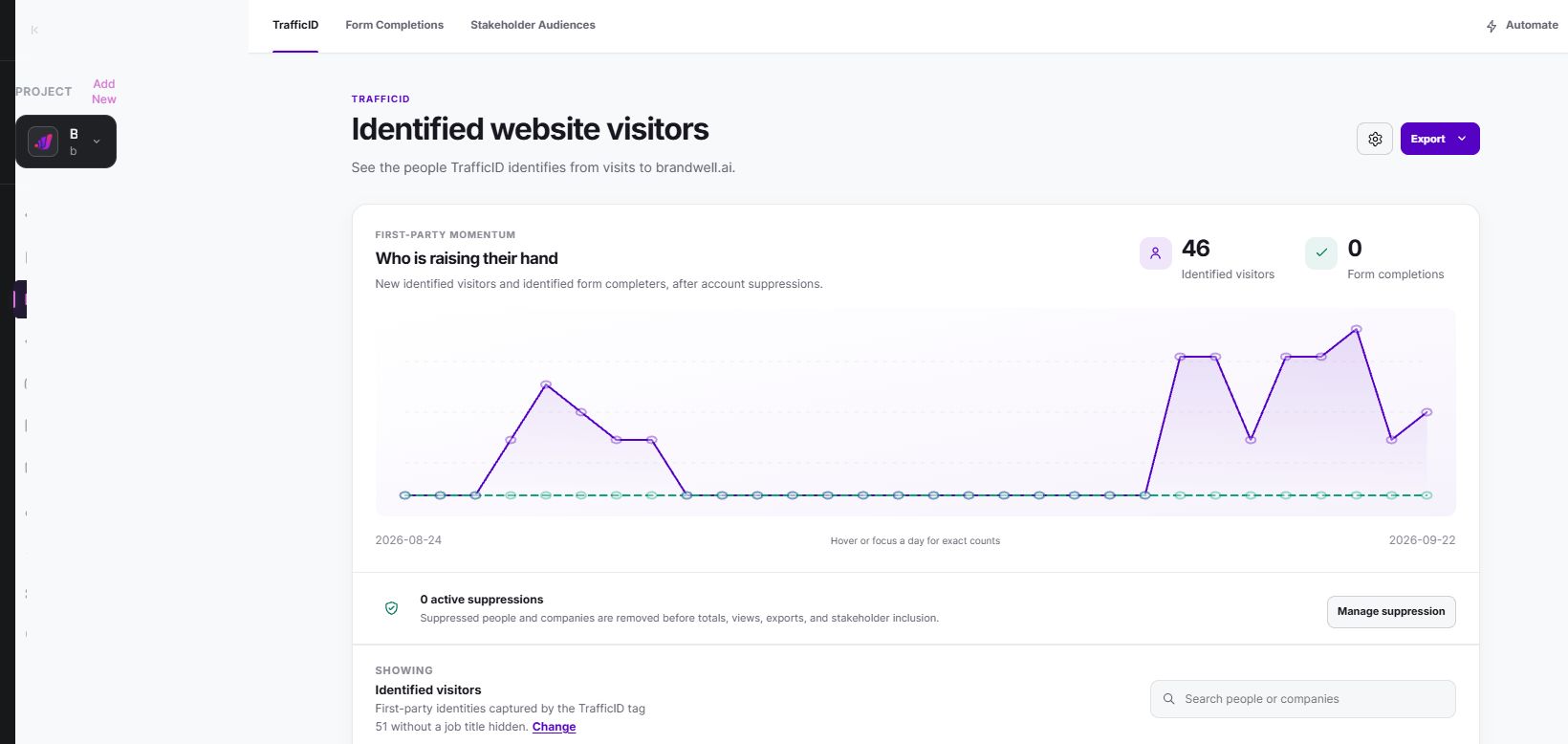
TrafficID concerns identified visitors to your own site. Review the fields present in your workspace rather than assuming each visitor has a complete profile or every possible behavior is tracked. Coverage and available contact details vary.
- Select the correct project. Open TrafficID for the intended website.
- Review setup. Check the website tag and installation status in TrafficID settings, including the intended pages and exclusions.
- Inspect Identified visitors. Review the available person, company, role and activity information, filters and suppression controls.
- Keep other views distinct. Form Completions and Stakeholder Audiences are separate views. Do not label every stakeholder as someone who visited your site.
- Prepare the next step. Bring eligible evidence into your configured qualification process. Use Automate or the relevant configured campaign only after reviewing the action and eligibility.
- Verify the destination. Confirm the correct record, owner, suppression state and result. Opening a workflow is not evidence that an action completed.
Build a scoring worksheet with visible evidence
Start with a small set of criteria the team can explain. Keep the original observation, source and timestamp alongside each decision. These are suggested worksheet fields, not a claim that every field is native to TrafficID.
- Stable record and account IDs, with a documented duplicate rule.
- Company fit: supported industry, location, size or other relevant criteria.
- Role fit: observed role, its source and whether it remains unknown.
- Activity: the event actually present, its time and relevant context.
- Evidence confidence: confirmed, uncertain, conflicting or missing.
- Eligibility and suppression: checked separately from the numeric score.
- Proposed action, responsible owner and reason.
- Rule version, review date and eventual outcome.
For example, a payroll software seller may prioritize an eligible company that fits its supported customer size and has relevant observed activity. A job seeker or an existing customer with a support question may need a different route. The same page visit can have several explanations; a high score does not resolve them automatically.
Choose rules before choosing weights
Begin with clear gates and review categories rather than an elaborate point total. For instance, separate records into “eligible for research,” “needs identity review,” “wrong fit,” and “suppressed.” Document the evidence necessary for each state.
If you add points, label the initial weights as hypotheses. A rule such as five points for company fit and two for a relevant observed event is a local choice, not a validated probability. Avoid describing a score of 70 as a 70% purchase likelihood without calibration evidence for the exact outcome and population.
Prevent double counting. Several repeated events can reflect one session, while related company fields may represent the same underlying fit criterion. Decide how repeated activity expires and how account-level observations relate to individual records.
Combine visitor evidence with CRM history
A current visit should not erase the existing relationship. Check account ownership, customer status, prior replies, open opportunities, unresolved support issues and suppression before proposing follow-up. Preserve conflicts for review rather than selecting whichever value raises the score.
Keep new observations separate from outcome labels. If a scoring rule uses information that appeared only after the qualification decision, a historical test can look artificially strong. Evaluate the evidence that was available at the decision time.
AIMEE can help research an account and prepare a next-step brief through configured connected tools. Review the brief and actual workflow result. This is not a promise of a particular CRM connector, automatic model training or unrestricted execution.
Worked example: review priority and missed opportunities
In a fictional evaluation, a rule flags 40 of 200 eligible records for review. After a defined follow-up, 12 flagged records satisfy the agreed qualification outcome and 28 do not. Precision is 12 divided by 40, or 30%. This measures the share of flagged records that met that particular outcome, not overall accuracy or sales lift.
The scikit-learn precision documentation defines this metric as true positives divided by all predicted positives. It explains the metric, not a TrafficID performance benchmark.
Suppose the other 160 records include eight additional qualified outcomes. The rule captured 12 of 20 qualified records, or 60% recall, and missed eight. A narrow queue may be manageable while still missing useful records. Review both sides of the decision rather than celebrating only the selected queue.
If review costs $400 for those 40 flagged records, that is $10 per flagged record and $33.33 per flagged record meeting the qualification outcome. These calculations exclude other costs and do not establish customer acquisition cost or additional revenue caused by scoring.
Test and maintain the process
- Define the outcome, population, observation window and review capacity.
- Evaluate records using only evidence available at the decision time.
- Track accepted, rejected, missing and suppressed records separately.
- Check the unflagged population for missed outcomes.
- Review rates by relevant segment and sample size; small groups can be unstable.
- Record rule changes, reasons and owners before the next evaluation.
A higher conversion rate among selected records may reflect selection rather than an improvement caused by the workflow. If the question is whether acting on the score creates additional outcomes, use a suitable experiment with clear assignments, consistent follow-up and contamination checks.
Retire rules that depend on stale or unavailable fields. Inspect unexpected changes in counts before relaxing the criteria. Increasing queue volume can add review work without improving useful conversations.
Frequently asked questions
Does TrafficID automatically create this lead-scoring model?
This guide describes a qualification process you define using available visitor evidence. Verify the actual configured capabilities before assuming automatic scores, weights or routing.
Does an identified visitor have permission to receive marketing?
Identification alone does not establish that. Review the actual relationship, source, channel requirements and suppression before acting.
Should missing information lower the score?
Preserve it as unknown. The appropriate route may be review or no action, depending on the required evidence. Do not invent a negative fact or fill the gap with a guessed role.
How does this differ from MarketPulse?
TrafficID concerns eligible identified visitors to your own site. MarketPulse supports topic research with ICP filtering and available matches. Keep their sources and interpretations distinct.
Watch the TrafficID demo and review current plans. For topic research, MarketPulse standard plans are starting at $500/mo. Connected products and usage depend on the selected package.
Reviewed and updated October 3, 2026.

Written by
Jeff Joyce has been helping brands grow online since the Myspace era, when custom HTML layouts were still a competitive advantage. What started in design quickly evolved into a career spanning social media, content strategy, video, agency ownership, and growth marketing. After building his own agency and testing countless AI tools, Jeff joined BrandWell with a clear focus: helping marketers understand how AI can actually improve the way they create, optimize, and scale content. Today, Jeff brings a CMO-level perspective to BrandWell's marketing strategy, blending brand positioning, content, video, customer education, and growth. His work centers on turning complex AI concepts into clear, practical marketing that helps brands move faster, create better content, and stay competitive without losing their voice.

 Farnaz Kia