


On this page
- Separate account priority from role relevance
- Five audience designs to test
- Build an audience waterfall
- Prepare the source and audience records
- Define roles, exclusions and creative
- Measure outcomes rather than audience precision alone
- Choose a workflow that fits your team
- Where BrandWell fits
- Keep these operating templates
- Common questions
Use buyer-intent signals to prioritize companies, then use job title, function and seniority to reach relevant roles within those companies. Keep those decisions separate. A company-level research signal does not establish that a particular LinkedIn member researched the topic or has purchasing authority.
This guide explains five audience designs, a practical setup checklist, measurement and operating costs. It distinguishes proposed workflows from verified platform capabilities and includes the current BrandWell products.
Separate account priority from role relevance
Account fit asks whether a company belongs in your market. Intent asks whether an observed research pattern warrants attention. Role relevance asks who should receive a particular message. None of these questions alone proves a buying decision.
Record what the signal actually represents, its source, observation date, matching method and limitations. A topic, domain association, contact record and ad audience are different objects. Avoid describing every matched member as an identified researcher.
LinkedIn’s targeting documentation distinguishes job titles, job functions and seniority. Titles primarily use member input with some rules and inference; functions and seniority map titles through LinkedIn’s taxonomy. Location is required. These facets describe platform targeting, not independently verified purchasing authority.
Five audience designs to test
1. Priority companies with function and seniority
Choose a justified account cohort, then apply the relevant role criteria. This works best when the list is large enough to deliver after filtering and the buying roles are known. Keep a fit-only comparison cohort where practical.
LinkedIn’s company-list guidance confirms that company audiences can be refined with function or seniority. Use Campaign Manager’s current CSV template and preserve its headers. Company website or LinkedIn Page URL can help matching. The documented upload minimum is 300 rows, while activation requires at least 300 matched member accounts: these are different counts.
Do not add so many filters that a workable company list becomes an unusable member audience. Check the resulting availability and forecast inside the actual account before launching.
2. Job-title clusters
Group relevant title variants by responsibility, such as operations leadership or infrastructure management. Build the list from actual customer roles, not a guessed universal list. Record included titles, exclusions and the reason for each choice.
Title-only targeting can miss people whose titles differ while their responsibilities match. Function plus seniority can be a useful alternative, but may broaden into unrelated roles. Compare the approaches using qualified outcomes and sufficient delivery rather than assuming narrower is better.
3. Buying-committee messages
Create distinct messages for the technical evaluator, operational owner and commercial approver when those roles exist in your market. A technical message might explain implementation; an operational message might describe process changes; a commercial message might show a documented cost model.
Keep the underlying offer consistent. A senior title is not proof of budget ownership, and an ad interaction is not evidence that the entire committee agrees. Avoid overfragmenting a small audience into cells that cannot deliver meaningfully.
4. Intent-tier cohorts with consistent roles
Compare defined signal tiers while keeping role filters, creative, time window and offer as consistent as possible. Write down the tier rule before seeing the results. Include observation date and expiry criteria.
Higher-scoring accounts may differ in company size, existing relationships or activity for reasons unrelated to incremental demand. Report those differences. A tier comparison is descriptive unless the experiment addresses selection effects.
5. Controlled expansion
Start with a deliverable audience, then change one material criterion at a time. For example, add an adjacent role cluster while keeping the offer and measurement rules fixed. Keep an unchanged comparison when feasible.
Record the expansion setting actually used in Campaign Manager. Do not mix a manually specified audience with an automated audience and attribute every difference to intent data. Stop or revise when the additional reach produces unacceptable cost or poor-fit responses.
Build an audience waterfall
Measure the steps from market fit to actual delivery. Keep company counts separate from member counts, forecast estimates and reached people.
- Market-fit companies: Accounts that meet your documented commercial criteria.
- Eligible upload records: Records with suitable identifiers and an approved use.
- Matched companies: Companies the platform can resolve.
- Available members: People associated with the matched audience.
- Role-filtered audience: The audience remaining after relevant targeting selections.
- Delivered reach: Members actually reached during the reporting period.
Fictional example: Of 1,000 fit companies, 800 are eligible for upload and 600 match. Eligibility is 80%; matching is 75% of uploaded companies. Separately, a forecast of 8,000 members narrows to 2,000 after role filters, and delivery reaches 1,500 members. That is 25% of the initial member forecast and 75% of the filtered estimate. These figures are illustrative and cannot be combined into a company-to-person conversion rate.
If the audience fails, locate the specific stage. Poor upload identifiers, weak company matching, excessive filtering and limited delivery need different remedies. Do not label all of them a data-quality failure.
Prepare the source and audience records
- Signal record: Topic, observation time, source and level of observation.
- Identity record: Company identifier, domain, matching basis and known ambiguity.
- Freshness rule: Update schedule, expiry and treatment of inactive signals.
- Activation record: Upload version, destination, audience settings and responsible owner.
- Outcome record: Delivery, engagement, qualified response and customer outcomes.
Review whether the specific information may be used for the proposed upload before activation. Limit access and retention to the approved purpose. Do not interpret possession of an email address or phone number as permission to contact someone.
Company lists and contact lists are separate audience methods. For contact targeting, use the currently supplied platform template and requirements; do not assume a company upload rule applies to personal contact records. This article does not promise a native BrandWell-to-LinkedIn audience sync.
Define roles, exclusions and creative
Maintain a role matrix with responsibility, title variants, likely questions, relevant proof and exclusions. Review it with sales or the client owner who knows the actual customer. Correct misleading matches rather than continually adding filters without a reason.
Use commercially justified exclusions, such as existing customers when the campaign is specifically for new-customer acquisition, employees or demonstrably irrelevant roles. Keep excluded cohorts visible in the measurement record. Follow the platform’s applicable targeting rules.
Useful creative answers a specific role’s question. Explain the implementation boundary, evidence, costs or next step plainly. Do not claim to know that the individual is researching a private issue merely because their company belongs to a priority audience.
Measure outcomes rather than audience precision alone
Freeze the audience definition and baseline before making a change. Track upload version, company match, filtered reach, spend, qualified inquiries and opportunities separately. Reconcile customer outcomes with the actual CRM records.
A matched company is not a reached member; an impression is not an inquiry; an inquiry is not a purchase. Report both the numerator and denominator for every rate. Review attribution windows and duplicate events before adding platform-reported outcomes to other reporting.
Where practical, compare the intent-assisted approach against a comparable fit-only or role-only approach. A randomized holdout can help test incrementality if the design and delivery support it. Without that, describe the result as an association rather than assigning every subsequent opportunity to the campaign.
Fictional cost example: $500 for data, $2,000 for ads and 20 hours of work at $60/hour total $3,700. Ten qualified inquiries imply $370 per inquiry; four opportunities imply $925 per opportunity. Neither number is customer acquisition cost or ROAS. These are proposed budget calculations, not LinkedIn prices or BrandWell performance benchmarks.
Choose a workflow that fits your team
A manual export and review can suit a bounded pilot. A larger operation may need a supported integration, access controls, version history, suppression updates and failure handling. Check what is actually configured rather than assuming that an API exists or a platform setting is available to every account.
Account for data subscription, media, creative, implementation, review, maintenance and reporting. Role-only targeting may be sufficient when intent signals add little useful information. Very small markets, weak identifiers or unclear buying roles may make a simpler approach preferable.
For an agency, obtain client-approved audience criteria, creative and activation scope. Separate client records and report operating costs honestly. A service package is your commercial workflow; it does not establish product resale rights or unlimited access to client data.
Where BrandWell fits
MarketPulse supports topic-based intent research. Standard plans are starting at $500/mo: Starter covers one topic with weekly pulls; Growth includes three topics with daily pulls; Scale includes ten topics with daily pulls. Data availability and fields vary, and audiences can overlap.
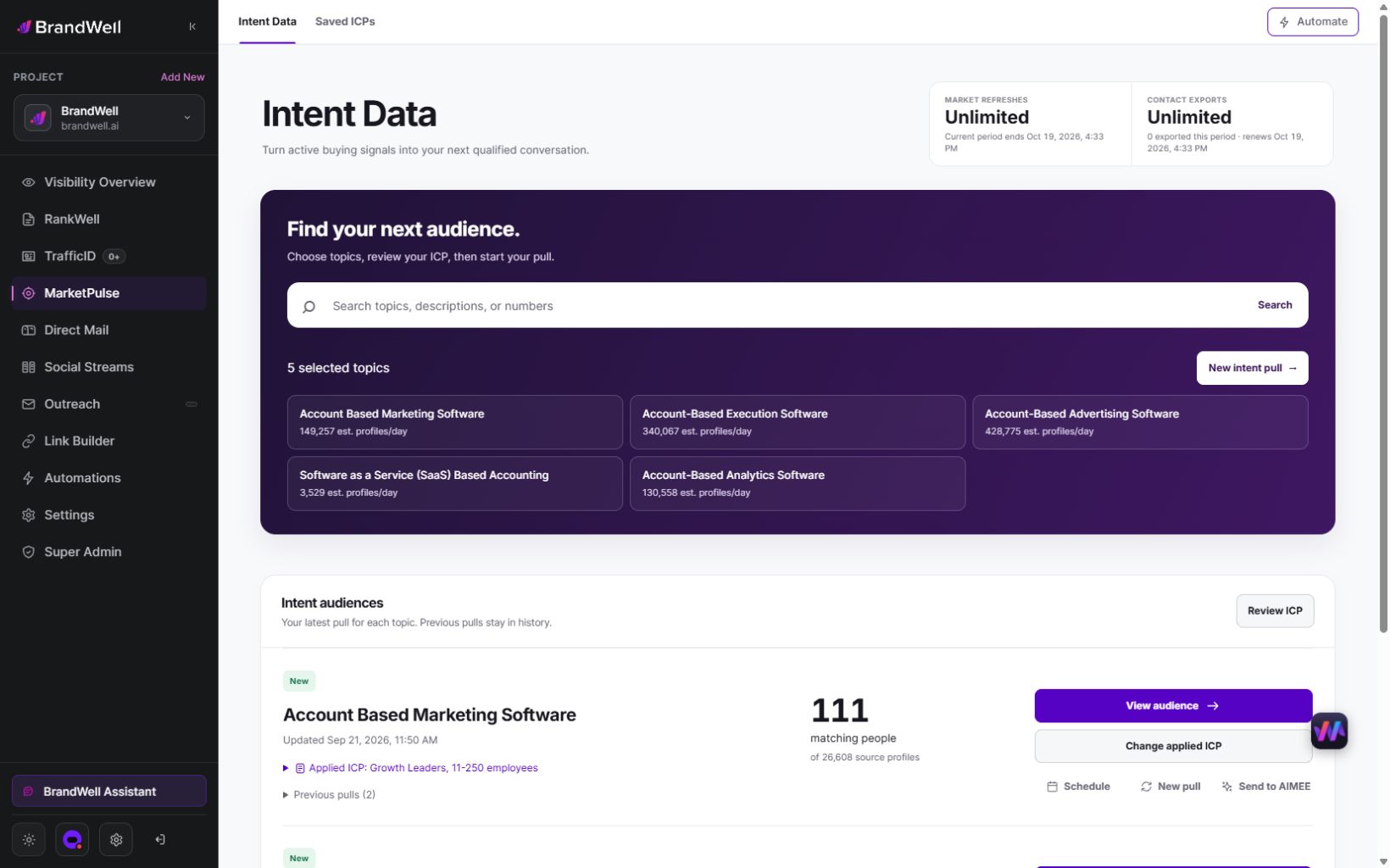
Use relevant topic findings to investigate market fit and prepare an account hypothesis. Validate the company association and proposed use before any separate ad-platform activation. MarketPulse does not establish a member’s LinkedIn identity, buying authority or a guaranteed match rate.
TrafficID concerns eligible visitors to your own website. RankWell supports content research and editorial work. AIMEE can help prepare research and connected workflow tasks, depending on configured access and tools. Confirm the destination and action before external changes.
Keep these operating templates
- Role matrix: Responsibility, title variants, message and exclusion reason.
- Audience register: Source version, criteria, upload date, availability and expiry.
- Experiment brief: Baseline, changed criterion, comparison and success rule.
- Creative sheet: Role question, approved evidence, offer and destination.
- Outcome sheet: Spend, reached members, qualified inquiries, opportunities and customers.
Give each record an owner. Recheck account fit, stale titles, missing identifiers, suppression and actual delivery as the campaign runs. Preserve enough history to explain a result without retaining unnecessary records indefinitely.
Common questions
Does company intent identify the individual researcher?
Not by itself. State whether the source observes a company, topic, contact or visitor and explain its matching limitations.
Is seniority the same as purchasing authority?
No. Confirm the actual decision process with customer evidence rather than relying only on a title category.
Should I use titles or function plus seniority?
Choose according to role variation and available reach. Test the alternatives using qualified outcomes rather than assuming one is universally better.
Why does a large list deliver to a small audience?
Check upload eligibility, matching, location, role filters and delivery separately. Company and member counts are different measures.
Can I automatically sync MarketPulse into LinkedIn?
This guide does not establish that integration. Verify an available, approved workflow and the destination’s current requirements first.
Will intent targeting improve conversion?
That needs measurement. Relevant signals can support prioritization, but do not guarantee incremental sales or justify skipping a comparison.
Explore MarketPulse or review the current BrandWell products to plan a bounded research workflow.
Reviewed and updated October 3, 2026.

Written by

