


On this page
- What makes an opportunity worth investigating?
- Start with Search Console page and query data
- Match the query to the actual page
- Interpret keyword estimates carefully
- Choose a concrete page improvement
- Original example: improving a service guide
- Use current BrandWell research and content tools
- Measure the change without promising a quick win
Low-hanging fruit keywords are relevant search opportunities where an existing page or a clearly defined new page can be improved with a manageable amount of useful work. They are candidates for testing, not guaranteed easy rankings. Start with your own search data, the reader’s task and the evidence your business can contribute.
What makes an opportunity worth investigating?
Look for a question that fits your offer, a page that can answer it well and a specific improvement you can deliver. An existing guide with impressions and an incomplete answer may deserve attention before a new article on a loosely related high-volume term.
There is no universal keyword-difficulty threshold, minimum search volume or word count that proves an opportunity is easy. A specific phrase can still have strong competition or little business relevance.
Start with Search Console page and query data
Google’s Performance report guidance explains clicks, impressions, CTR and average position. Filter the page you are evaluating, then inspect its queries, countries and devices over a defined period. Keep the settings recorded for comparison.
Use impressions to investigate visibility, not to estimate qualified demand automatically. A low CTR can reflect query fit, position and the displayed result as well as title wording. Average position summarizes observations; it is not a fixed place every searcher sees.
Match the query to the actual page
Ask whether the reader wants instructions, a product explanation, a comparison or an existing destination. Check the live results for that task and the page types shown. Use this to assess fit, rather than copying another article’s outline or claims.
If your page addresses a different task, a title change alone may not be enough. Improve its actual answer or choose a more suitable page. Avoid creating several nearly identical articles simply to cover wording variants.
Interpret keyword estimates carefully
Record the research tool, date, location and settings with any estimate. Use estimates to prioritize investigation, not as a promise of visits. Do not equate an advertiser competition metric with organic ranking difficulty.
Google’s Keyword Planner guidance explains the assumptions behind its statistics and forecasts. Ad planning data and organic search outcomes are different measurements.
Choose a concrete page improvement
- Answer the main question clearly near the beginning.
- Replace obsolete instructions and unsupported statistics.
- Add a real example, demonstration or useful decision criteria.
- Give sections descriptive headings that match their content.
- Connect relevant pages with useful internal links.
- Make the title and search description accurately represent the page.
Describe images according to what they show. Do not force a keyword into unrelated alt text. Keep a working URL unless there is a reason to change it and an appropriate migration plan.
Original example: improving a service guide
A fictional IT provider has a guide about preparing for an office move. Search data shows the page appears for questions about a network-migration checklist. The guide talks about the provider but barely explains the preparation process.
The team adds a reviewed checklist covering inventory, responsibility, timing and rollback planning, then links to the relevant service page. It labels the example as fictional and does not claim a ranking or conversion result before measurement.
Use current BrandWell research and content tools
Use the Keyword Research workspace within Visibility to investigate relevant opportunities. Review the estimates and query context, then prepare an approved brief for RankWell.
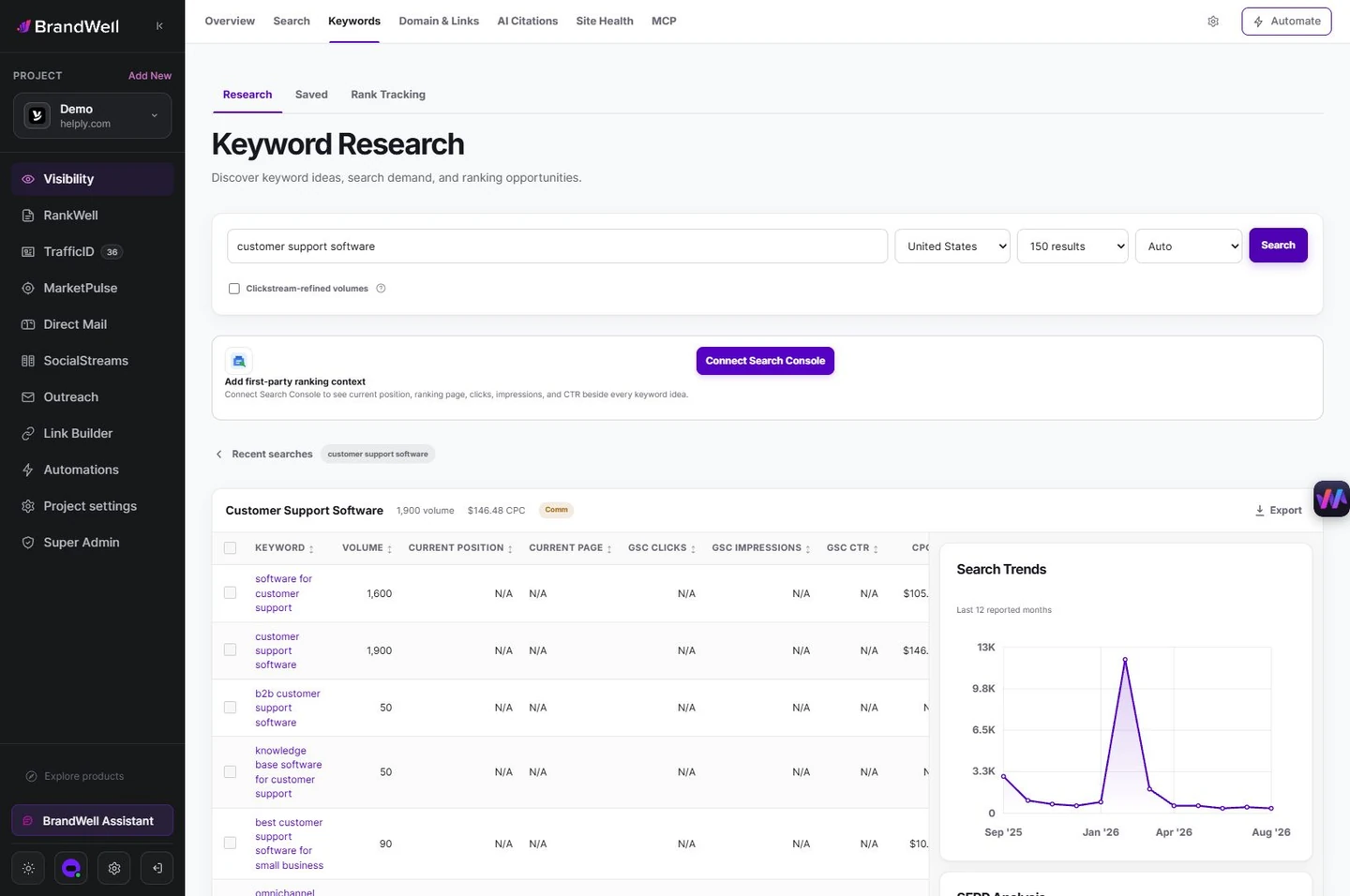
Review the draft’s sources, original examples and search preview in RankWell. AIMEE can help prepare approved work through configured tools. Keep the finished page accurate and useful rather than optimizing to a score alone.
Measure the change without promising a quick win
Save the original page and search baseline, record the edit date and compare equivalent periods. Inspect query mix, devices and seasonality before attributing a change to the edit. Search visibility and business outcomes need separate measures.
Google’s people-first content guidance emphasizes usefulness and reliable information. A fuller answer can be worthwhile even when a new ranking or traffic increase has not yet been demonstrated.
Reviewed and updated October 2, 2026.

Written by
Julia McCoy has contributed articles to BrandWell on content marketing, writing, and search engine optimization. This archive retains her original bylines; individual articles may be updated by the BrandWell editorial team.

