


On this page
Personalize email around a verified need, an actual request or relevant business context. Visitor insights can help you research that context, but identification does not establish subscription, buying readiness or permission to contact through every channel. Confirm eligibility before preparing a campaign.
Useful personalization explains why the message matters. It does not need to announce that you observed someone browsing, invent a relationship or promise results you cannot support. Keep the sender, subject, offer and next step accurate.
What counts as reliable personalization data?
| Source | Useful context | Avoid assuming |
|---|---|---|
| Explicit inquiry | The person’s stated question or requested resource. | Permission for unrelated campaigns or other channels. |
| Subscription preferences | The topics and frequency the subscriber chose. | Every subscriber wants a sales call. |
| Customer record | Verified product, plan or implementation context. | Old details and preferences remain current. |
| Identified website activity | Available visit and profile context for review. | A visit proves a specific pain point or purchase stage. |
| Added stakeholder | A possible relevant role at an account. | The stakeholder was the website visitor. |
| Public business information | Verified company offering or professional role. | Public availability establishes channel permission. |
Swipe the table to see all columns.
Keep the source, date, confidence and permitted use with the record. When information is missing, use a neutral fallback or skip the personalization. Do not generate a claim simply because a template field requires text.
Eight steps to prepare a personalized campaign
1. Define the purpose and eligible audience
Choose one useful objective, such as answering an inquiry or offering a relevant implementation resource. Review the audience’s actual permissions, location, relationship and applicable channel requirements.
The FTC’s CAN-SPAM Rule concerns commercial email and its primary purpose. Personalization does not create a compliance exemption. Obtain appropriate advice for the requirements that apply to your audience and message.
2. Segment by meaningful differences
Use verified needs, product context or selected preferences. Keep opt-outs, existing customers and active conversations in the appropriate exclusion or handling rules. A page visit can support research without defining a sales stage.
3. Check the sending workflow
Confirm sender identity, domain setup, approved audience, suppression and reply ownership. Use a test record to verify the destination and merge fields. Do not assume an export automatically synced into a campaign.
4. Write dynamic sections with fallbacks
Prepare a short, relevant paragraph for a known use case. Use plain wording when company or role information is unavailable. Check every variant for factual accuracy and awkward grammar.
For example, replace a verified service description with “digital marketing services” when appropriate; otherwise use “your business.” Do not fill a missing first name with a company name or expose raw template tags.
5. Recognize genuine milestones
Use an actual subscription anniversary or completed implementation when relevant. Do not infer birthdays or celebrate a browsing threshold as though it were a customer relationship. Keep the message useful rather than overly familiar.
6. Recommend a fitting next step
Offer a guide, demonstration or conversation tied to the known problem. Verify current product facts and eligibility. A recommendation is a proposal to evaluate, not proof that the product will produce a particular result.
7. Re-engage selectively
Check the previous interaction, loss reason and contact preferences. Use an honest, concise question and make declining easy. Avoid fake reply threads, invented deadlines and repeated messages after a stop request.
8. Test and measure
Preview desktop and mobile versions, links, fallbacks, exclusions and reply routing. Define the outcome before comparing subject lines or copy. Review qualified replies and actual business outcomes alongside delivery and engagement.
Use TrafficID as a review input
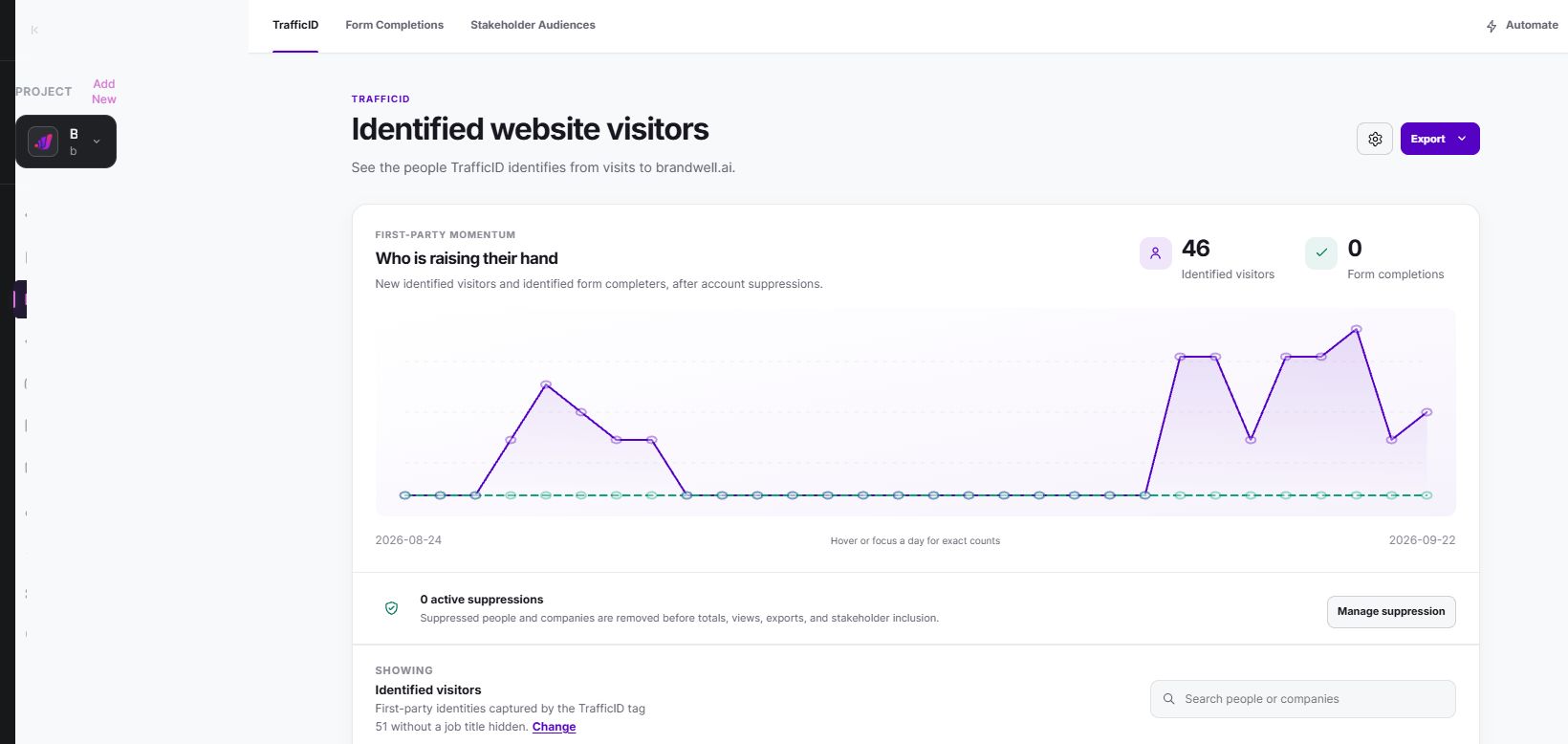
- Select the intended project and verify the website tag and exclusions.
- Review identifiable visitors and available activity. Coverage and fields vary.
- Distinguish the visitor from a form submitter or an added stakeholder.
- Check fit, source permissions, suppression and channel eligibility.
- Approve a relevant export or configured follow-up with a named owner.
- Confirm destination receipt, responses and actual outcomes.
AIMEE can help prepare research and draft messages through configured tools. Review the audience, claims and final action before execution. An available or enriched mobile number is not SMS opt-in.
For available topic research beyond your own website, MarketPulse plans are starting at $500/mo. Keep topic research separate from website activity and explicit requests. A matching topic does not prove every account contact researched it.
Eight email templates to adapt after eligibility review
These are writing examples, not complete compliance templates or permission to contact. Replace bracketed fields with verified facts. Add the sender details, required disclosures and opt-out mechanism appropriate to the message. Never invent the event, referral, trial or relationship referenced.
1. Relevant professional context
Subject: A resource on [verified business task]
Hi [First name],
Your public work on [verified topic] relates to a guide we prepared on [specific task]. It covers [useful detail]. Would that resource be useful?
2. A clear use case
Subject: Reviewing [specific workflow]
Hi [First name],
[Company]’s published offering includes [verified service]. Our [current capability] may be relevant to [specific task]. I can share a short walkthrough so you can assess the fit. Interested?
3. Reply to an actual inbound inquiry
Subject: Your question about [requested topic]
Hi [First name],
Thanks for asking about [actual question]. [Accurate answer or resource.] If useful, we can review [relevant next step] together. What would you like clarified first?
4. Revisit a previous conversation
Subject: Is [previously discussed task] still relevant?
Hi [First name],
When we spoke in [verified month], you mentioned [actual need]. We now have [verified relevant update]. If that task is still on your list, would a short overview help? If priorities changed, no problem.
5. Answer a pricing request
Subject: Your pricing question
Hi [First name],
Thanks for requesting pricing for [product]. The current offer is [verified price and conditions]. The key allowance for your proposed workflow is [verified allowance]. I can help compare the options if you share [necessary detail].
6. Help an actual trial user
Subject: Getting started with your [product] trial
Hi [First name],
Thanks for starting your trial. Here is the setup guide: [working link]. If you are working on [stated task], begin with [verified first step]. Reply if you need help or would prefer a walkthrough.
7. Share a product demonstration
Subject: A walkthrough of [specific task]
Hi [First name],
We prepared a demonstration of [verified workflow], including [useful step] and [relevant limitation]. If that matches your current work, I can send the link. Would that be helpful?
8. Follow a genuine introduction
Subject: Following [referrer]’s introduction
Hi [First name],
Thanks to [referrer] for the introduction. They mentioned [verified reason shared with permission]. I can help you evaluate [specific task]. Would you prefer a short resource or a conversation?
If the only context is a website visit, do not replace these facts with a fabricated inquiry, trial or referral. Determine whether a permitted and relevant outreach route exists before drafting.
Measure personalization beyond opens
Fictional example: 100 eligible messages are delivered, ten receive human replies and four replies meet the agreed qualification criteria. Reply rate is 10% of delivered messages; qualified-reply rate is 4% of delivered messages, or 40% of replies. None is a purchase conversion rate.
Keep delivered messages, unique recipients, automated replies and repeated replies distinct. Treat tracking data as imperfect evidence. A click or open does not establish who made the purchase or whether personalization caused it.
When comparing variants, keep audience, timing, offer and outcome definitions appropriate to the test. Record sample size and unknown outcomes. Review complaints, opt-outs and incorrect personalization as well as favorable responses.
Frequently asked questions
Is adding a first name enough?
No. Relevance comes from the task, accurate context and useful next step. A neutral greeting is better than an incorrect name.
Can I say “I saw you on our pricing page”?
Do not assume the available record supports that personal claim. Use verified context and avoid unnecessary behavioral detail. Added stakeholders may never have visited.
Can visitor data populate my subscriber list?
Identification and subscription are different sources. Review eligibility and preserve the permission actually given before any enrollment.
Should every email be AI-generated?
AI can help organize research and prepare drafts. A person should verify facts, permissions, fallbacks and the final message before sending.
Where can I see the current workflow?
Watch the TrafficID demo to review identifiable website activity and its place in a broader growth process.
Reviewed and updated October 6, 2026.

Written by
Jeff Joyce has been helping brands grow online since the Myspace era, when custom HTML layouts were still a competitive advantage. What started in design quickly evolved into a career spanning social media, content strategy, video, agency ownership, and growth marketing. After building his own agency and testing countless AI tools, Jeff joined BrandWell with a clear focus: helping marketers understand how AI can actually improve the way they create, optimize, and scale content. Today, Jeff brings a CMO-level perspective to BrandWell's marketing strategy, blending brand positioning, content, video, customer education, and growth. His work centers on turning complex AI concepts into clear, practical marketing that helps brands move faster, create better content, and stay competitive without losing their voice.

 Farnaz Kia