


On this page
- Sales leads, prospects and opportunities
- Where sales leads can come from
- How teams classify leads
- A practical lead-management process
- An original qualification example
- Use content to answer the next question
- Review website audiences with TrafficID
- Configure helpful follow-up
- Protect and govern lead information
- Measure quality, cost and time
- Common questions
A sales lead is a person or organization your business has recorded as a potential customer for a defined follow-up or qualification process. Teams use the term differently, so document what qualifies as a lead in your system. A contact record, website visit, request and sales opportunity are different kinds of evidence.
A lead is not a guaranteed buyer. The useful work is establishing product fit, understanding the need, checking whether contact is appropriate and assigning a relevant next step.
Sales leads, prospects and opportunities
- Contact: a person or company record. It may contain no evidence of interest.
- Lead: a potential customer selected for a defined qualification process.
- Prospect: often a lead with an established fit or reason for a sales conversation. Define this locally.
- Opportunity: an active potential deal with a stated need, owner and next action.
- Customer: a completed purchase or agreement under your reporting policy.
Do not count a database import as generated demand. Likewise, opening an email, viewing pricing or appearing in an identified-visitor record does not establish a budget, buying authority or permission for every contact channel.
Where sales leads can come from
Sources include explicit inquiries, product trials, event conversations, referrals, content responses and appropriately permitted research. Each source needs a different interpretation.
- Direct inquiry: respond to the request and determine fit.
- Newsletter signup: deliver the requested program; do not assume a sales meeting was requested.
- Referral: confirm the context and whether an introduction is expected.
- Website activity: investigate relevant evidence without treating every visitor as a lead.
- Topic research: review audience fit and available signals before deciding on an eligible action.
- Existing customer: distinguish a new expansion opportunity from acquisition of a new customer.
How teams classify leads
Labels such as cold, warm and hot are shorthand. Make their definitions explicit rather than assuming that every team uses them alike. A pricing question can come from a student or existing customer as well as a ready buyer.
Information-qualified lead (IQL), marketing-qualified lead (MQL) and sales-qualified lead (SQL) are also operating labels. Set the criteria and ownership:
- IQL: information interest under your policy, with no confirmed buying need.
- MQL: the marketing team’s threshold for fit and relevant engagement.
- SQL: the sales team’s accepted threshold for a sales conversation or investigation.
Separate qualification from enrollment. Someone can match the target customer profile while being ineligible for a particular email, phone or SMS campaign.
A practical lead-management process
- Attract or identify: connect the offer to an appropriate audience through useful content, a campaign, referral or permitted research.
- Record: preserve the source, timestamp, request and available evidence. Deduplicate without losing the original source.
- Check eligibility: apply channel permissions, suppression and relevant restrictions before activation.
- Qualify: assess the need, supported use case, buying process and timing. Keep unknown fields unknown.
- Assign: give the record an owner, a specific next action and a due date.
- Respond: answer the actual question and explain fit and limitations.
- Close or pause: record the purchase, disqualification, opt-out or agreed later follow-up.
A scoring model can help prioritize review, but a score is not confirmation of intent. Check whether its inputs are current and meaningful. Do not let repeat page loads or automated email activity manufacture a high score.
An original qualification example
Consider a hypothetical IT provider offering office migration support. These invented records illustrate decisions, not customer results:
- Record A: a business requests a migration consultation and states its location and schedule. Review whether the provider supports that location, project scope and date, then respond.
- Record B: an identified visitor views the migration guide. That is an observed activity signal with uncertain need. Research fit; do not mark a requested consultation or SMS consent.
- Record C: a current customer asks for help with another office. Create an expansion inquiry with the account owner.
- Record D: a newsletter subscriber asks to unsubscribe. Apply suppression, even if a prior activity score was high.
For each record, store a short explanation of the decision, the evidence used and the next owner. That is more useful than a color-coded temperature with no definition.
Use content to answer the next question
A public guide can explain the problem. A product page can clarify the solution, current pricing and requirements. A demonstration can show the process. Choose the material that helps the actual decision rather than forcing every lead through the same sequence.
Use Visibility for research and RankWell for the brief, draft and editorial review. Cite supported facts, use current product screens and check the destination after publishing. Content can support a conversation; it cannot promise a fixed number of leads per post.
Review website audiences with TrafficID
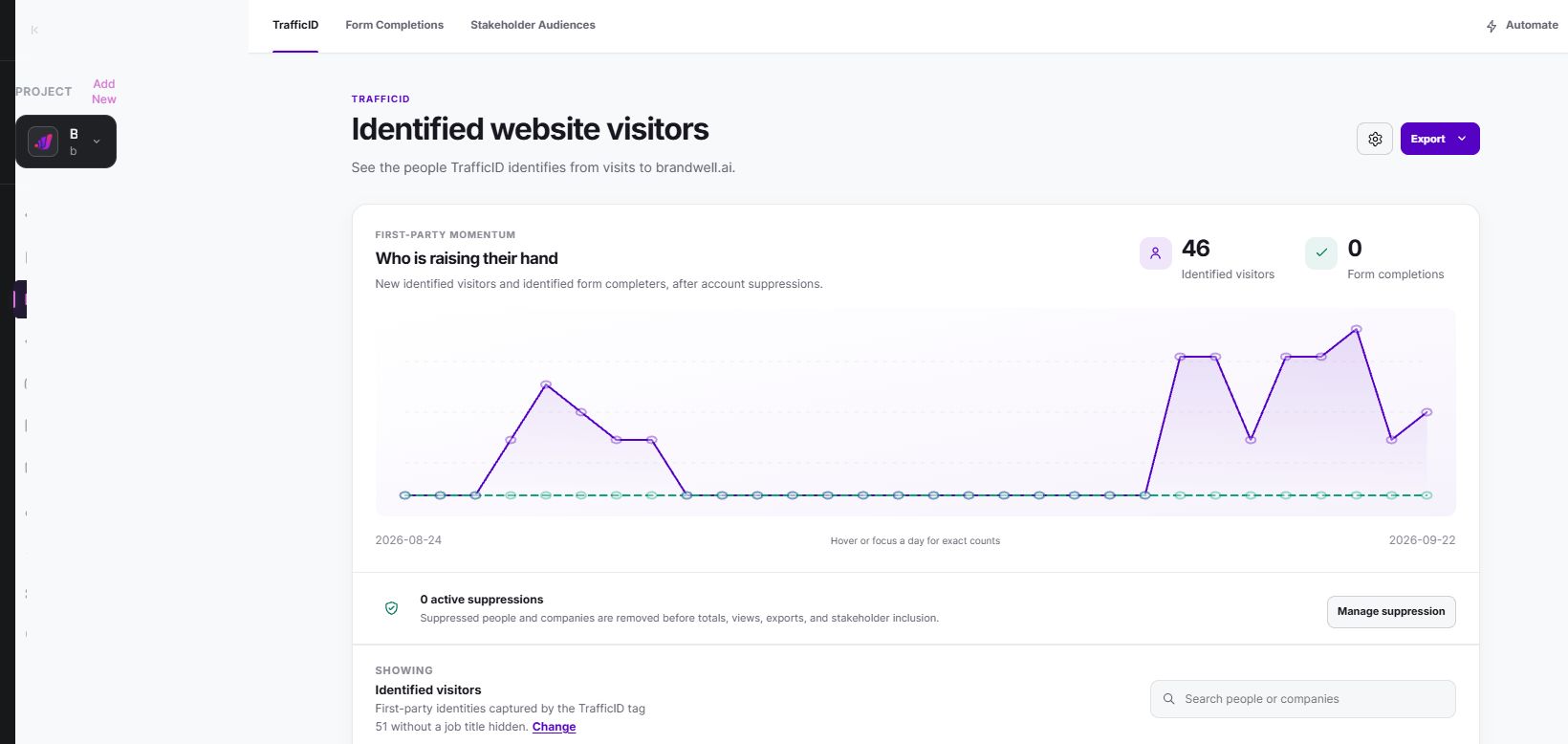
TrafficID surfaces identified website visitors and available person, role, company, source and activity fields. It does not identify every visitor or guarantee that each field is available. An identified visit remains evidence to review.
- Select the intended project and open TrafficID.
- Review the website tag and installation status in settings.
- Install the project’s tag on the intended pages and check exclusions and applicable tracking choices.
- Review Identified visitors, filters and suppression controls.
- Keep Form Completions and Stakeholder Audiences distinct from identified visits.
- Use Automate or the configured campaign workflow only after reviewing recipient eligibility.
For research beyond your site’s audience, MarketPulse plans are starting at $500/mo. Available topic data covers the previous 24 hours for a pull; counts and contact coverage depend on topics and filters, and audiences can overlap. Topic activity is not an inbound request or a consent record.
Configure helpful follow-up
In BrandWell Automations, define the trigger, eligible recipients, wait conditions, suppression checks and owner. AIMEE can help carry approved work through configured tools; available execution depends on those tools and approvals.
After a requested consultation, a useful follow-up summarizes the agreed need, answers outstanding questions and identifies the next step. Do not invent prior conversations, customer results, scarcity or deadlines. Pause when the person declines or when the proposed use case does not fit.
Protect and govern lead information
Determine the rules for the person’s location, the data use and the contact channel. The ICO’s UK lawful-basis guidance describes multiple bases for processing. Consent is not the only basis, and the appropriate basis depends on purpose and circumstances. This UK reference does not establish eligibility in other jurisdictions.
Processing eligibility, tracking choices and permission for a communication are separate checks. Do not treat a supplied or enriched phone number as SMS opt-in. Record the actual affirmative choice and program when consent is required.
- Minimize: collect the fields needed for the defined purpose.
- Restrict access: assign roles and protect accounts and exports.
- Preserve context: keep source, date, permissions and suppression with the record.
- Retain deliberately: assign a retention and deletion process.
- Check destinations: review what connected tools receive and how withdrawals propagate.
Removing a name or hashing an identifier does not automatically make a record anonymous. Do not promise anonymity merely because a field is masked.
Measure quality, cost and time
Track records, qualified conversations, opportunities and customers separately. Include production, distribution and follow-up costs in your chosen cost measure.
In a hypothetical campaign, 100 eligible inquiries produce 25 qualified conversations and five customers. That is a 25% inquiry-to-qualified-conversation rate and a 5% inquiry-to-customer rate. With $2,000 total campaign costs, cost per inquiry is $20 and cost per customer is $400. These figures are examples, not a BrandWell benchmark or forecast.
Measure time from a consistent starting event to a defined outcome. Review the median and distribution for comparable closed records, and report still-open records separately. There is no universal three-to-six-month sales cycle for all B2B businesses.
Common questions
Is an identified visitor automatically a sales lead?
No. Identification provides available evidence. Your business must assess fit, define the lead threshold and check the permitted next action.
Can enrichment create consent?
No. Additional contact fields do not establish a person’s affirmative permission for a communication program.
How quickly should a lead buy?
Timing depends on the need, product, buying process and agreed schedule. Use your own comparable records, and avoid pressuring someone based on an assumed timetable.
Reviewed and updated October 3, 2026.

Written by

