


On this page
- 1. Define the audience and useful outcome
- 2. Audit the existing library and search baseline
- 3. Research questions in Visibility
- 4. Turn the question into a brief and reviewed draft
- 5. Make the page’s promise clear
- 6. Use images and media that help the reader
- 7. Resolve technical barriers and mobile problems
- 8. Distribute the work and maintain useful relationships
- 9. Plan a calendar the team can maintain
- 10. Measure the plan without overstating the result
- Frequently asked questions
An SEO strategy is a prioritized plan for helping the right audience discover useful pages through search. It connects customer questions, content, technical access and measurable business outcomes. Start with what the business needs, identify the most important gaps and assign work that your team can publish, verify and maintain.
This guide covers research, editorial planning, on-page review, technical checks, distribution and measurement. The goal is a workable plan rather than a promise that a particular checklist will deliver a ranking.
1. Define the audience and useful outcome
Write down whom the site serves and what a successful visit helps them do. An informational article, product page, local service page and support guide can require different formats and calls to action.
Original hypothetical example: a bakery wants more qualified celebration-cake inquiries. The team identifies questions about order lead time, serving sizes, delivery area and dietary requests. Its useful outcome is an inquiry containing enough information to prepare a quote, rather than visits from anyone searching for recipes.
Define the outcome before choosing keywords. A large search-volume estimate is not enough if the page cannot serve those readers or the business cannot fulfill their request.
2. Audit the existing library and search baseline
Inventory live URLs, page purpose, owner, last substantive review, product relevance and important technical issues. Identify useful pages that need correction, overlapping pages serving the same question and material about products you no longer offer.
Use Search Console for search impressions, clicks, CTR and average position. Use site analytics for behavior and configured conversion events after a visit. Do not describe Google Analytics as the source of your organic keyword rankings.
Prioritize groups with a concrete problem:
- Impressions but few clicks: inspect the query, visible result and whether the page’s promise matches the search.
- Visits but weak qualified outcomes: review audience fit, the answer and the next step.
- Useful pages with technical barriers: investigate access, rendering, indexing and links.
- Outdated product claims: correct them before promoting the page.
- Missing customer questions: create content only where the gap is real.
Compare like periods and segments. Device, country, query mix, seasonality and search appearance can change CTR. A sitewide query export does not establish which query belongs to every individual page.
3. Research questions in Visibility
Use the keyword-research workflow in Visibility to investigate relevant searches and opportunities. Treat the metrics as inputs to editorial judgment, then review the actual search results and the question a useful page must answer.
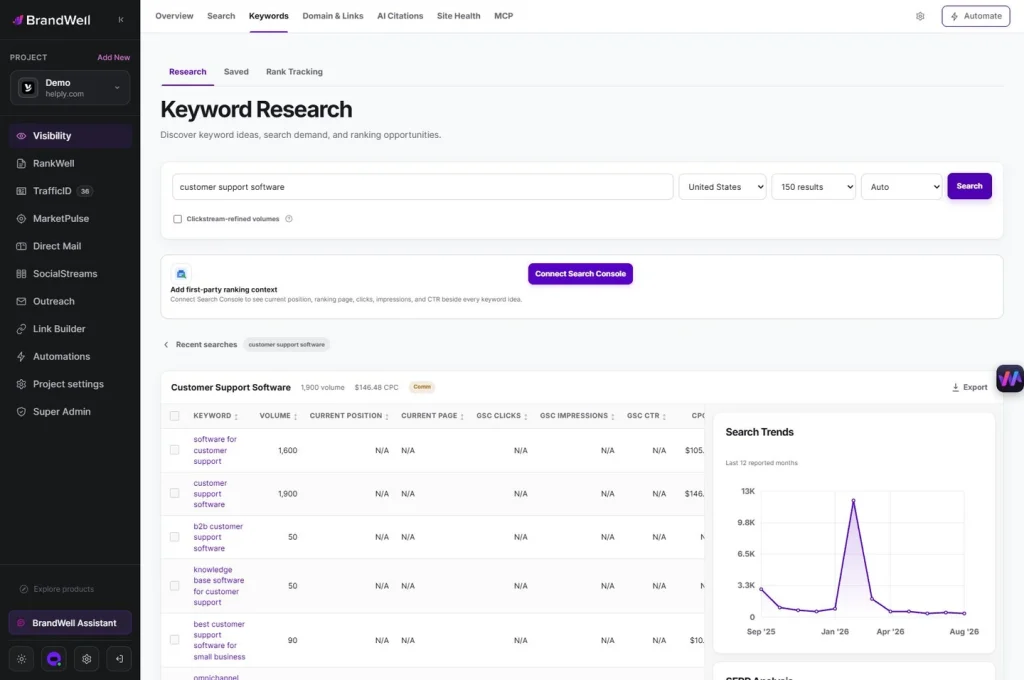
For the bakery example, separate a cake-ordering question from a recipe question. The ordering page should explain supported options and practical requirements. A serving-size article can help the same reader make a decision without duplicating the entire ordering page.
Record the intended audience, primary question, existing URL if any, evidence required and proposed next step. Group related questions for navigation and editorial planning; do not assume that building a topic cluster automatically establishes authority.
4. Turn the question into a brief and reviewed draft
Use RankWell in the current BrandWell portal to prepare and review content from the brief. The Content Hub supports article, strategy, queue and calendar work. Bring verified product information, source links and original material into the draft.

A useful brief specifies:
- The reader’s question and scope of the answer.
- What the company can actually provide.
- Sources, dates and limitations for factual claims.
- Original examples, screenshots or instructions that add value.
- Related pages and a relevant next action.
- The reviewer and publication requirements.
Google’s explanation of E-E-A-T adds experience to its quality-rater framework. It also explains that rater guidelines do not directly influence ranking. Use real expertise and experience honestly; do not invent credentials, customer results or first-hand testing.
Review generated content for factual accuracy, source use and usefulness. A score or generated draft is a starting point for editorial review.
5. Make the page’s promise clear
Write a descriptive title and main heading that reflect the actual content. The reader should quickly understand what the page will help them do. Avoid repeating the same phrase across every heading or using a year the body no longer supports.
Google’s title-link guidance explains that result titles are generated automatically from several sources. A page’s title and visible heading influence that presentation; they do not give you complete control of the displayed result.
For the bakery, “Celebration Cake Orders: Lead Times, Sizes and Delivery” makes a different promise from a broad “Best Cakes” headline. The page must actually explain those ordering details.
Write an accurate summary for the meta description. Use headings to organize the answer, descriptive internal links to relevant next pages and a readable URL. Do not change an established URL solely to insert a keyword without considering redirects and existing links.
6. Use images and media that help the reader
Choose screenshots, diagrams or photographs that explain the specific task. Keep current product images current, remove broken embeds and replace unreadable graphics. Identify illustrative examples rather than presenting them as actual customer results.
Check image dimensions, file weight, responsive behavior and descriptive alternative text. Reserve space for images so the page does not jump during loading. A large graphic that adds no useful information can make the mobile page slower and harder to read.
Use video when it helps demonstrate the task. Do not add it simply to increase time on page. Test the page with media unloaded as well as loaded, and make essential instructions available in text.
7. Resolve technical barriers and mobile problems
Review important pages for successful responses, intended indexing, canonical URLs, usable navigation, working links and visible content after rendering. Test templates as well as individual pages; a template problem can affect the whole library.
Google’s robots.txt guidance distinguishes crawl control from keeping a page out of search. A crawl block is not a reliable replacement for an indexing instruction or access protection.
For mobile, test readable text, menu use, forms, tables, tap targets, image fit and horizontal overflow. Inspect slow requests, unnecessarily large assets, blocking code and third-party embeds. Use performance reports to locate a problem, then verify the affected interaction after the change.
Structured data should accurately represent the visible page and use a currently supported feature. Do not assume that adding FAQ markup will produce a FAQ rich result. Check the current feature documentation and validate the implemented markup.
8. Distribute the work and maintain useful relationships
Share approved content where it answers a real audience question: a customer email, a sales follow-up, a relevant social post or a partner resource. Match the format to the audience instead of placing promotional links everywhere.
Useful original resources can support editorial outreach. Do not promise a placement, pay for ranking credit or treat every directory listing and brand mention as a guaranteed search benefit. Review the destination, relevance and any required disclosures.
For a local business, keep supported services, location, opening hours and contact information accurate on the website and applicable business profile. Build pages around actual customer needs and service areas rather than repeating a template for places you do not serve.
9. Plan a calendar the team can maintain
Assign owners for research, drafting, review, publishing and follow-up. Include maintenance of important existing pages alongside new articles. Estimate the time required for real source and product verification.
For the bakery, one useful ordering-page correction may deserve priority over ten loosely related recipe posts. A serving-size guide can follow once its examples and ordering details are reviewed.
Review pages when prices, products, sources or customer questions change. Update the substance and record the change. Altering a date alone does not make an outdated page useful.
10. Measure the plan without overstating the result
Original hypothetical calculation: an ordering page receives 1,000 impressions and 20 clicks in a baseline period, giving 2% CTR. A later comparable period has 1,200 impressions and 30 clicks, giving 2.5% CTR. That is a 0.5 percentage-point increase, not proof that one title change caused the difference.
Track qualified inquiries and completed orders separately. Keep the definition stable and inspect changes in device, query mix, average position and seasonality before attributing an outcome to an edit.
Record the URL, change date, hypothesis, checks, comparison period and result. If evidence is incomplete, say so. Search visibility and business outcomes both matter, but a higher impression count is not automatically more revenue.
Frequently asked questions
What should an SEO strategy include?
Audience and outcome, baseline, priorities, content briefs, technical checks, publication ownership, distribution and a measurement plan.
Should I create new pages or update old ones?
Choose the work that resolves the most important current gap. Useful existing pages may need corrections before more pages are added.
Does a high SEO score guarantee rankings?
No. Use recommendations as review inputs and evaluate the finished page against the reader’s need and the evidence.
How can BrandWell support the content work?
Investigate opportunities in Visibility, develop briefs and reviewed articles in RankWell, and organize approved work in the Content Hub. Confirm the tools and publishing connections available to the workspace.
How often should I review the plan?
Use a cadence the team can sustain, with earlier checks for product changes, broken pages, material performance shifts and unresolved factual concerns.
Reviewed and updated October 3, 2026.

Written by
Julia McCoy has contributed articles to BrandWell on content marketing, writing, and search engine optimization. This archive retains her original bylines; individual articles may be updated by the BrandWell editorial team.

