
On this page
Before automating your marketing, define the outcome, the eligible inputs, the action and the person responsible when something goes wrong. Check permissions, product capabilities and total operating cost. Then test one bounded workflow before expanding it.
Automation can repeat a process consistently, including its mistakes. A clear manual process and an observable result are better starting points than a long list of disconnected triggers.
What marketing automation means
Marketing automation uses software to perform defined activities when specified conditions are met. Examples include routing an inquiry, preparing a content draft for review or scheduling an approved follow-up. Some steps can run automatically; others require approval or an available integration.
It does not remove the need for strategy, consent, factual review or customer ownership. It also does not guarantee lower costs or more sales. Those outcomes depend on the process, audience and work required to maintain it.
A readiness checklist before you build
1. Choose one business outcome
State the result in terms the team can verify. For an inquiry workflow, that might mean assigning every eligible request to an owner and recording the first useful response. “Use more automation” is not a customer outcome.
Record the baseline period and current result. Define the denominator: all inquiries, eligible inquiries or contacted inquiries are different groups.
2. Map the process and owner
Write down the trigger, eligibility checks, action, approval, reply route and stop condition. Assign one accountable owner and a backup. Decide where exceptions appear and how quickly they must be reviewed.
Check what happens after a reply or purchase. A person should not continue receiving a prospect sequence because the workflow cannot recognize the change.
3. Check the inputs and permissions
Identify the source and meaning of each field. A website visitor, a topic match and an explicitly submitted inquiry are different observations. Do not imply a specific person asked for help when the data only shows a broader signal.
Review recipient eligibility, suppression, channel permission and personalization. Keep the evidence needed for the intended use. Do not substitute an enriched phone number for an opted-in reminder number.
4. Verify the tools and connections
Confirm the actual available action, account permissions, required fields and destination. A product page describing a workflow does not establish that every external system is connected in your account. Test the configured route with appropriate test data.
Document anything that still requires a manual handoff. Avoid promising native integrations, real-time behavior or a completely autonomous process until those capabilities are verified.
5. Plan for missing data and failures
Use a generic fallback when a personalization field is missing. Route ambiguous or invalid records for review. Decide whether a timeout should be retried, inspected or stopped, and prevent a retry from duplicating a message or paid action.
As an engineering example, AWS Step Functions documentation distinguishes retries from fallback handling. Your own workflow needs explicit failure behavior too. This is not a claim that BrandWell uses or natively integrates with that service.
6. Set approval and stop controls
Require review for factual claims, sensitive exceptions or consequential actions. Make it possible to pause a workflow, suppress a recipient and investigate the latest action. Test the stop path as carefully as the successful path.
7. Budget the full process
Include subscriptions, setup, operator review, data, sending, corrections and maintenance. Separate a recurring entitlement from consumed usage. A draft produced quickly can still be expensive if it needs extensive correction.
For buyer-intent research, MarketPulse plans are starting at $500/mo. Confirm the current package and any separate channel or execution costs before budgeting a workflow.
An original pilot template
| Decision | Illustrative inquiry workflow |
|---|---|
| Trigger | A new request submitted through the approved form. |
| Eligibility | Valid contact details, relevant request and no applicable suppression. |
| Action | Assign an owner and prepare a relevant response for approval. |
| Missing data | Use a generic greeting; ask for clarification instead of inventing facts. |
| Failure | Flag the record for the owner; check prior action before retrying. |
| Stop | Reply, purchase, opt-out or explicit owner decision ends the prospect path. |
| Acceptance | The right owner receives the request and the approved response is recorded once. |
| Measurement | Eligible requests, successful assignments, useful replies, errors and full cost. |
Swipe the table to see all columns.
This is a process-design example, not a preconfigured BrandWell automation. Adapt it to verified capabilities and the actual customer journey.
Choose the relevant current BrandWell workflow
- RankWell supports reviewed content research, briefs, drafts and publishing preparation.
- MarketPulse supports topic-based buyer-intent research and available audience workflows.
- TrafficID concerns identified website audiences, separate from topic research and form inquiries.
- Outreach supports configured sequences, personalization, reply handling and suppression.
- SocialStreams supports the available social content workflow.
- AIMEE can assist through available configured tools. Define its scope and approval points.
Review the automation examples as starting points, then confirm the inputs, connections and actions your account supports. A useful first pilot usually crosses fewer systems and has a clear human owner.
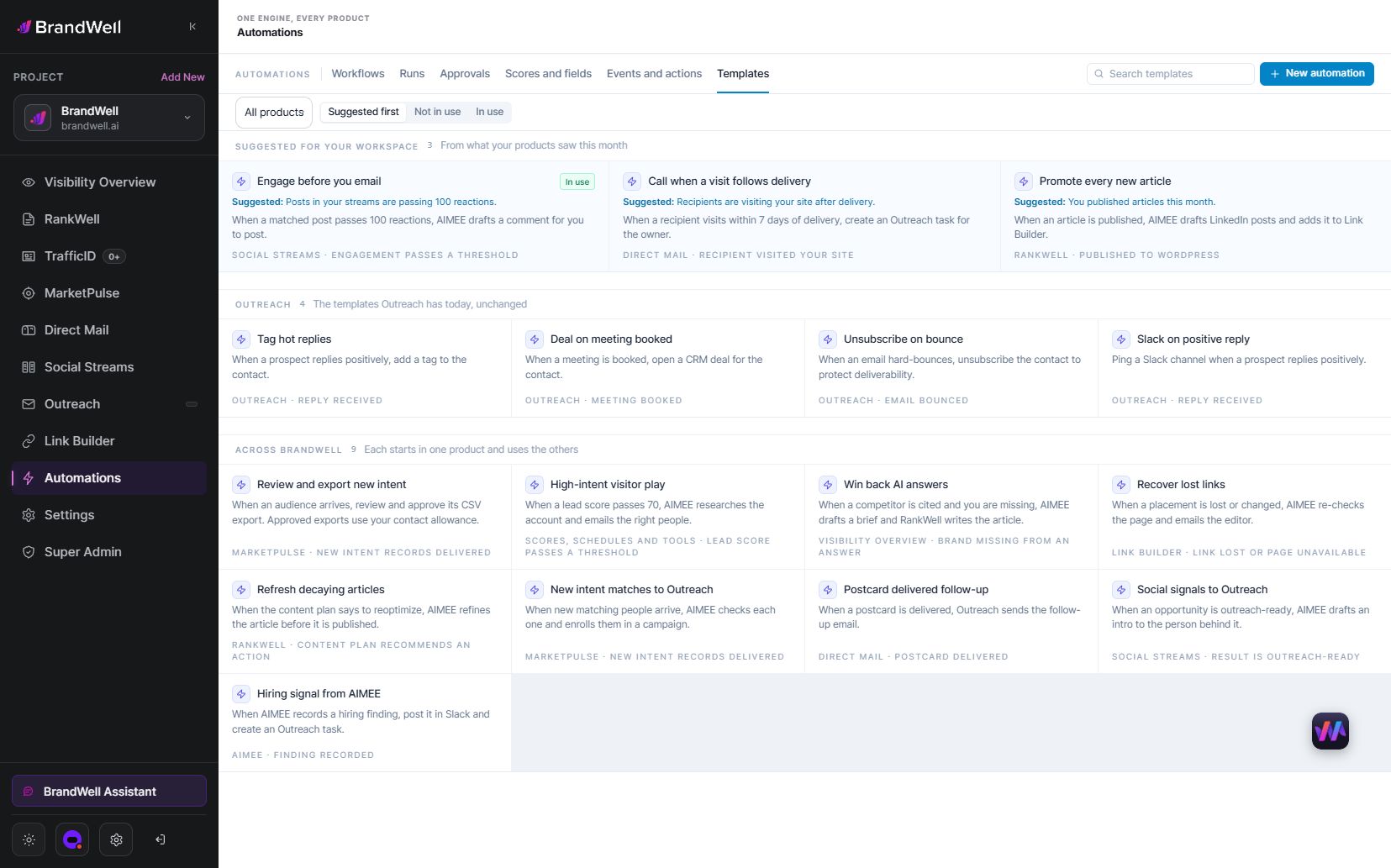
Test the exceptions before expanding
Run a small pilot with duplicate requests, missing fields, a disconnected destination, a reply, a purchase and an opt-out. Confirm that each reaches the intended owner or stop state. Inspect the log rather than relying only on a success notification.
Compare total cost and accepted outcomes with the baseline. For a fictional pilot, ten accepted handoffs at $200 total cost means $20 per accepted handoff. If two need rework, include that effort in the final cost. Do not divide only by all triggered records when the business needs completed handoffs.
Keep, revise or stop the workflow based on the evidence. A low conversion rate alone does not identify the cause; inspect audience fit, message, destination, availability and follow-up before choosing a fix.
Common questions
What should you automate first?
A repeatable, clearly owned process with valid inputs, an observable outcome and a manageable exception path.
Does automation mean no human involvement?
No. Decide which actions can run automatically and which need review, approval or a manual handoff.
How do you know whether it saved money?
Compare equivalent accepted outcomes using full setup, operating, review and correction costs.
Reviewed and updated October 7, 2026.

Written by
Julia McCoy has contributed articles to BrandWell on content marketing, writing, and search engine optimization. This archive retains her original bylines; individual articles may be updated by the BrandWell editorial team.