

On this page
To see who is visiting your website, combine analytics with information visitors submit and a visitor-identification tool. Analytics explains traffic and behavior. Forms and logins identify people who provide details. TrafficID can identify a portion of your website audience and show available person, company, and visit context. No method gives you a complete, verified list of everyone who visits.
Start with the question you need to answer. Counting visitors, finding the companies interested in a service, and deciding who should receive a sales follow-up require different evidence.
What can you actually learn about a website visitor?
- Traffic: which sources and pages bring visits, using analytics.
- Declared identity: the details someone gives you through a form, purchase, or account.
- Identified visitors: the people or companies an identification service can match to recorded activity.
- Buying-group context: additional relevant contacts at an identified company. These people must not be described as visitors unless they actually visited.
A company match does not prove that a particular employee browsed your site. A recorded visit also does not tell you that someone has budget, purchasing authority, or an immediate project.
Can Google Analytics tell you the names of your visitors?
Google Analytics is not a directory of visitor names and email addresses. Its reporting identity can use configured User-ID, device identifiers, and modeling to organize measurement. That does not turn an unknown visitor into a named prospect. See Google’s reporting identity documentation.
Keep contact records in the appropriate customer system. Google prohibits sending personally identifiable information such as email addresses and personal mobile numbers into Analytics; its PII guidance also covers accidental collection through URLs, titles, and event fields.
How to check visitors with TrafficID
- Select your Company Project. Make sure the workspace is associated with the website you want to measure.
- Review the website tag. In TrafficID settings, check the supplied tag and reported installation state. Confirm it runs on the intended pages with your site’s privacy controls.
- Open Identified visitors. Review available names, roles, companies, and visit context. Use the filters to investigate the audience that matters to your business.
- Check Form Completions separately. A submitted inquiry and a passive identified visit are different signals. Preserve that distinction.
- Apply suppressions. Exclude customers, colleagues, and people or companies you should not approach.
- Choose a next step. Research a relevant account, export an eligible audience, or prepare follow-up through the configured workflow.
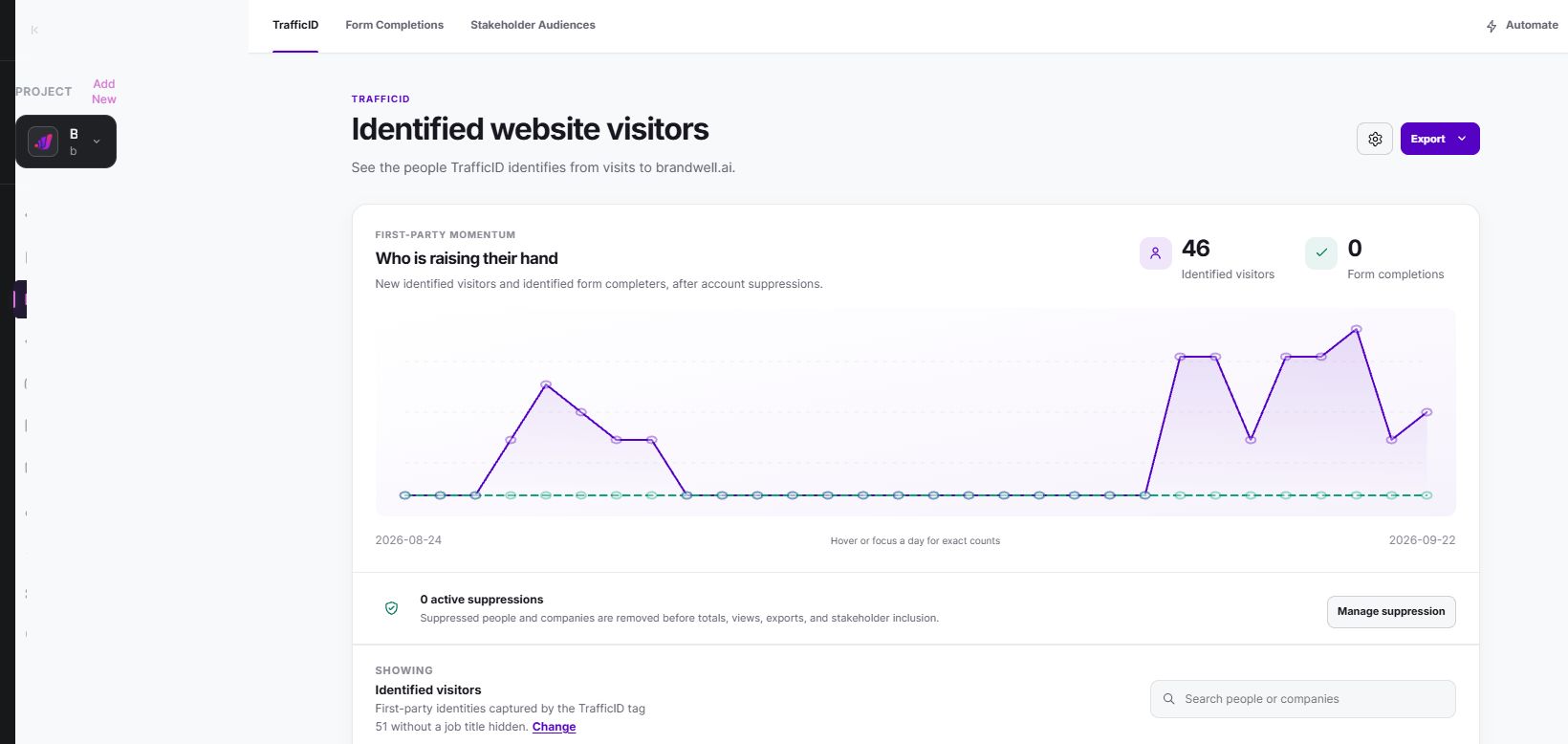
See the TrafficID product walkthrough and current pricing. TrafficID identifies website demand; MarketPulse covers topic-based intent data and is starting at $500/mo. They answer different questions and have separate plan details.
Turn visit context into a useful conversation
Suppose an identified person at a suitable company returns to a service page. Your first task is to understand the account, not to assume they want a sales call. Check their company, the relevance of their role, the pages recorded, and whether another teammate already owns the relationship.
AIMEE can help prepare account research and a draft follow-up. Give it a narrow brief: summarize what the company sells, explain why your offer could fit, and propose one useful next resource. Review the evidence and the message before sending.
For example, an IT provider could prepare a practical migration checklist for a company researching its migration service. Avoid messages that exaggerate what you know, such as claiming the prospect is currently shopping for a replacement provider.
How to judge whether identification is helping
Track the stages separately: identified records, records that fit your customer profile, eligible contacts, reviewed outreach, replies, qualified opportunities, and purchases. A large identified audience is only useful if the next stages produce relevant conversations.
Use a consistent reporting period and deduplicate people and companies. Compare equivalent sources and audience segments. A campaign bringing more traffic can raise identified counts without improving match quality or sales efficiency.
Privacy and coverage questions to ask
Check the service’s geographic coverage, collection methods, available fields, retention controls, and permitted uses. Configure consent and opt-out handling for your audience. An available phone number is not evidence of SMS permission.
Privacy requirements depend on the technology and jurisdiction. For example, the UK ICO’s storage and access guidance covers pixels, scripts, and fingerprinting as well as cookies. Calling a method cookieless does not itself exempt it.
Frequently asked questions
Can I identify every anonymous visitor?
No. Match availability, browser restrictions, consent choices, device use, and data coverage can all limit identification. Evaluate the usable audience rather than assuming full coverage.
Can an IP address identify a specific person?
An IP address alone is not reliable proof of a specific visitor’s identity. Shared networks, mobile connections, and VPNs make that inference particularly weak.
Can I see repeat visits?
Where the tool has sufficient identity and activity information, you can review recorded repeat activity. Gaps in collection or a change of device can affect the picture.
What should I set up first?
Define your goal, verify the website connection, configure privacy and suppression controls, then review a small audience before automating follow-up. Explore TrafficID to see how those steps fit together.
Reviewed and updated October 2, 2026.

Written by