On this page
- Write the brief before the prompt
- Six details to consider
- Original prompt and generated example
- Three more original prompt examples
- Revise one problem at a time
- Use reference material responsibly
- Prepare the image for the live page
- Use the illustration in current BrandWell content
- What makes an AI art prompt good?
A useful AI art prompt describes the subject, action, setting, visual medium, composition and lighting, plus any important constraints. Start with the details that matter to the image’s purpose, inspect the result and revise a specific problem. There is no universal word count or phrase order that guarantees a good image.
Write the brief before the prompt
Decide where the image will appear and what it needs to communicate. A blog illustration, a portrait and an instructional diagram have different requirements. Identify the required subject, crop and whether space must remain available for page text.
Use a generated illustration to explain an idea, not to manufacture evidence. Do not present a fictional scene as a photograph of a real customer or a generated interface as an actual product screenshot.
Six details to consider
- Subject and action: what is present and what it is doing.
- Setting: the location and background details that matter.
- Medium: photography, gouache illustration, pencil drawing or another relevant treatment.
- Composition: wide scene, close view, position of the focal point or intended crop.
- Lighting and palette: visible light conditions and useful color guidance.
- Constraints: text requirements, unwanted elements and features that must remain consistent.
You do not have to fill every category for every image. Avoid conflicting instructions, such as simultaneously requesting a close portrait and a detailed full city panorama. Abstract concepts can be explored, but describe a visible interpretation when you need a particular scene.
Original prompt and generated example
Create an editorial gouache illustration of a small greenhouse on a rooftop at sunrise. Show one gardener inspecting a young plant, with low city buildings in the background. Use a wide composition, soft warm morning light, a muted purple and green palette and painterly paper texture. No text, logos or watermark. Do not imitate a named artist.
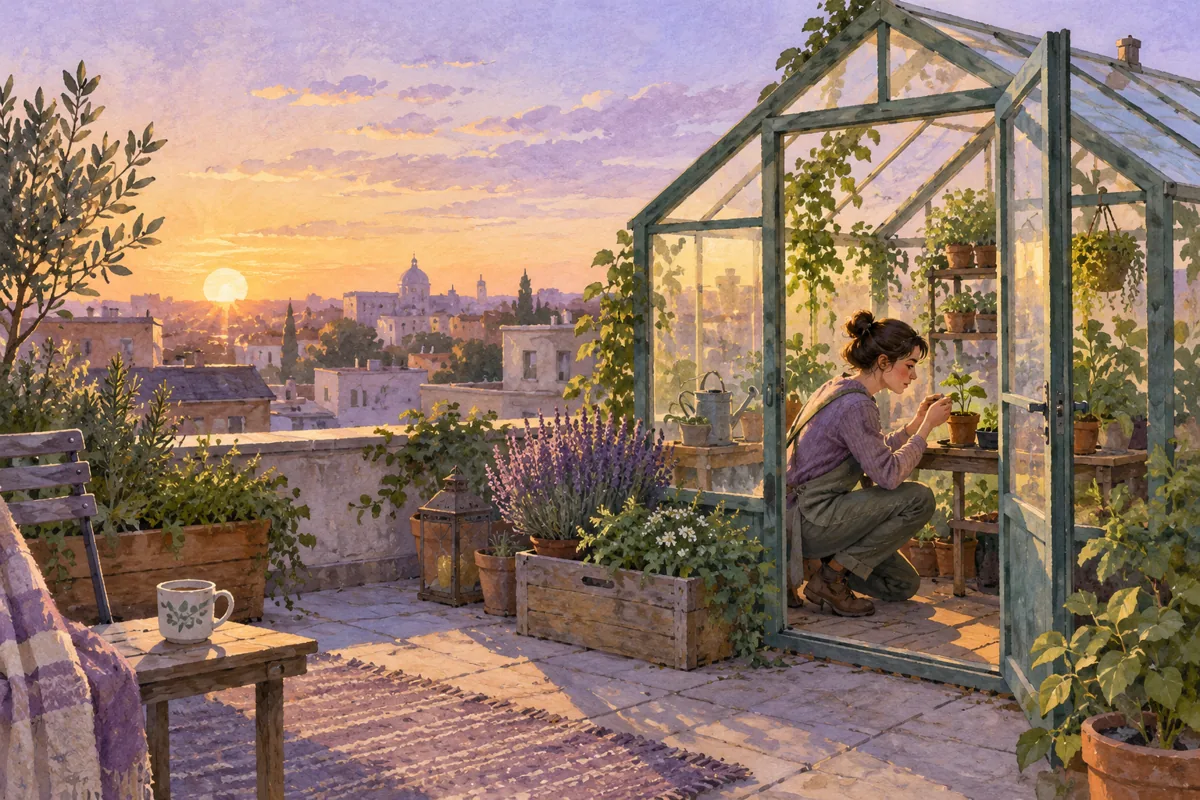
The result shows the intended greenhouse, gardener and morning light. The greenhouse occupies much of the right side, with city context on the left. If the publication needed room for a headline on the right, that composition would need revision. A pleasant result can still fail a particular layout requirement.
Three more original prompt examples
- Portrait illustration: a charcoal portrait of a fictional botanist holding a small notebook, close framing, soft side light and a plain background. No readable text.
- Concept image: an editorial paper-cut illustration of a winding path leading toward a sunrise, simple forms, a restrained palette and a clear focal point. No chart or factual data.
- Article background: a quiet desk with blank paper, a pencil and a plant, viewed from above in soft daylight, with open space for separately designed page text.
These are starting descriptions, not validated results or instructions that guarantee a particular output. Inspect each generated image against its intended use.
Revise one problem at a time
If the subject is too small, ask for a closer composition while preserving the relevant setting. If lighting is wrong, change that instruction. If text is inaccurate, fix it and inspect every character, or place important text separately in a layout tool.
Do not assume that adding “negative prompt:” invokes a dedicated setting in every tool. Prompt syntax, reference images and controls differ. Use the documentation for the tool actually being used.
For example, OpenAI’s image-generation documentation describes limits in precise composition, text placement and consistency. This is a documented example of why output review matters, not a promise about every generator.
Use reference material responsibly
If you provide a reference image, specify whether it supplies composition, subject detail or visual direction. Confirm that you can use it for the intended purpose. Avoid implying that a generated variation is automatically free of third-party rights concerns.
The U.S. Copyright Office’s January 2025 report discusses human contribution and copyrightability of AI outputs. Do not equate a detailed prompt with guaranteed ownership of every expressive element. Review the actual use and applicable requirements.
Prepare the image for the live page
Check the subject, visual defects, intended crop and readability at the actual display size. Compress a suitable web version and include dimensions so the browser can reserve its space. Inspect the image on a phone; a detailed desktop composition may become unclear in a small card.
Write alternative text according to the image’s role. W3C’s alt-text decision tree distinguishes informative, functional and decorative images. Describe the relevant meaning rather than stuffing a keyword into every image description.
Use the illustration in current BrandWell content
In RankWell, review how the image supports the article’s approved brief. Keep captions, alternative text and source context accurate. Use a real product screenshot when you are demonstrating an actual interface.
AIMEE can help prepare approved tasks through configured tools. Available image-related actions depend on configuration and access; do not assume every generation feature is connected. Inspect the finished page before publication.
What makes an AI art prompt good?
A good prompt gives enough direction for the intended result without conflicting instructions. The final test is the image itself: does it communicate the right thing in the real layout? Save the prompt, result and revisions so you can explain what changed and reuse the useful decisions.
Reviewed and updated October 2, 2026.

Written by
Jeff Joyce has been helping brands grow online since the Myspace era, when custom HTML layouts were still a competitive advantage. What started in design quickly evolved into a career spanning social media, content strategy, video, agency ownership, and growth marketing. After building his own agency and testing countless AI tools, Jeff joined BrandWell with a clear focus: helping marketers understand how AI can actually improve the way they create, optimize, and scale content. Today, Jeff brings a CMO-level perspective to BrandWell's marketing strategy, blending brand positioning, content, video, customer education, and growth. His work centers on turning complex AI concepts into clear, practical marketing that helps brands move faster, create better content, and stay competitive without losing their voice.
 Justin McGill
 Farnaz Kia