


On this page
- Which report answers your question?
- Connect Search Console to GA4
- Why is the Search Console report missing?
- Read the Queries report without overinterpreting it
- Track searches inside your website separately
- Turn the findings into a BrandWell content plan
- A practical prioritization example
- Measure the change with consistent denominators
- Frequently asked questions
To find organic keywords in Google Analytics 4, connect Search Console and open its Queries report. GA4 does not reveal the Google search term for every visitor. Use Search Console for query performance and GA4 for what visitors do after landing on your website.
This guide covers the current setup, the difference between organic and on-site searches, and how to turn a promising query into a content decision in BrandWell.
Which report answers your question?
| Question | Use | What it tells you |
|---|---|---|
| What did people search on Google? | Search Console Queries | Reported queries, clicks, impressions, CTR and average position |
| Which landing pages attract engaged visitors? | GA4 landing-page reporting | Sessions, engagement and configured key events |
| What do visitors search on my own site? | GA4 view_search_results event | Internal searches captured by your implementation |
| What related topics could we target? | BrandWell keyword research | Keyword ideas and available market estimates |
Swipe the table to see all columns.
Connect Search Console to GA4
- Choose the correct GA4 property and open Admin → Product links → Search Console links.
- Select Link, choose the verified Search Console property and select the matching web data stream.
- Review the association and submit it. You need the Editor role on the Analytics property and verified ownership of the Search Console property.
- In Reports, open the Search Console collection. If it is not visible, an authorized editor can publish the collection from Library.
Check that both properties cover the same pages. A domain property and a URL-prefix property can have different coverage. See Google’s Search Console integration instructions for the current permissions and linking requirements.
Why is the Search Console report missing?
First check the selected Analytics property, linked web stream and Search Console ownership. Then inspect Library: the Search Console collection is unpublished by default. A missing navigation item does not establish that your website has no search traffic.
Google documents a maximum 16-month Search Console history in these reports and a 48-hour availability delay. Linking does not create evidence from before the relevant stream and site-verification dates. Check the integration’s availability rules before interpreting an empty period.
Read the Queries report without overinterpreting it
Start with a complete reporting period. Compare equivalent periods, and separate branded searches from discovery searches. Then look at clicks, impressions, CTR and position together.
A page at position 35 with low CTR needs a different diagnosis from a page at position 5 with low CTR. Average position is not a fixed daily rank. A change in the countries, devices or queries generating impressions can change the average even when an individual keyword does not move.
- High impressions, low CTR: review the actual search results, your title and the promise made by the page.
- Relevant queries near page one: look for missing examples, weak answers or a page format that does not match the searcher’s task.
- Several pages for one query: decide which page should answer it before creating another article.
- Falling clicks: compare impressions and position before assuming the title caused the decline.
Not every query is reported. Search Console omits anonymized queries, so table totals can differ from overall totals. You also cannot turn aggregate query reporting into an exact query-to-person purchase history. Google’s data discrepancy guide explains these limits.
Track searches inside your website separately
Internal searches happen after someone arrives. In GA4, review your web stream’s Enhanced measurement settings and its Site search configuration. When your implementation supports it, the view_search_results event records the search_term parameter. Verify your site’s query parameter and test the event rather than assuming every search interface is captured automatically.
Search terms such as “invoice export” or “cancel subscription” may reveal navigation or support needs. They are not automatically evidence that people search those phrases on Google. Avoid sending personal details or sensitive values through search-event parameters.
Test the internal-search implementation
- Run a harmless test search and inspect the results URL. Identify the parameter containing the search phrase.
- In the web stream, open Enhanced measurement settings and check Site search against that parameter.
- Verify that the resulting
view_search_resultsevent contains the expectedsearch_term, without personal information. - If the interface does not expose a supported URL parameter, review its event implementation with your developer instead of assuming automatic collection.
Google’s enhanced measurement reference describes URL-parameter-based collection and the Search term dimension. An internal search event is separate from a Google organic query.
Turn the findings into a BrandWell content plan
- Open your project in BrandWell and go to Visibility → Keywords → Research.
- Enter a relevant phrase, choose the market and run the search. Review the ideas, available volume, intent and trend information. Connect Search Console to add your own ranking context.
- Shortlist a phrase that matches what your business actually offers. Use the row’s Plan action, or open RankWell and enter the phrase in Strategy check.
- Choose Check opportunity. Review the evidence about existing pages, demand and drafts before deciding whether to create or improve content.
- Save a useful brief and review the resulting draft before publishing. Return to reporting after the updated page has been crawled.
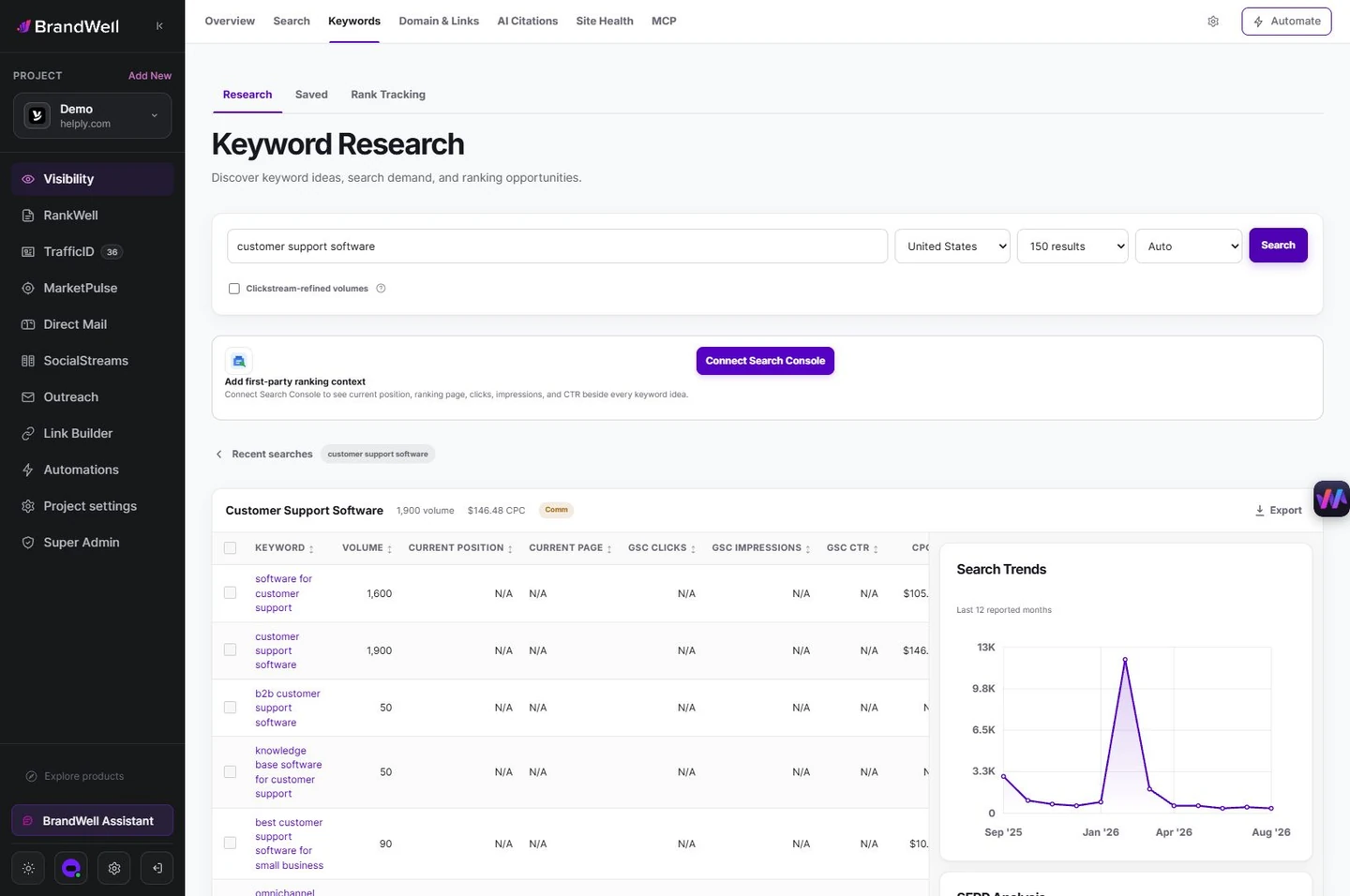
The screenshot is an example query in a demo project. Market estimates change, and missing Search Console fields mean the project has not supplied that first-party evidence.
A practical prioritization example
Suppose a support-software company gets impressions for “shared inbox for small teams” but its only relevant page is a broad product overview. Check whether searchers want a definition, buying criteria or a product page. If the current page can answer the task, improve it. If the intent is meaningfully different, plan a separate guide and link it to the product page.
Record the original period, query group, target URL and intended outcome. A useful report ends with a decision and an owner, not just a keyword export. Explore RankWell and Visibility to connect research, content and measurement.
Measure the change with consistent denominators
Fictional example: a page gets 20 clicks from 2,000 impressions, a 1% CTR. Later it gets 30 clicks from 2,500 impressions, a 1.2% CTR. That is a 0.2 percentage-point increase. Different query coverage, position, device mix or seasonality can contribute; this comparison alone does not establish the edit caused it.
Keep the query group, country, device and reporting window consistent where possible. Record qualified inquiries and purchases separately using your verified measurement setup. Do not label clicks as leads or infer a person’s exact search from an aggregate query report.
Frequently asked questions
Can GA4 show every organic keyword for each visitor?
No. The linked Search Console report provides aggregate search evidence, not a complete personal query history. Use it to assess content opportunities while treating on-site behavior as a separate measurement layer.
Is an internal search term an SEO keyword?
It can inspire research, but it may describe a support or navigation task after arrival. Validate external demand and search intent before planning an article.
Should every query get its own page?
No. Group queries by the task a page should answer. Improve an existing page when it serves that task; create a separate page when the audience need is meaningfully different.
Reviewed and updated October 6, 2026.

Written by
Julia McCoy has contributed articles to BrandWell on content marketing, writing, and search engine optimization. This archive retains her original bylines; individual articles may be updated by the BrandWell editorial team.

