
On this page
Anonymous website visitor identification connects some recorded visits with available person or company information. It relies on identity signals and matching, not an ability to reveal every person on the internet. A browser identifier, an identified person, and an additional contact at the same company are different records and should remain distinguishable.
This guide explains the mechanics and the limits, then shows how to evaluate an identification workflow in BrandWell. For a practical starting checklist, see how to check who is visiting your website.
What does “anonymous” mean here?
In marketing, anonymous often means that your team has not connected a visit to a usable contact record. It does not necessarily mean the underlying data is legally anonymous or impossible to associate with a person.
A randomly assigned browser ID may let software recognize activity from that browser without showing a name. An authenticated account gives you an identity supplied through your own service. A third-party match introduces another source of evidence, with its own coverage and accuracy limits.
Common identity signals and their limitations
Forms and authenticated accounts
A form submission or login links activity to information provided through your site. Keep the source and time of that interaction. Distinguish an inquiry, a newsletter subscription, a customer login, and a purchase rather than treating them as interchangeable marketing permissions.
Network and company information
Network information may support a company-level match. It does not prove which employee visited. Remote work, shared networks, mobile carriers, and VPNs can make the association incomplete or misleading.
Cookies and browser identifiers
A cookie can help recognize a browser. It does not by itself supply a person’s name or email. For example, Google Analytics reporting identity describes measurement identities, not a prospect contact database.
Do not base your strategy on a blanket statement that Chrome has eliminated third-party cookies. Google’s April 2025 announcement retained user choice rather than introducing the previously discussed standalone prompt. Browser policies and individual settings still affect collection.
Identity matching and enrichment
An identity service can associate eligible signals with records it can match. Enrichment then adds available context, such as company or role. Missing fields should stay missing until supported; an AI-generated guess should not be presented as verified contact information.
Device fingerprinting
Fingerprinting combines device or browser characteristics. It is not a universal consent workaround. The ICO explains that PECR can apply to fingerprinting that accesses or stores information on a device, and UK GDPR also applies where personal data is involved. Review the rules for the actual deployment and audience.
Evaluate the output before scaling a workflow
Use a small test audience and record what the tool actually returned. These five questions make the evaluation more useful than a headline match-rate claim:
- What was observed? Record the site, page, and time associated with the visit.
- What was matched? Separate the browser, person, and company.
- What was added? Label enriched fields and additional stakeholders clearly.
- What can the team use? Check field availability, suppression, channel eligibility, and permitted uses.
- What happened next? Record research, replies, opportunities, and purchases without calling all matched records qualified leads.
How this works in TrafficID
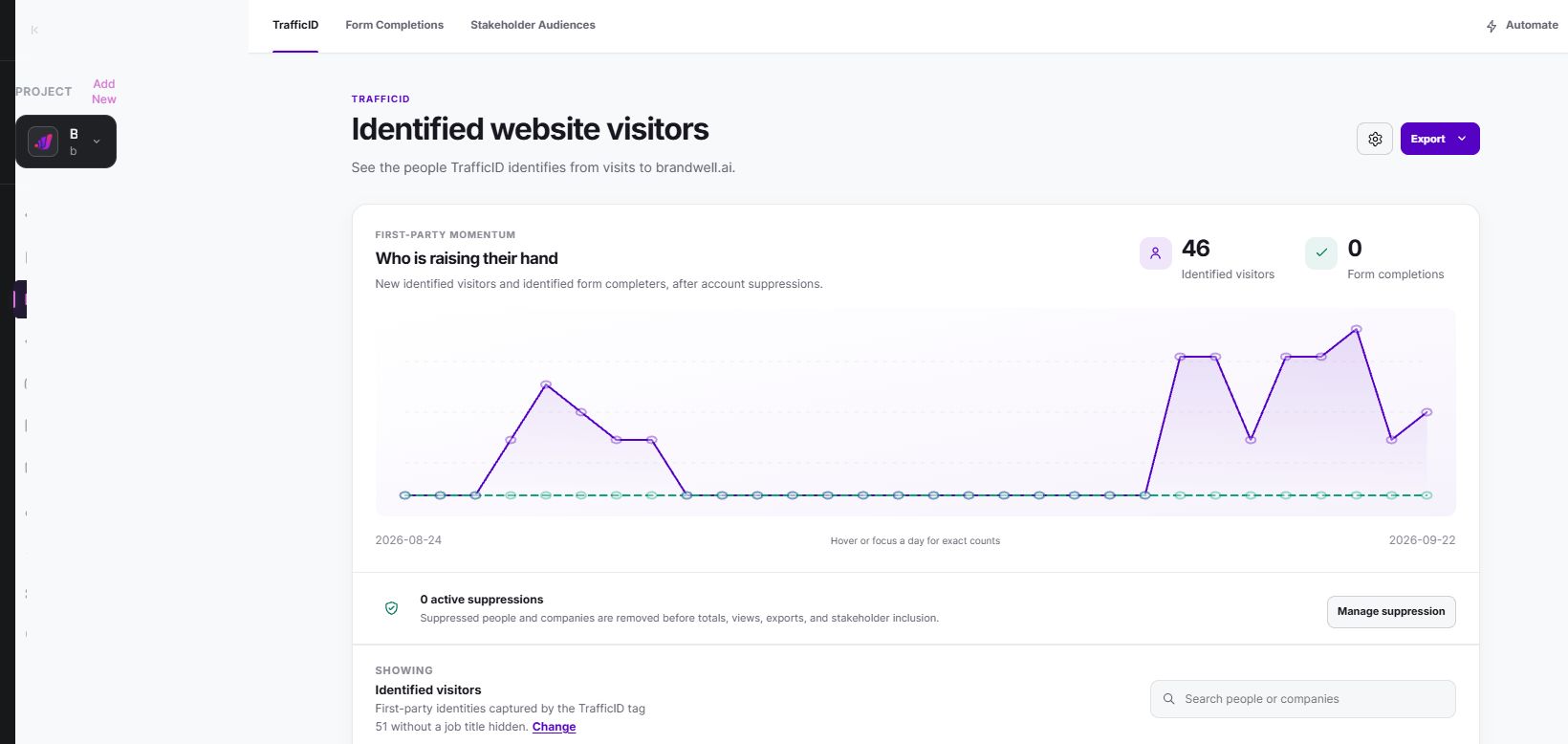
In the relevant Company Project, open TrafficID and check the website-tag setup. Review Identified visitors and Form Completions as separate views. Inspect the available person, company, and visit context before selecting a follow-up audience.
Stakeholder Audiences can add decision makers at represented companies according to your saved ICP. Keep those added contacts distinct from the original site visitors. Apply person and company exclusions before exporting or preparing an outreach workflow.
AIMEE can prepare a company brief and a relevant next action from the reviewed context. An owner should decide whether the proposed message is appropriate. The TrafficID walkthrough shows the current product, audience views, and pricing.
Website identification versus off-site intent data
Website identification starts with activity on your own site. Topic-based intent data starts with research signals associated with relevant subjects. One should not be reported as the other.
Use TrafficID to understand identifiable demand already reaching your website. Use MarketPulse, with plans starting at $500/mo, to explore available topic audiences. Overlap between those audiences does not prove that every topic researcher visited your website.
Frequently asked questions
Is “deanonymization” guaranteed?
No. Identification depends on the signals and records available. The term should not imply universal coverage, perfect accuracy, or access to a person’s private browsing history.
Does a website visit authorize a text message?
No. A visit and an enriched phone number do not establish an SMS opt-in. Preserve the consent evidence for the specific channel and program.
Which metric matters most?
Use several: usable identification coverage, fit, eligible contacts, replies, and qualified opportunities. Keep the denominator consistent when comparing periods, and show unknowns rather than hiding them.
Reviewed and updated October 2, 2026.

Written by
Jeff Joyce has been helping brands grow online since the Myspace era, when custom HTML layouts were still a competitive advantage. What started in design quickly evolved into a career spanning social media, content strategy, video, agency ownership, and growth marketing. After building his own agency and testing countless AI tools, Jeff joined BrandWell with a clear focus: helping marketers understand how AI can actually improve the way they create, optimize, and scale content. Today, Jeff brings a CMO-level perspective to BrandWell's marketing strategy, blending brand positioning, content, video, customer education, and growth. His work centers on turning complex AI concepts into clear, practical marketing that helps brands move faster, create better content, and stay competitive without losing their voice.

 Farnaz Kia