


On this page
- Distinguish research intent from keyword intent
- Start with a topic connected to what you sell
- Build a practical MarketPulse research workflow
- Give the seller useful context
- Write outreach around a relevant problem
- Work through a bounded example
- Measure usefulness and operating cost
- Choose capacity for the work you can use
- Prospecting questions
Use search-related intent data for B2B prospecting as a reason to investigate a relevant person or account, then choose a useful next action. Match the topic to your offer, apply your ideal customer profile, review available details and check the existing customer relationship before contacting anyone.
A topic signal does not prove purchase readiness, reveal a person’s exact search history or establish permission to contact them. Keep the strength of your claim consistent with the evidence you actually have.
Distinguish research intent from keyword intent
In SEO, search intent describes what a query suggests the searcher wants to accomplish. In a prospecting workflow, intent data refers to research-related signals associated with a topic and an available record. Those are different uses of the word “intent.”
A report may contain people, companies or account-level associations depending on the product and source. If the input is account-level, do not label a separate employee as the person who performed the research. If a contact record is available, review the topic and identity context without inferring a known buying project.
Start with a topic connected to what you sell
Choose a problem or service your business can actually address. Read the topic’s meaning and examine the resulting audience. A broad label may include general learning, vendors, students or other people who are not prospective customers.
For an original example, an IT services company selling ongoing support to small businesses could investigate a relevant IT-services topic. It should still review company fit and roles rather than assuming every technical researcher is a decision-maker shopping for a managed-service contract.
Document the included and excluded concepts. Change the topic or filters when the sample does not match your offer. A large unfiltered count is not a reason to overlook poor audience fit.
Build a practical MarketPulse research workflow
- Search the topic catalog: Choose the topic closest to your offer and check the audience it returns.
- Apply your ICP: Use relevant available company, role and geographic filters.
- Review the records: Check which identity and contact details are actually present. Note missing or ambiguous information.
- Check existing relationships: Separate customers, open opportunities, prior conversations and suppressed contacts from new prospects.
- Assign a next action: Research, approve follow-up, wait or reject with a reason.
- Record the outcome: Keep acceptance, action, replies and opportunities distinct.
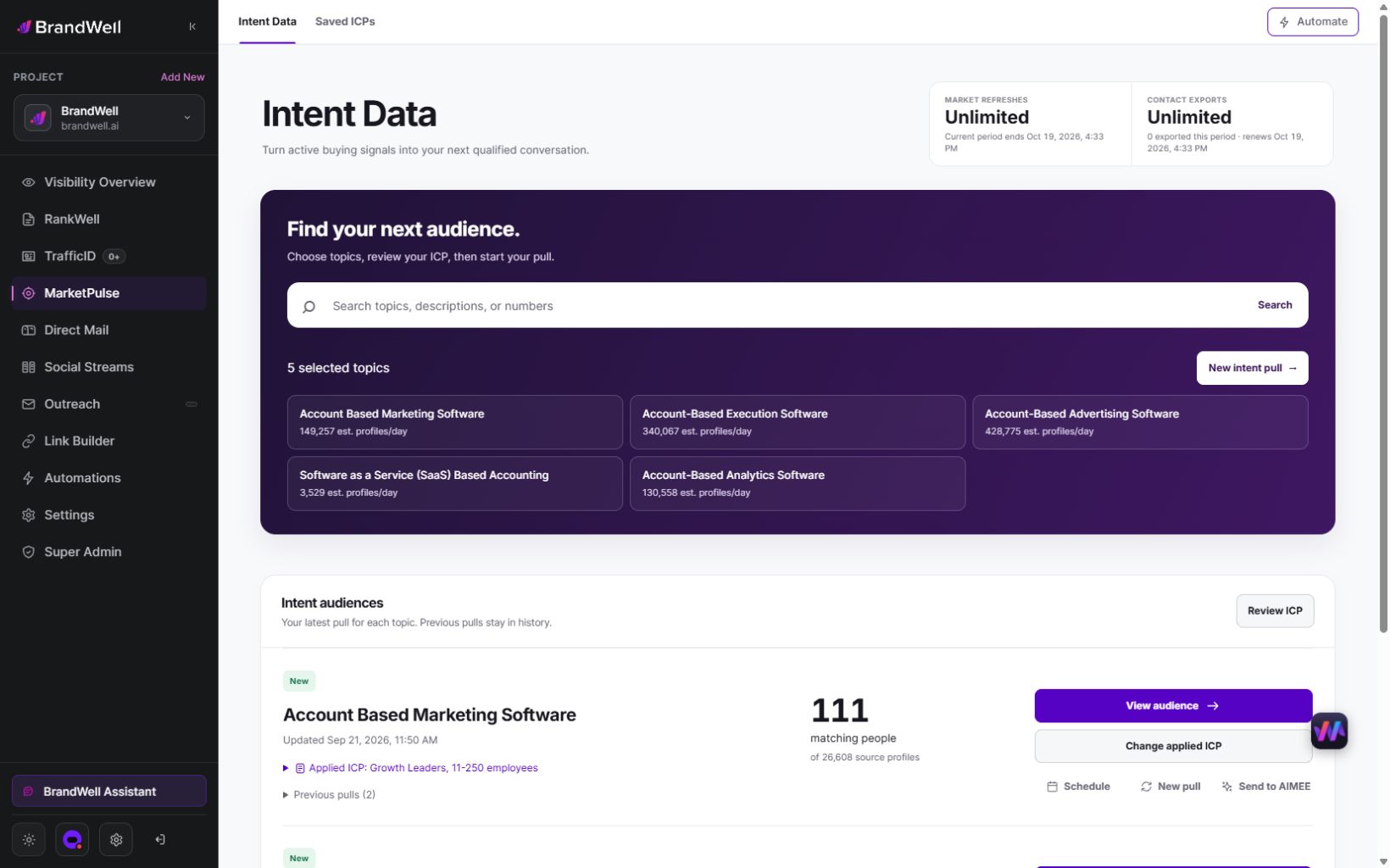
MarketPulse plans are starting at $500/mo. An Intent Scan retrieves available data from the previous 24 hours. Counts and fields vary by topic and filters, and audiences may overlap. Plan refresh cadence determines how often you can obtain a new pull.
Give the seller useful context
A seller should be able to explain why a record is in the queue and what remains unknown. Keep a simple review note:
- Relevant topic and why it relates to the offer.
- Available recency or source context, without inventing unavailable fields.
- Company and role fit.
- Existing CRM relationship and ownership.
- Missing details or reasons for further research.
- Approved next action and responsible person.
An explicit demo request or reply is direct evidence of interest in a conversation. Do not let an inferred score override it. Similarly, do not treat a topic match as equivalent to someone asking for a demo.
Write outreach around a relevant problem
Use the research to improve relevance, not to claim private knowledge of the recipient. Avoid messages such as “We saw you searching for IT support yesterday.” That overstates what the topic data establishes and can undermine trust.
An original message example could say: “We help small teams organize IT support and device onboarding. If that is relevant to your role, I can share the checklist we use to scope the work.” Adjust it to a verified role and actual service, and use it only through a permitted outreach process.
The FTC’s CAN-SPAM guide states that commercial-email rules cover B2B messages too. Review applicable channel requirements before activating a contact. An enriched email or mobile number is not an opt-in.
BrandWell Automations and AIMEE can support assigned work through configured tools and permissions. Add the appropriate review and ownership steps. Do not assume a topic match should automatically enroll every record into a sequence.
Work through a bounded example
This is an original illustration, not a BrandWell result. A team reviews 120 available records. It rejects 30 that do not fit its market, sets aside 20 with an existing relationship or suppression reason and holds ten for clarification. Sixty remain for research.
Of those 60, sellers act on 40, receive eight replies and qualify three opportunities. Report the stages separately: 60 accepted for research, 40 acted on, eight replies and three opportunities. Do not label all 120 records “sales-qualified leads.”
The reply rate among acted-on records is 8 / 40 = 20%. The opportunity rate among those records is 3 / 40 = 7.5%. Using a different denominator changes the question. Include the review window and whether enough time has passed for later outcomes to appear.
Measure usefulness and operating cost
Track the time spent reviewing and acting on records as well as subscription and channel costs. For an original example, $250 in data access plus $300 in review work and $50 in channel costs totals $600. If the workflow accepts 60 records, that is $10 per accepted record. If it produces three qualified opportunities, that is $200 per opportunity, before other costs. These figures are illustrative.
To assess improvement, compare the intent-informed workflow with your existing prioritization method. Keep the market, offer, time window and capacity reasonably comparable. A won account that appeared in an intent report does not, by itself, prove that intent data caused the sale.
Review rejected records and reasons for no action too. The bottleneck may be audience fit, seller capacity, contact information, message quality or the offer. More pulls cannot resolve every one of those problems.
Choose capacity for the work you can use
- Starter:one topic with weekly refreshes and 25,000 monthly contact exports.
- Growth:three topics with daily refreshes and 100,000 monthly contact exports.
- Scale:ten topics with daily refreshes and unlimited contact exports.
Growth and Scale include AIMEE for the initial user. Daily use of all topics provides 90 or 300 pulls respectively in a 30-day month. Connected products and fulfillment may have separate costs. Eligible early-access pricing is a separate time-limited offer.
Agencies and other service businesses can use available capacity for client work within their scope and permitted use, or recommend clients to BrandWell. Define each client’s topic, review process and responsibilities before expanding the service.
Prospecting questions
Can I tell who performed the exact search?
Do not infer an exact query transcript or a known buying decision from topic data. Use the identity and research context actually supplied, and keep account-level evidence separate from a person you later identify.
Is this the same as website visitor identification?
No. MarketPulse focuses on topic research. TrafficID addresses identifiable activity on your own website, with coverage that varies. Review the product and setup suited to your question.
What should I try first?
Start with one relevant topic, a defined ICP and a small reviewable queue. Explore MarketPulse’s demo and plans, then measure audience fit and the next action before expanding.
Reviewed and updated October 2, 2026.

Written by

