


On this page
An SEO content template is a reusable brief that defines the reader’s task, the evidence needed, the page structure, and the checks required before publication. It helps a team produce consistent work without forcing every article into the same outline.
Use the template below for a new article or an existing page that needs improvement. It is an editorial framework, not a promise of rankings or a fixed word-count formula.
Copy this content brief
Replace the bracketed prompts with specific decisions. Leave a field marked unresolved when the evidence is missing; do not ask a writer or AI system to invent the answer.
Purpose and reader
- Working title: [What the page actually helps the reader do]
- Reader: [Role, situation, and relevant prior knowledge]
- Main task: [The question or decision to resolve]
- Desired outcome: [What the reader should understand or complete]
- Scope: [What this page covers and deliberately leaves elsewhere]
Research and evidence
- Search opportunity: [Relevant query group and dated evidence]
- Existing page: [URL to improve, or why a distinct new page is needed]
- Direct answer: [A short, accurate response to the main task]
- Original contribution: [Example, test, worksheet, interview, or analysis]
- Source register: [Claim, primary source URL, date checked, and limitation]
- Expert review: [Who must validate the topic-specific details]
Structure and assets
- Main sections: [The decisions or steps in a useful order]
- Examples: [Real with permission, or clearly labeled hypothetical]
- Images: [What each visual explains, source, rights, and alt-text decision]
- Internal links: [Relevant next resources and why each helps]
- Next action: [A suitable step after the reader’s question is answered]
Publication and measurement
- Title and description: [Accurate search-result promise]
- Review owner: [Person responsible for accuracy and maintenance]
- Technical checks: [Mobile, links, images, canonical, indexability, and metadata]
- Baseline: [Date range, impressions, clicks, CTR, and relevant outcomes]
- Change log: [What changed, when, and why]
A completed example
Imagine a payroll software business revising an article for operations managers who are preparing a migration. The following is an original fictional brief, not a report of measured keyword demand.
Working title: Payroll Migration Checklist: Owners, Checks, and Cutover Steps.
Task: Help the reader assign responsibilities and identify what must be verified before switching systems.
Scope: Planning and validation. The article does not provide jurisdiction-specific tax advice or promise that every payroll system has the same import process.
Original contribution: A completed sample checklist showing an owner, evidence, due date, and rollback decision for each step.
Evidence: Current product documentation for supported import behavior and an implementation specialist’s review. Any external requirements need a directly relevant authoritative source.
Next action: Use the blank checklist, then review the product’s actual implementation requirements if it fits the business.
This brief gives the writer a useful assignment. “Write 2,000 words about payroll and include these 20 phrases” does not provide the same direction.
Research before fixing the outline
Review existing pages, customer questions, and search data. Determine whether the page needs a clearer answer, a missing example, a corrected fact, or a new format.
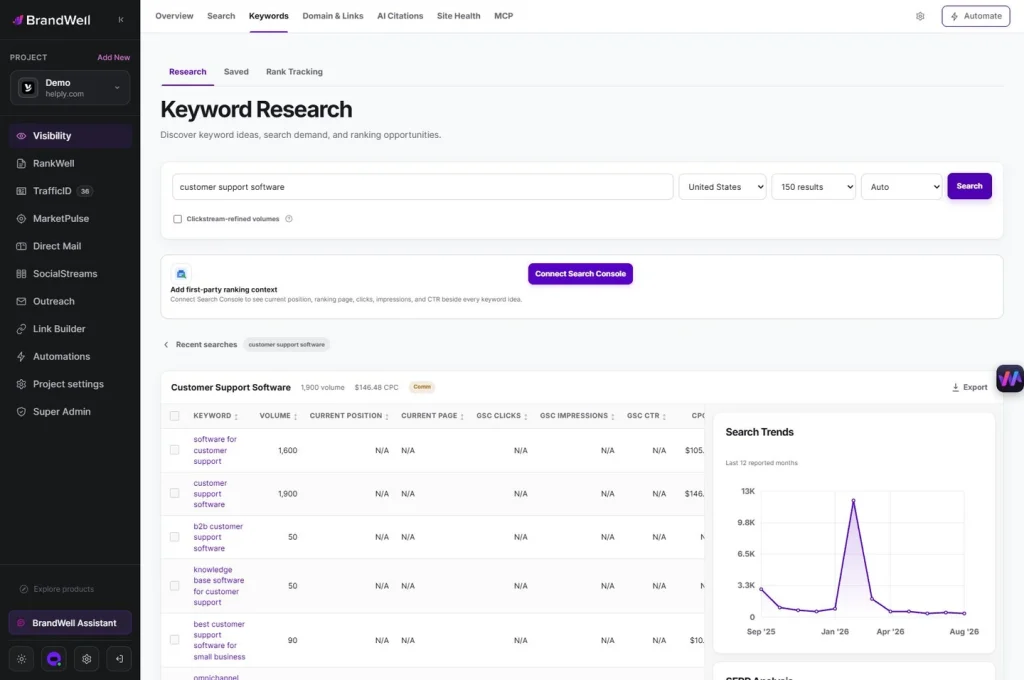
In BrandWell, use keyword research to investigate the opportunity and RankWell to develop the content. Keep the evidence and editorial decision together rather than publishing every suggested query as a separate article.
AIMEE can help organize approved research and prepare a draft. Human review remains necessary for factual accuracy, product claims, and whether the answer is useful.
Write titles and descriptions without false limits
Google’s title-link guidance recommends clear, concise, distinctive titles. There is no fixed HTML title length limit; displayed text may be shortened to fit the available space.
A meta description is a suggested summary, not a guaranteed snippet. Google’s snippet documentation explains that the search result may draw from the page’s content and vary by query.
Use a preview as an editing aid. Do not remove a necessary word solely to meet an arbitrary character target, and do not promise a numbered list or current-year comparison the article does not contain.
Choose visuals for explanation
A product screenshot should show the relevant workflow at a readable size. A chart should identify its source, date, units, and assumptions. A decorative illustration should not masquerade as research evidence.
The W3C alt-text decision tree distinguishes informative, functional, and decorative images. Describe the meaning or function where needed; do not fill alt text with keywords unrelated to the visual.
Compress images appropriately, preserve clear text, and test them at mobile width. Check that the featured image still matches the article after a title or scope change.
Make the article easy to use
Use headings for real sections and steps. Keep related ideas together, make tables usable on small screens, and remove repeated introductions. A reader should be able to locate the answer without navigating around unnecessary promotion.
There is no required number of headings, FAQs, or words. Add a question section only when it resolves useful remaining questions. A template should guide thinking, not create filler.
Verify and maintain the published page
Open the live URL after publication. Check the title, main heading, links, featured image, sharing image, and mobile layout. Confirm that the page still uses the intended URL and does not accidentally exclude itself from indexing.
Record the prior version and the changes. Compare search and business outcomes using appropriate periods, while noting other site or campaign changes. A revised article is completed editorial work; improved performance is a separate result to measure.
Frequently asked questions
Does AI make a content brief unnecessary?
No. A clear brief helps define the facts, audience, scope, and review criteria whether a person or an AI system prepares the draft.
Should every article use the same outline?
No. Keep the planning fields consistent, then choose a structure that suits the reader’s task.
Is longer content automatically better?
No. Cover what the task requires with useful evidence and examples, and remove material that does not help.
Reviewed and updated October 2, 2026.

Written by
Julia McCoy has contributed articles to BrandWell on content marketing, writing, and search engine optimization. This archive retains her original bylines; individual articles may be updated by the BrandWell editorial team.


1 comments