


On this page
The four common keyword types by search intent are informational, navigational, commercial, and transactional. Other labels describe different dimensions: branded or non-branded, broad or specific, local or location-independent, and primary or supporting. A single query can belong to several of these groups.
Use the labels to decide what a page should answer. They are planning aids, not rules about repeating words or guaranteed steps in a buyer’s journey.
The four keyword types by intent
Informational keywords
The searcher wants to understand something or complete a task. Examples include “what is buyer intent data” and “how to build a content calendar.” A useful page gives a direct answer, practical steps, examples, and evidence where needed.
Navigational keywords
The searcher wants a particular destination. Examples include “BrandWell login” and “RankWell support.” Make the intended destination easy to recognize and reach. A long educational article is unlikely to satisfy someone who simply needs to sign in.
Commercial keywords
The searcher is evaluating an option. Examples include “intent data pricing” and “website visitor identification features.” Explain fit, capabilities, limitations, and cost clearly. Do not assume every person using the phrase is ready to purchase.
Transactional keywords
The searcher wants to take an action, such as “buy intent data” or “book payroll software demo.” Provide a relevant action and the information needed to make that decision. A query can still contain uncertainty or overlap with commercial research.
Other keyword categories you can use together
- Branded: names a business or product, such as “BrandWell MarketPulse.”
- Non-branded: describes a need without naming the supplier, such as “intent data platform.”
- Local: includes or implies a place, such as “IT support Phoenix.”
- Product or service: describes the offering, such as “payroll software.”
- Primary: the main query or topic in a page brief.
- Supporting: a related question the same page should answer.
“BrandWell intent data pricing” can be branded, product-related, and commercial at the same time. There is no single authoritative total number of keyword types because these labels classify different things.
Short-tail and long-tail keywords
Broad, popular topics sit toward the head of a demand distribution. More specific, less frequently searched queries sit toward its long tail. Word count can be a clue to specificity, but it is not a reliable definition.
For example, “marketing” is broad, while “content calendar for a two-person IT marketing team” states a much narrower task. That specificity helps shape the answer. It does not automatically mean easy rankings or a higher conversion rate.
Check the actual query and available demand evidence. A highly specific product name can be short, while a long phrase can still be ambiguous.
SEO categories are different from advertising match types
Google Ads broad, phrase, and exact match control how keywords can match searches in advertising. They are not organic SEO categories. Exact match can include searches with the same meaning or intent, rather than only an identical sequence of words. Negative keywords have separate behavior. See Google’s keyword matching documentation.
Do not label a short SEO phrase “broad match” merely because it is broad in meaning. Keeping the two systems separate prevents mistakes in content briefs and advertising plans.
Turn keyword types into a page plan in BrandWell
- Open Visibility, then Keywords and Research. Search the topic in the relevant market.
- Review the wording and intent. Compare estimates with the question a customer would actually ask.
- Check current search results. Look at the formats and tasks represented; intent can be mixed.
- Review existing coverage. In RankWell’s Articles workflow, use Check opportunity before creating another brief.
- Group related tasks. Keep questions together when one useful page can answer them. Separate topics that need a different purpose or format.
- Write the brief. Specify the reader, direct answer, evidence, example, and next action.
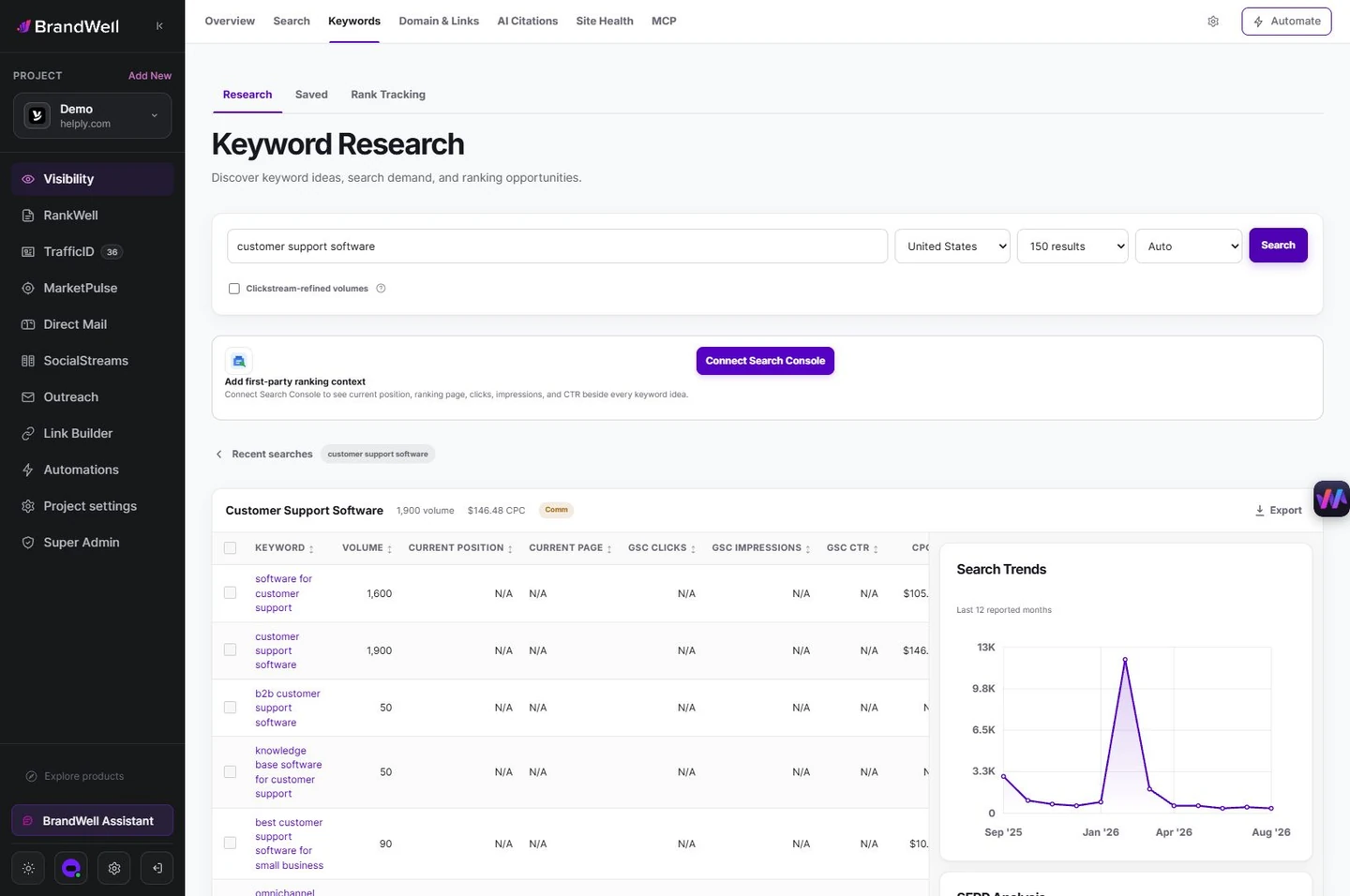
RankWell helps turn the reviewed opportunity into content. Use your own examples and check claims before publishing. Google’s SEO Starter Guide emphasizes useful, understandable content rather than mechanical keyword repetition.
How to measure whether the plan is working
Group Search Console queries by the task you intended to serve. Compare impressions, clicks, CTR, and position over equivalent periods, with device and country in mind. Then check whether visitors take the relevant next action.
A navigational page and an informational guide need different success criteria. A login page should help people sign in. A tutorial should answer the task and offer a useful next resource. Neither should be judged solely by the number of times it repeats a phrase.
Frequently asked questions
How many types of keywords are there?
Four intent labels are common, but there are additional categories for brand, specificity, location, and page role. These are overlapping dimensions, not one fixed list.
Does a primary keyword have to be short?
No. Primary describes its role in your brief. A specific question can be the main topic of a page.
Do I need a separate page for every variation?
No. Group variations that serve the same task. Creating near-duplicate pages can make the site less useful; review overlapping page intent before adding another URL.
Reviewed and updated October 2, 2026.

Written by
Julia McCoy has contributed articles to BrandWell on content marketing, writing, and search engine optimization. This archive retains her original bylines; individual articles may be updated by the BrandWell editorial team.

